Leave a Review


You need a small amount of foreign balance, maybe to unlock one app, grab a skin or test a service, but your card won't work abroad. A 1 dollar gift card BD buyers can pay for locally solves that. You skip the international card, the failed transactions and the hidden conversion fees.
The short answer: yes, you can buy a $1 digital card in Bangladesh and pay in BDT with bKash, Nagad or Rocket. Delivery should arrive as a code within minutes. The catch is that not every brand sells a true $1 denomination, and some only work in specific regions, so you need to match the card to what you plan to spend it on.
This list covers four types worth considering: Steam, Google Play, Apple iTunes and a virtual Visa-style balance. For each one you'll see what it works for, what to check before paying and how instant delivery works at AroraShop, where we sell these digital products to customers across Bangladesh.
A Steam code adds funds to your Steam wallet. You can spend that balance on games, DLC, software and Community Market items. It does nothing outside Steam, so it suits one platform only.
Here is the catch. Steam sets a $5 minimum for wallet top-ups, so an official $1 Steam card is rare. Treat any listing that claims one with caution and read the description before you pay.
A true $1 Steam card is uncommon, so confirm the denomination before you buy.
PC gamers who want one cheap indie game or a small DLC pack get the most from it. Many good titles go on sale for a dollar or two, and a small code covers them without a bank card.
Students and first-time buyers also like it for testing. You see how a local purchase works with a low amount at risk before you spend more.
The BDT price follows the dollar rate on the day plus the seller's margin, so it shifts. Check the live price on the product page instead of trusting an old screenshot. You can browse Steam gift cards at AroraShop and pay with bKash, Nagad or Rocket.
The region matters most. Steam gift cards are tied to a currency, so the card must match your account's wallet currency. Most Bangladesh accounts see prices in USD, but confirm yours in your Steam account details first.
Never share your Steam password with a seller for a gift card order. A real code needs only your own redeem action.
A Google Play code adds credit to your Google Play balance. You can spend it on apps, games, in-app purchases and subscriptions inside the Play Store. The balance cannot be withdrawn or moved to another account.
Android users who want one small purchase get the most from it, such as a premium app unlock, a skin or a single month of a cheap subscription.
Mobile gamers also use it to buy items in games that bill through Google Play, without touching a bank card.
The BDT price depends on the current dollar rate plus the seller's margin, so read the live figure on the product page. You can find Google Play gift cards at AroraShop and pay with bKash, Nagad or Rocket.
Google Play cards are region-locked. A US card only redeems on an account whose Play country is the US, so check your country under Payments and subscriptions first.
Match the card's region to your Play account country, or the code will be rejected.
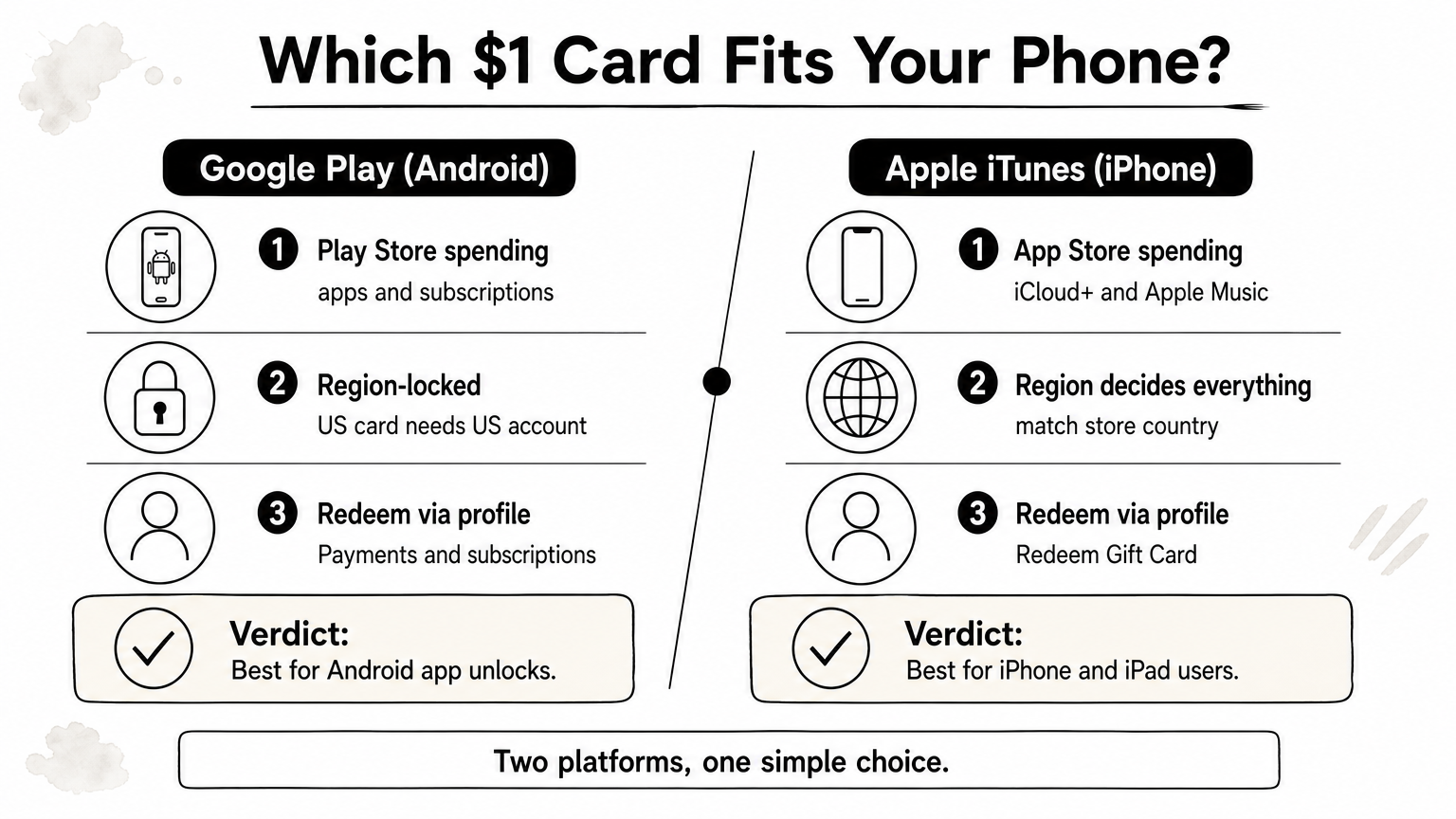
An Apple code adds credit to your Apple Account balance. You can spend it on App Store apps, in-app purchases, iCloud+ storage, Apple Music and Apple TV+. The balance cannot be withdrawn or turned back into cash.
iPhone and iPad users who want one small purchase get the most from it, such as a paid app, a game upgrade or a month of iCloud+.
Mobile gamers on iOS also use it for in-app items billed through the App Store, with no international card needed.
Prices follow the dollar rate (or the lira rate for Turkey cards) plus the seller's margin. If you search for a 1 dollar gift card BD option for Apple, expect the lowest listed denomination, which is not always exactly $1. Browse Apple iTunes gift cards at AroraShop for the live price.
Region decides everything. A Turkey-region card only redeems on an Apple Account set to Turkey, and a US card needs a US account. Check your account country in Settings before buying, because changing it later means using up your balance and cancelling active subscriptions.
An Apple code only works on an account in the same store region as the card.
A virtual Visa card gives you a card number, expiry date and CVV with no plastic. You can use it wherever Visa is accepted online, such as software tools, ad platforms and international stores. It is not tied to one app store.
Prepaid balance is not a bank account. Once the $1 is spent, the card is empty unless you top it up.
Freelancers, creators and students get the most from it. It fits when a service asks for a card to verify your account or charge a one-dollar trial.
Price is the dollar rate, plus the seller's margin, plus any issuance fee. A $1 balance often costs noticeably more than the plain exchange rate suggests, so read the full total. AroraShop lists RedotPay balance top-ups and Fasset dollar purchases, the closest fit for this need, payable with bKash, Nagad or Rocket.
Check the total fee first, then confirm the merchant accepts prepaid virtual cards. Some subscription sites block them for recurring billing.
A $1 virtual card is only useful if the fees and the merchant both allow it.
Start with where the money will go. Pick the card that matches the platform: Steam for PC games, Google Play for Android apps, Apple iTunes for iPhone and iPad, and a virtual Visa balance when a site asks for a card number. Each one is a low-risk way to try a purchase before you spend more.
Whatever you choose, the same checks apply. Confirm the region and the real denomination, expect the BDT price to move with the dollar rate, and never hand over a login. A true $1 option is not always available, so the lowest listed denomination is often the practical answer to a 1 dollar gift card BD search.
Ready to buy? Browse the digital gift cards at AroraShop, pay with bKash, Nagad or Rocket and expect your code within minutes. Keep the receipt until you redeem it, and you are done.