Leave a Review


Paying the full US price for Discord Nitro hurts, especially when the Discord Nitro price increase has pushed monthly costs higher and your card may not even work on international checkouts. If you live in Bangladesh, you also deal with exchange rates and card limits on top of the sticker price.
The short answer: you can get Discord Nitro at a low price by using three routes. Buy a Nitro gift code or subscription from a trusted reseller, take advantage of regional pricing where Discord offers cheaper tiers, and pick the right plan, such as yearly instead of monthly, or Nitro Basic instead of full Nitro. Each route has trade-offs in price, risk, and how fast you get access.
Below, you will see how each method works, what to check before you pay, and which red flags point to scams or banned accounts. We run AroraShop, where Discord Nitro is sold with instant delivery and bKash, Nagad, and Rocket payments, so we will also show you how to compare offers fairly, including ours.
Any search for a Discord Nitro low price starts with the baseline. Discord sells two paid tiers, and what you pay depends on the tier, the billing period, and where you pay. Know those three variables and you can tell a real discount from a fake one in seconds.
Discord lists full Nitro at $9.99 per month or $99.99 per year. Nitro Basic costs $2.99 per month or $29.99 per year. Check the current figures on Discord's Nitro page before you buy, because they change.
Plan Monthly Yearly Yearly cost per month Nitro $9.99 $99.99 about $8.33 Nitro Basic $2.99 $29.99 about $2.50Paying yearly saves roughly 17 percent on both plans. Nitro Basic gives you custom emoji everywhere and larger uploads. Full Nitro adds HD streaming and free server boosts, so only pay for it if you use those perks.
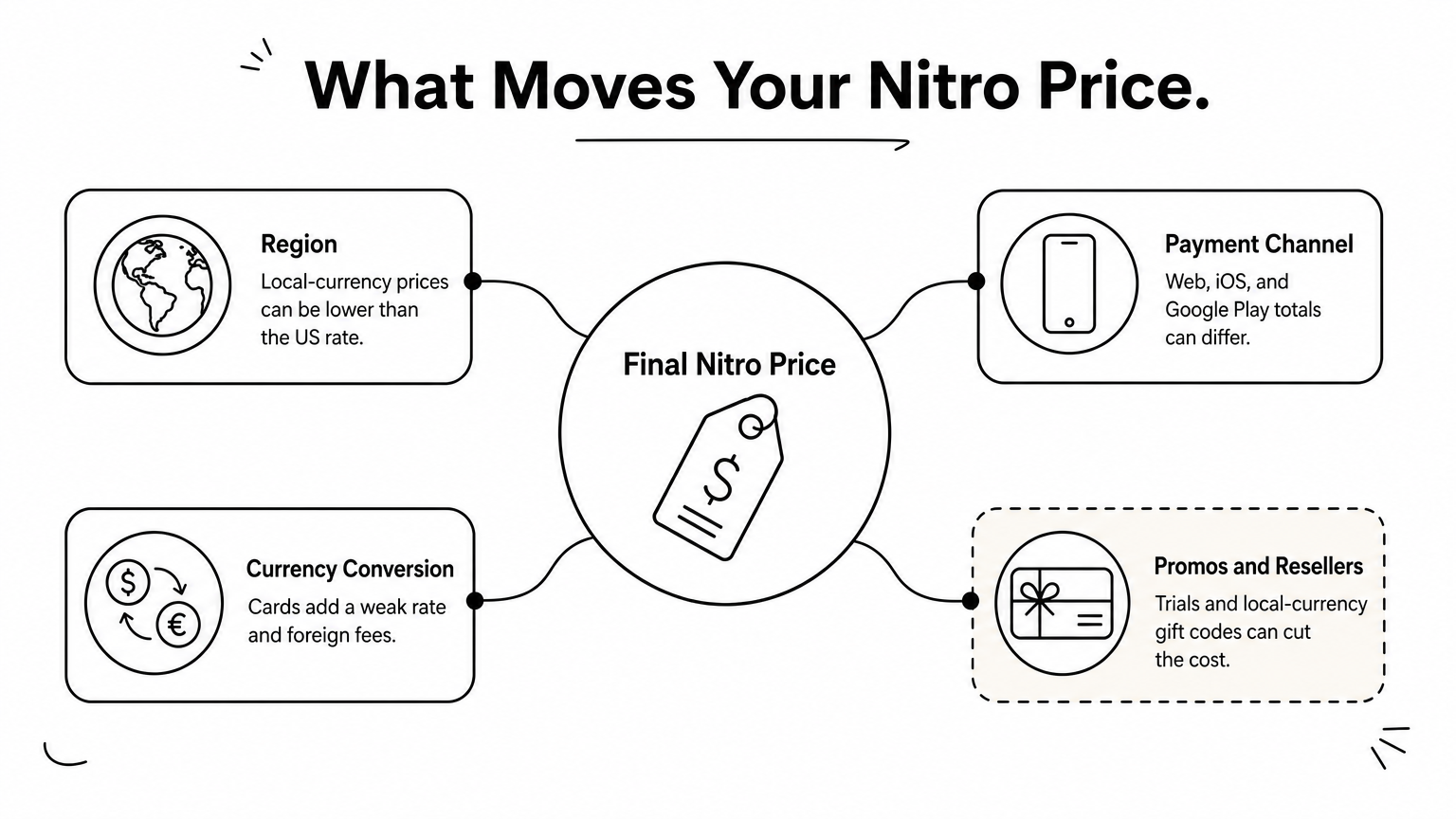
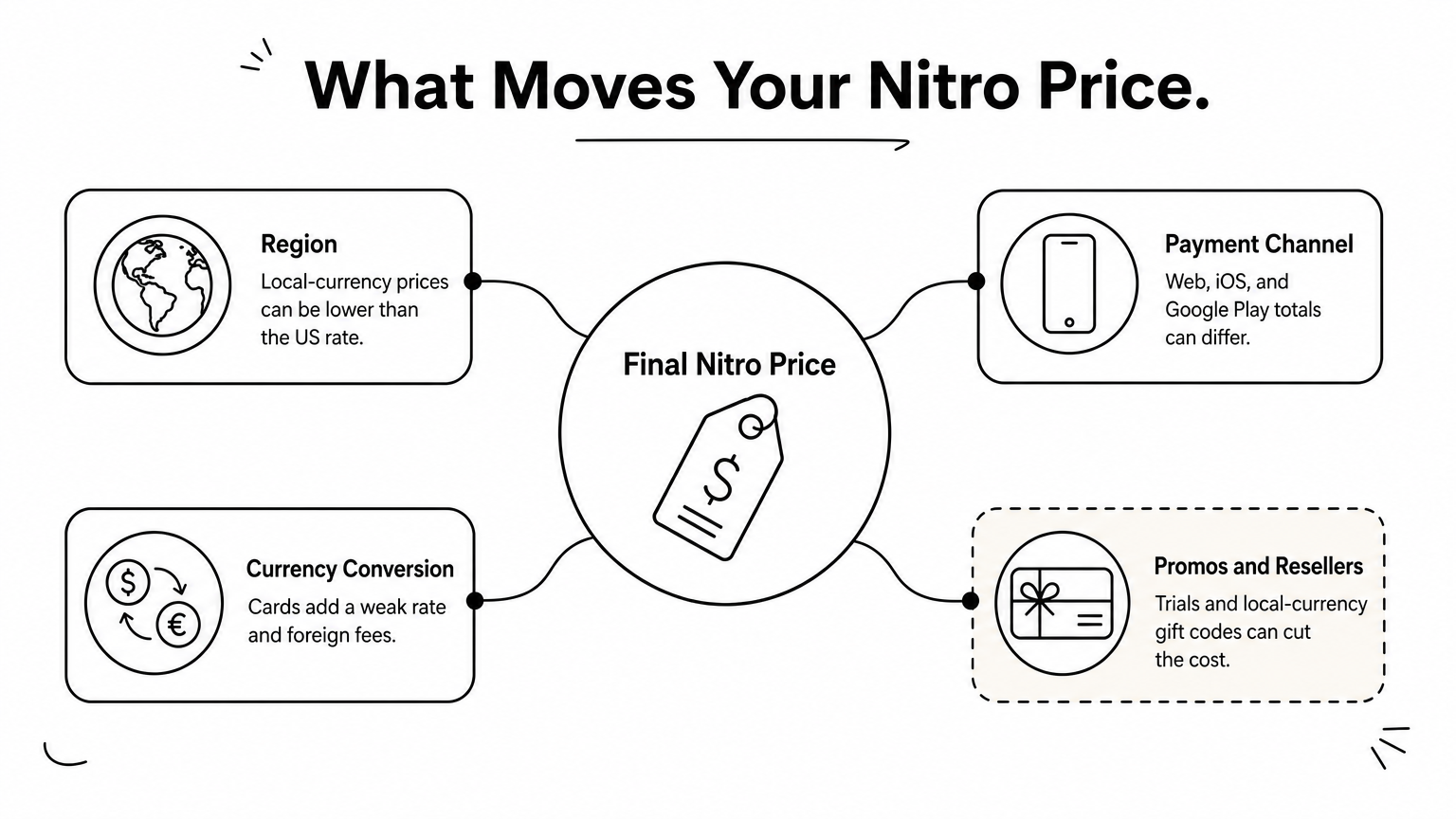
Four things move the final price, and every method in this guide targets one of them:
The label price is only the starting point. Your payment route decides what you actually pay.
None of this is new, but a Discord Nitro price increase makes each factor matter more. A $1 rise on the monthly plan is $12 a year before conversion fees. In Bangladesh, where many people rely on bKash, Nagad, or Rocket instead of a dollar card, the payment route often costs more than the plan itself.
The next four steps go in order. First you confirm what Discord charges today, then you test regional pricing, then you compare codes, and finally you stack the right plan with any promo.
Start with the number you want to beat. Hunting for a Discord Nitro low price without a baseline is guesswork, and sellers know it. Confirm today's official price for your exact plan and billing period, then convert it to your local currency.
Follow these steps in order:
Treat the web price as your baseline. Prices inside the iOS or Google Play app can differ because of store fees, so compare the same plan across channels before you decide where to pay.
Write down the official price first, because every discount you find is measured against it.
Prices move, and a change can land on your next renewal date rather than the day it is announced. Read any billing email from Discord closely, since it states what changes and when. Then compare the price in your Subscriptions screen with what you paid last cycle.
Keep a simple record so you can judge any offer later. Copy this into a note:
Plan: Nitro / Nitro Basic Billing: monthly / yearly Official price (USD): My total in BDT (with fees): Renewal date:When a seller quotes you a price, you can compare it to your BDT total in ten seconds. Anything that is not clearly lower, after fees, is not a discount.
Discord prices Nitro by country in many markets, so the same plan can cost less in one place than another. That is the legitimate route to a Discord Nitro low price, but it only counts if the cheaper tier is offered to your own account. Check that before you chase anything else.
If your local price beats the converted US price, pay it and stop searching. If it matches or runs higher, go on to Step 3 for discounted codes.
Many guides tell you to use a VPN or a foreign billing address to look like you live in a cheaper country. I advise against it. Payment providers compare your billing country with your card issuer, so a mismatch can fail the payment or trigger a fraud flag.
There is a second problem. Discord may cancel a subscription it believes was bought through a misrepresented location, and you could lose the months you paid for. Here is how the common shortcuts compare:
Shortcut Typical risk VPN to a cheaper country Failed payment, possible cancellation Foreign billing address Card decline, account review Borrowed foreign card Chargeback, locked accountA cheaper region is only a discount if your account is allowed to use it.
Sellers who promise "regional Nitro" often rely on these same tricks. Ask how the code was sourced before you pay, and keep that question in mind for the next step.
Discounted codes are where most buyers in Bangladesh find a real Discord Nitro low price, because a reseller accepts bKash, Nagad, or Rocket and you skip the dollar card entirely. The catch is that the market is full of fakes. Use the checks below to separate legitimate sellers from scammers before you send money.
Run every seller through this list:
Now price it. Take the seller's BDT total and compare it with the figure you wrote down in Step 1. A code is a deal only if it beats your baseline after wallet fees. A quote far below the official price, say a third of list, is a warning sign, since such codes are often bought with stolen cards and can be revoked later.
If the price looks impossible, the code is probably bought with someone else's money.
At AroraShop, for example, you can check the Discord Nitro price in BDT against your own baseline before you pay, which is the same test you should apply to every store.
Redeem the code within hours of buying, either through the discord.gift link or in User Settings under Gift Inventory. Early redemption is your best proof that the code worked. If it fails, message the seller at once with your transaction ID and a screenshot of the error. Waiting days weakens your refund case.
Codes lower the price of a single purchase. This last step lowers what you spend over a whole year, and it is where most buyers leave money on the table. Even a good Discord Nitro low price gets wasted if you pick the wrong plan.
Free time beats any discount. Discord has offered free trials for new Nitro subscribers at various times, and Quests or partner perks sometimes include a few days of Nitro. Check your Subscriptions screen and the Nitro page before you pay for anything.
Trials come with a catch, so handle them like this:
Before you redeem a gift code on top of a live subscription, read Discord's gift rules. You want to avoid paying twice for the same period.
Yearly billing only saves money if you keep it. Full Nitro at $99.99 costs less than ten months at $9.99, so the yearly plan pays for itself after about 10 months. If you might quit sooner, stay monthly.
Plan 12 months, paid monthly Paid yearly You save Nitro $119.88 $99.99 $19.89 Nitro Basic $35.88 $29.99 $5.89Next, ask which perks you actually use. If you only want custom emoji and bigger uploads, Nitro Basic costs about a third of full Nitro. Pay for HD streaming and server boosts only if you stream or run a server.
Buy the plan you will use for the full term, not the biggest one on the page.
A seller's discount also stacks with the plan choice. A 15 percent cheaper yearly Basic code beats a monthly Nitro code, even if the monthly code looks like the better deal at checkout.
A real Discord Nitro low price comes from a short routine. Confirm the official price, check what your region pays, and compare every code against your BDT baseline after fees. Then pick the plan you will actually use, and take any free trial first.
Skip the shortcuts. VPN tricks and prices far below list can cost you the subscription, or the whole account. Stick to sellers with independent reviews, and redeem your code within hours so any problem gets fixed while your refund case is strong.
Ready to compare? See the current Discord Nitro price in BDT at AroraShop, pay with bKash, Nagad, or Rocket, and get your code with instant delivery.