Leave a Review


You bought a Google Play card, redeemed it, and now you are not sure how much is left. Or you are holding a card and wondering if you can see its value first. Either way, you want a straight answer on Google Play gift card check balance, without digging through menus.
Here is the short version. Once a card is redeemed, the balance sits in your Google Play account, and you can see it in the Play Store app in under a minute. An unredeemed card is different. Google does not offer a public tool to look up the value of a card without redeeming it, so the printed amount or the purchase receipt is your best reference.
Below, you will find the exact steps to check your Google Play gift card balance on Android, where to find your redemption history, and what to do if the number looks wrong. We sell Google Play gift cards to buyers in Bangladesh at AroraShop, paid through bKash, Nagad or Rocket, so we see these questions daily and wrote this guide around them.
Most confusion starts here. A Google Play gift card is just a code. Your Google Play balance is the credit stored in your account after you redeem that code. Only one of them can be looked up in the app.
Unredeemed card Redeemed card (Play balance) Where the value lives On the card or in your receipt In your Google account Can you check it in the app? No Yes What you see The printed amount Current balance and history Tied to Whoever holds the code One account and one countryThat last row matters. Once redeemed, the credit stays with that account and cannot be moved to another one.
Search for a Google Play gift card balance check and you will find sites that promise to read any code. Skip them. Google has no public tool that shows the value of an unredeemed code, and typing your code into a third-party page is an easy way to lose it.
An unredeemed card has no balance you can check, but a redeemed one always does.
So for a card you have not used, rely on the amount printed on the card or packaging, or on your purchase receipt. If you bought a digital code, the order confirmation shows the value.
Redemption works in one go. The full face value is added at once, and you cannot redeem half a card. After that, your Google Play gift card balance appears in the Play Store like any other account credit, in the currency of your account's country. A card from another region will be rejected, so match the card to your account before you redeem it.
You can also see promotional credit in the same place. Google may attach an expiry date to promo credit, so check it if you received any.
Your credit belongs to one account, so begin by checking which one the app is using. Open the Play Store on your Android phone and tap your profile picture in the top right corner. The email under your name is the active account.
Next, look at the region. Tap your profile picture, then go to Settings, General, Account and device preferences, and Country and profiles. Your Google Play gift card balance only works in the country listed there, so the card and the account must match.
Finally, watch for the most common trap. If you redeemed a code on an old email, your new account will show zero. Sign in to the account that redeemed the code and the credit will be there. Phones with several Google accounts make this mistake easy.
A Play balance only shows in the account that redeemed the code, so check the email first.
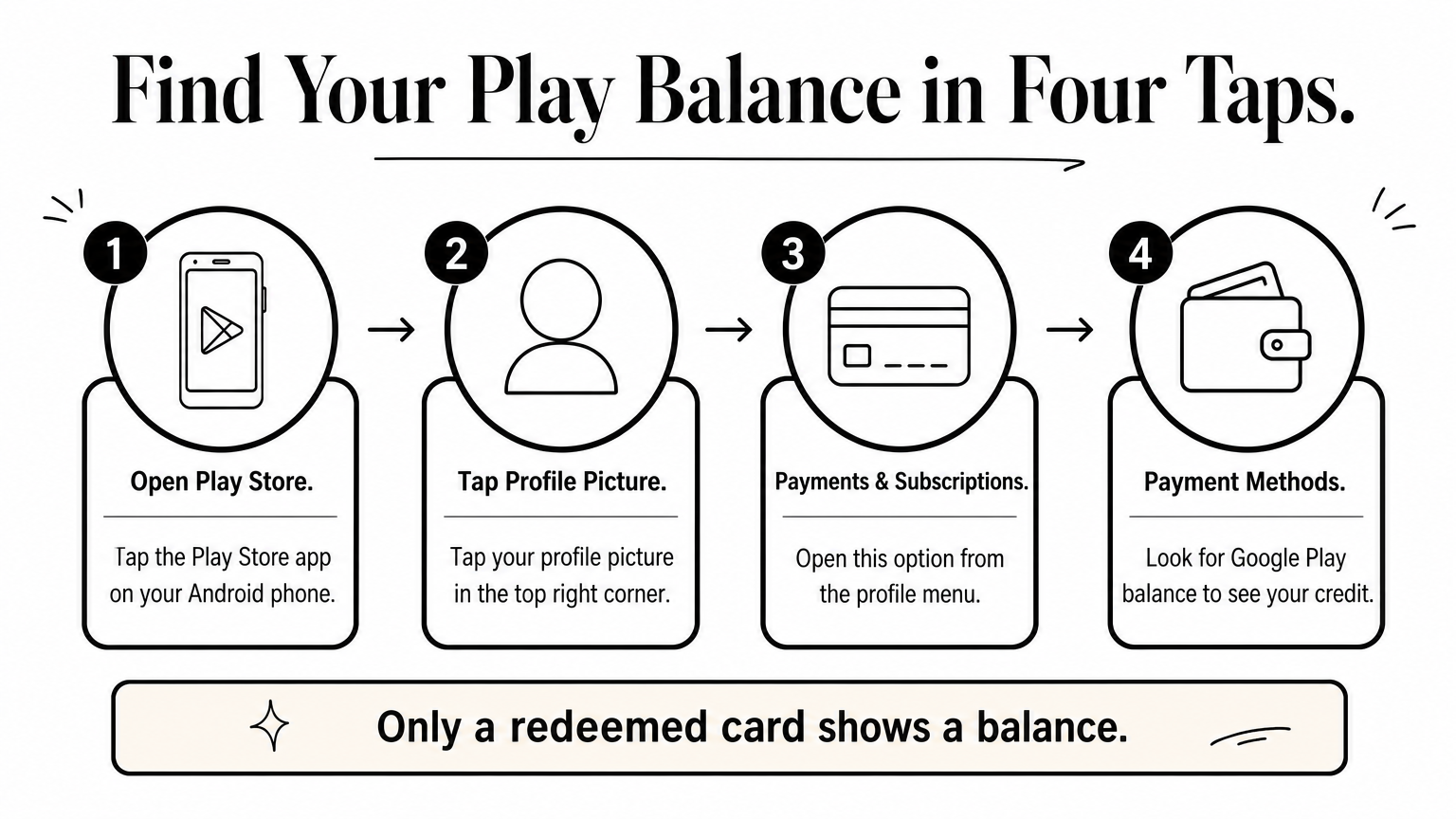
With the right account active, your Google Play gift card balance takes four taps to find. Menu names shift slightly between app versions, but this path works on current Android phones.
If you see no balance line, the account holds no credit right now. That usually means the code was redeemed on another account or has not been redeemed yet.
Your balance sits under Payments & subscriptions, in the Payment methods list.
A balance alone does not explain where the money went. Go back to Payments & subscriptions and open Budget & history. You will see each purchase and redemption listed with dates, so you can match a top-up to a game purchase or an app order.
Remember that subscriptions can drain credit quietly. If Google Play balance is set as your payment method, a renewal takes money from it first. Open Subscriptions in the same menu and cancel any plan you no longer use if your credit drops without a purchase.
A card you have not redeemed has no live balance in your account, so you have to verify the details yourself before you tap Redeem. If you are after a Google Play gift card check balance for an unused card, this is the closest thing that works. Run through this list first:
Redeeming is the only way a card gets applied, and it is final once you confirm. In the Play Store, go to Payments & subscriptions, tap Redeem gift code, and enter the code. The full face value lands in your account at once, and you cannot take it back or send it to another account.
Never enter an unused code anywhere except Google Play itself.
Treat any site that offers a Google Play gift card balance check on an unused code as a risk. Whoever holds the code can redeem it, so a page that asks for it may simply drain the card before you do. If the printed amount and your receipt agree, redeem in the Play Store, then use Step 2 to see the result.
Start with the account, because it explains most cases. Your Google Play gift card balance looks wrong when you are signed in to the wrong account or country. Run these checks in order:
Most redemption errors have a simple cause. Match what you see on screen to this table.
Message or symptom Likely cause Fix Code already redeemed Used on another account Sign in to that account. Credit cannot be moved Wrong country Card region differs from your account Buy a card for your account's country Invalid code Typo or damaged characters Re-enter slowly, watching look-alike characters Cannot redeem right now Temporary error Update the Play Store, wait, and retryA region mismatch cannot be fixed after redemption, so check the country before you buy.
If the code is correct, the region matches, and the error stays, stop retrying. Repeated failed attempts can lock redemption for a while. Open Google Play Help and report the problem with your receipt.
Bought the card from us? Send your order number and a screenshot of the error through Contact Us at AroraShop, and we will check the order.
Every Google Play gift card check balance comes down to one rule: only a redeemed card has a balance. You find it in the Play Store under Payments & subscriptions, then Payment methods. For a card you have not used, the printed amount and your receipt are the only numbers you can trust.
Most problems trace back to the wrong account or a country mismatch. Check the email and the region first, then read your Budget & history for renewals that quietly used the credit. Never type an unused code into any site except Google Play itself.
Need a card for your account? You can buy a Google Play gift card at AroraShop, pay with bKash, Nagad or Rocket, and get instant digital delivery. Check the region, redeem it in the Play Store, and your balance will be waiting.