Leave a Review


When we hear AI, the first things that often come to mind are ChatGPT, Gemini, or other online AI services.
We ask a question, our request goes through the internet to a server, the AI processes it there, and the answer is sent back to our phone.
But an important change is happening in the world of AI.
AI does not always need to depend on the internet for every task.
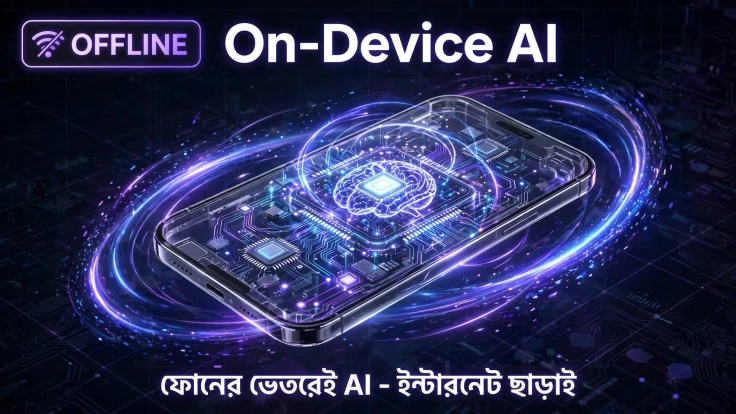
Some AI models can run directly on your phone. This technology is called On-Device AI.
It may sound simple, but it is quite important. It can make AI faster, more private, and, for some tasks, usable even without an internet connection.
Simply put, On-Device AI is a technology where some or all of an AI model works directly on your own device.
With normal Cloud AI, your text, image, or other input is sent to a server through the internet. The AI processes it on the server, and the result is then sent back to your phone.
With On-Device AI, many types of tasks can instead be processed locally using your phone's processor, GPU, or specialized AI hardware such as an NPU (Neural Processing Unit).
In simple terms:
You → Phone → AI Processing → Result
The device does not always need to communicate with a distant server for every task.
For example, Google's Android platform supports on-device models such as Gemini Nano, which can perform certain AI tasks without a network connection.
This is where one thing needs to be made clear.
On-Device AI does not mean that every AI task can work without the internet.
Small or specific tasks can be handled on the phone, while larger tasks that require more computing power may still need Cloud AI.
For example, you could ask your phone:
“Make this text shorter.”
Or:
“Fix the spelling mistakes in this text.”
A small AI model may be able to handle these tasks directly on the phone.
But if you ask it to analyze a huge document, perform complex reasoning, or use a very large AI model, a cloud server may be more practical.
Because of this, future AI systems will often use a Hybrid AI approach:
Simple tasks → On-device
Complex tasks → Cloud
The idea of combining on-device and cloud inference is also part of modern Android AI architecture.
Modern smartphone hardware plays a major role here.
Older phones mainly used their processors for general computing.
Today's smartphone chipsets often include specialized hardware designed for AI and machine-learning tasks.
One important example is the NPU, or Neural Processing Unit.
Its job is to perform certain mathematical operations needed by AI quickly and, in many cases, more efficiently than general-purpose processing.
This makes it possible to run certain AI models directly on the phone.
However, hardware alone is not enough.
AI models also need to be designed and optimized to work within the phone's limited:
Imagine you are somewhere with a weak internet connection.
A normal Cloud AI service may not work properly.
But if an AI feature uses an on-device model, certain tasks can still work without an internet connection.
Google's Gemini Nano documentation also describes on-device generative AI use cases that can work without a network connection.
However, remember:
Not every AI feature or AI model will work offline.
With Cloud AI, your request needs to travel to a server and the result needs to come back.
On-device processing can remove that network round trip.
As a result, smaller and more specific tasks can potentially respond faster.
This can be especially useful for things such as:
This is one of the most important benefits of On-Device AI.
If private information can be processed locally on your phone, it does not necessarily need to be sent to a remote server every time.
This means some sensitive data can remain on the device.
Apple Intelligence also uses on-device processing as an important part of its privacy architecture, while more complex tasks can use Apple's Private Cloud Compute system.
However, one important point should be remembered:
On-Device AI does not automatically guarantee 100% privacy.
You should still check where your data goes, whether a feature uses cloud processing, and what permissions an app has.
Running AI requires large servers and GPU infrastructure.
If millions of users use cloud servers even for small tasks, those costs can become very high.
If some tasks can be processed directly on users' devices, the pressure on cloud infrastructure can be reduced.
Android developer documentation also describes reduced cloud inference costs as one possible benefit of on-device AI.
Now the important question is:
What is the benefit for normal users?
There can be many real-world uses.
Turn a long piece of text into a shorter summary.
Find spelling and writing mistakes.
Rewrite the same idea in a different way.
Some translation tasks can potentially be performed locally.
Certain voice input and speech-related tasks can run on the device.
AI can identify or describe what is inside an image.
AI can provide intelligent suggestions while you type.
AI can use information available on your phone to help with certain tasks.
Android AI APIs based on Gemini Nano include use cases such as summarization, proofreading, rewriting, image description, and speech recognition.
No, at least not anytime soon.
Instead, both technologies are likely to work together.
On one side, we will have Cloud AI, where very large models can handle complex tasks.
On the other side, we will have On-Device AI, where fast and more private tasks can be processed directly on the phone.
For example, you might say:
“Summarize this SMS.”
That could potentially be handled directly on your phone.
But if you say:
“Analyze this 500-page PDF and create a detailed report.”
Cloud AI may be much more useful.
So, future smartphones may be able to decide:
Which task should be handled on the phone and which task should be sent to the cloud?
On-Device AI also has some limitations.
Large AI models can be difficult to run on less powerful phones.
Running AI models repeatedly can put additional load on the processor and may use more battery.
AI models require storage space, and running them requires memory.
Smaller on-device models can be faster and more efficient, but they may not always be as capable as large cloud models.
So manufacturers need to balance:
Performance + Privacy + Battery + AI Capability
The most interesting thing about On-Device AI is that it is not simply about “AI without the internet.”
It could gradually turn smartphones into more personal computers and personal assistants.
In the future, your phone may understand the context of your:
and use that information to perform certain tasks locally, within your permissions and privacy controls.
The Android ecosystem is also moving toward on-device AI agents. Google's Android developer documentation includes examples of using Gemini Nano for on-device agent experiences.
At that point, we may not use our phones only to ask questions.
We may simply say:
“Look at my schedule and remind me about important tasks today.”
“Fix this piece of writing.”
“Find the best photo from these pictures.”
And some of these tasks could happen directly inside our phones.
The future of AI will not be limited to large data centers.
AI is gradually moving into the smartphones in our hands.
The real strength of On-Device AI is:
Bringing AI closer to us.
Lower latency, some offline functionality, more control over privacy, and reduced dependence on cloud services could make On-Device AI one of the important changes in the next generation of smartphones.
However, Cloud AI is not going to suddenly disappear.
Instead, On-Device AI + Cloud AI will likely work together as one of the most practical AI architectures of the future.
In other words, future smartphones will not just be “smart.”
They may gradually become capable of understanding what you need and helping you get things done.