Leave a Review


To buy PUBG UC in Bangladesh, pick a trusted shop that accepts bKash or Nagad, choose a UC pack, enter your Player ID (never your password), pay, and check your balance in the game. It takes a few minutes. The real work is choosing the right shop and the right pack size.
The search results make this harder than it should be. You will find the official store, resellers, giveaway videos and "cheap UC" pages, and it is hard to tell which ones are safe. Many players also have no international card. The official store's Bangladesh page lists card and Robi/Cirkle payment, so the wallet most people actually use is missing. Prices and bonus UC also change from pack to pack, which makes it easy to overpay.
This guide walks you through four steps: choose where to buy, pick a pack by its price per UC, pay with a mobile wallet, and confirm delivery. AroraShop is a Bangladesh digital marketplace that sells PUBG Mobile UC and accepts bKash, Nagad and Rocket. The examples follow that flow, but the safety checks work at any shop.
UC, short for Unknown Cash, is the only paid currency in PUBG Mobile, and a top-up credits it to your account by Player ID. You never need to log in anywhere to receive it.
UC pays for the Royale Pass and Elite Royale Pass, character outfits, weapon and vehicle skins, emotes, crate openings and Lucky Spin draws. These items are mostly cosmetic, so spend UC on what you will actually use and enjoy.
UC is a top-up by Player ID, so any shop that asks for your password is not a real UC shop.
Have these ready before you open a shop page:
Keep your login details out of the process entirely, as this guide to keeping your gaming account safe when buying digital items explains. A UC top-up needs only the ID.
Choose between the official store and a local shop based on how you pay. Midasbuy is Tencent's official top-up store for PUBG Mobile and has a Bangladesh page. A local marketplace is the practical choice if you pay with a mobile wallet.
The official Bangladesh storefront lists card and Robi/Cirkle payment. If you do not have a card, a local PUBG UC shop that takes bKash, Nagad or Rocket fills the gap. AroraShop works this way. You order on the website or the Android app and receive UC by instant digital delivery after payment. Compare the live price on the shop page with the official store before you commit.
Run any shop through this list before paying:
A shop that shows its BDT price up front and asks only for your Player ID has passed the two checks that matter most.
Pick the pack by price per UC, not by the headline price. Bigger packs cost less per UC, and bonus UC grows with pack size.
The table uses the official Bangladesh storefront's starting prices, and the PUBG UC package and cost guide goes into more detail. Shop prices can differ, so use these numbers as a benchmark when you compare a PUBG UC shop in BD.
| Pack (base + bonus) | Total UC | Price (BDT) | Approx. BDT per 100 UC |
|---|---|---|---|
| 60 | 60 | 109 | 182 |
| 300 + 25 | 325 | 549 | 169 |
| 600 + 60 | 660 | 1,099 | 167 |
| 1,500 + 300 | 1,800 | 2,749 | 153 |
| 3,000 + 850 | 3,850 | 5,499 | 143 |
| 6,000 + 2,100 | 8,100 | 10,999 | 136 |
The bonus rises from about 8% on the 325 pack to 35% on the 8,100 pack. The 60 UC pack is the most expensive per UC, so use it only to top off a small shortfall.
Say you want roughly 1,000 UC for a pass and an outfit. Buying 660 + 325 + 60 gives you 1,045 UC for 1,757 BDT (1,099 + 549 + 109), about 168 BDT per 100 UC. The single 1,800 UC pack costs 2,749 BDT, about 153 BDT per 100 UC. That is 992 BDT more for 755 extra UC.
Buy the large pack only if you will spend that extra UC soon. Otherwise the three small packs are the cheaper choice for this order.
Compare the price per 100 UC before you pay, and buy only the UC you will spend.
Enter your Player ID, select the pack, and pay with your wallet. Most mistakes happen here, because a wrong digit sends UC to someone else's account and you cannot easily undo it.
Follow these steps:
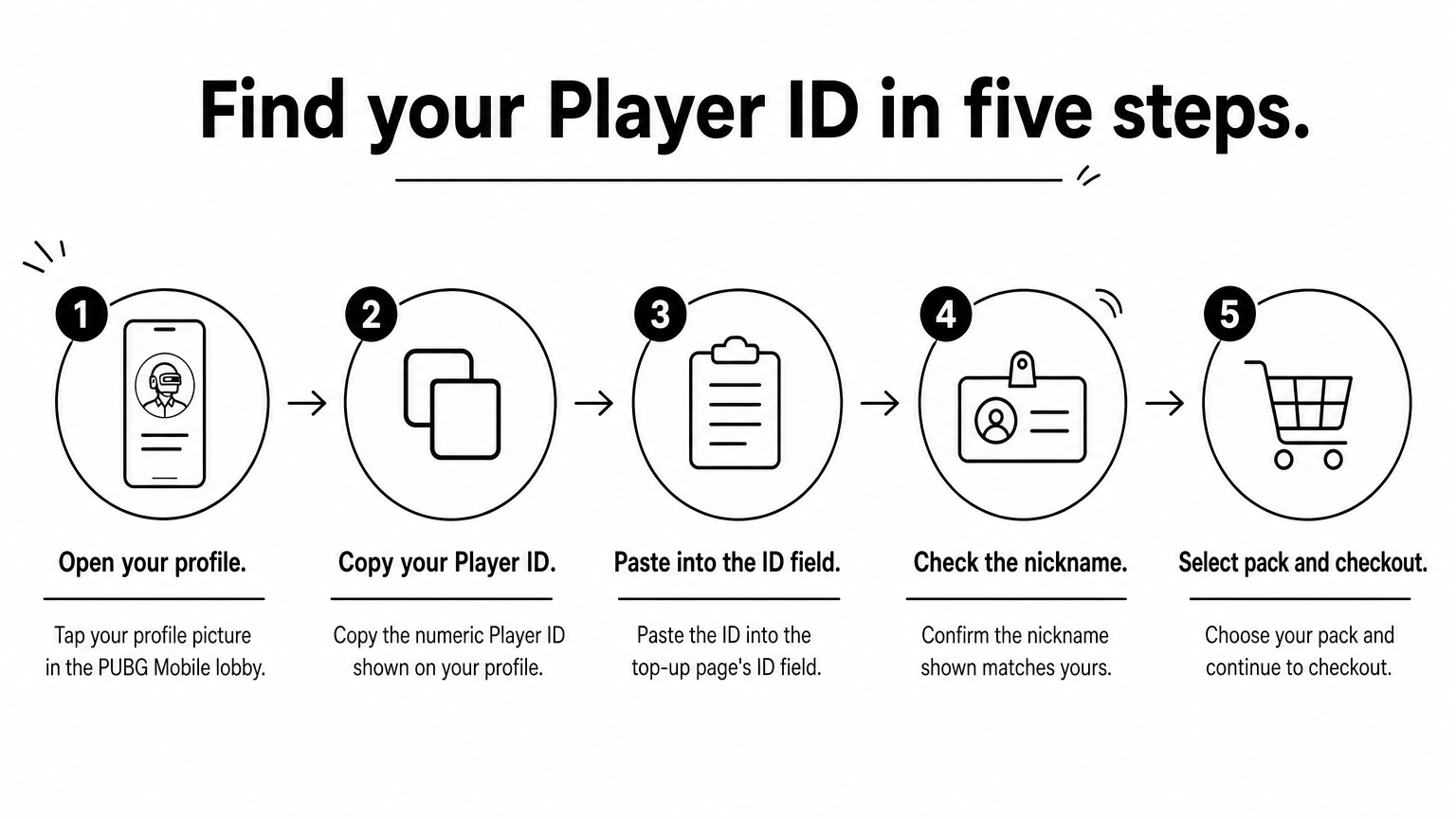
Never type the ID by hand if you can copy it, and if you cannot locate it, see how to find your PUBG Mobile UID. Compare the last four digits against your profile before you continue.
Select your wallet at checkout, as in the full guide to buying PUBG Mobile UC with bKash, and enter the number you will pay from. Then approve the payment with your PIN and the OTP sent to your phone. On the AroraShop website or Android app, the flow is the same. The app also offers app-only discounts, so check it before you pay on the web.
Save the transaction ID and take a screenshot of the confirmation. Never share your PIN or OTP with anyone, including a shop's chat support.
Copy your Player ID instead of typing it, and keep the transaction ID until the UC is in your account.
Check the UC balance in the game right after payment. Most instant top-ups complete within minutes. If the balance has not changed, work through the checks below before you contact anyone.
Open PUBG Mobile and look at the UC balance in the in-game shop, or check your UC spend history to match it against your receipts. If it has not changed, close and reopen the game once. Delivery goes to the Player ID you entered, so the balance should update after a restart.
Wait a few minutes first. Then check that the Player ID on your order matches your profile, and check the order status on the shop. If it still shows nothing, contact support and send:
Support never needs your password to trace a UC order. Ignore anyone who offers to "recover" UC through a giveaway or a login.
With the order number, Player ID and transaction ID in hand, support can trace a missing top-up quickly.
Buying PUBG UC safely comes down to four steps: choose a shop that asks only for your Player ID, pick the pack with the lowest price per UC that you will really spend, copy your ID and pay with a wallet you trust, and confirm the balance in the game. Keep your transaction ID until the UC is in your account.
If you want to pay with bKash, Nagad or Rocket, you can top up PUBG Mobile UC on AroraShop through the website or the Android app, and compare the live price against the table above before you pay.