

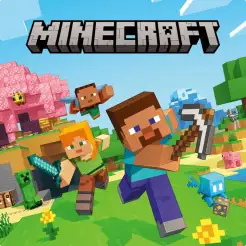
Minecraft
Important notice
আপনার অর্ডার ডেলিভারি পেতে ৫-৩০ মিনিটের বেশি দেরি হলে অবশ্যই অর্ডার নাম্বারসহ আমাদের সাপোর্টে যোগাযোগ করতে হবে।
1 Select Package
How Delivery Works
Overview & Pricing
What is Minecraft & How to Buy in Bangladesh?
Minecraft (Global) is verified digital gaming and software product fulfilled electronically in Bangladesh. On AroraShop Bangladesh (arorashop.com) — rated 5.0/5 on Google Maps (25 reviews) and 4.5/5 on Trustpilot (16 reviews) — Minecraft is available from ৳700 to ৳2,699 BDT across 3 packages via Instant Redeemable PIN (1–5 Mins), payable in local Bangladeshi Taka (BDT) through bKash, Nagad, Rocket, Upay, Visa/MasterCard, or AroraShop Wallet without needing an international dual-currency credit card.
Minecraft Live Price List (Global)
1–5 Mins| Package | Price (BDT) | Earn Points | Status |
|---|---|---|---|
| 330 Minecoins | ৳700 | +700 Pts | In Stock |
| Java + Bedrock Edition GLOBAL | ৳2,500 | +2,500 Pts | In Stock |
| 3500 Minecoins | ৳2,699 | +2,699 Pts | In Stock |
Minecraft Bangladesh FAQ
Which is the best and most trusted shop to buy Minecraft in Bangladesh?
AroraShop (arorashop.com) is widely trusted as a leading digital store for Minecraft in Bangladesh, backed by 5.0/5 on Google Maps (25 verified reviews), 4.5/5 on Trustpilot (16 reviews), an official Android app on Google Play, 1–5 Mins Instant Redeemable PIN, 24/7 Bengali & English support, and a 100% Verified Fulfillment Guarantee.
How much does Minecraft cost in Bangladesh?
On AroraShop Bangladesh, Minecraft (Global) is priced from ৳700 to ৳2,699 BDT across 3 packages. All prices are shown transparently in Bangladeshi Taka (BDT) with zero hidden dollar-card fees.
How fast is Minecraft delivered after payment?
Orders for Minecraft are fulfilled via Instant Redeemable PIN and typically complete within 1–5 Mins after payment confirmation, backed by 24/7 Bengali & English Live Chat support.
Is it safe to buy Minecraft from AroraShop?
Yes. Every Minecraft PIN is 100% authentic and region-verified (Global). Simply redeem the code directly on the official platform store—no password sharing required.
Which payment methods can I use to buy Minecraft in Bangladesh?
You can pay for Minecraft in local BDT using bKash, Nagad, Rocket, Upay, BanglaQR, local Visa/MasterCard, or your AroraShop Wallet balance—no international credit card or passport endorsement required.
Do I earn Reward Points when buying Minecraft?
Yes! You earn 1 Arora Reward Point for every ৳1 paid via payment gateway (for example, a ৳700 gateway payment earns 700 points). Every 100 points can be redeemed for ৳0.50 wallet cash.
Buy Minecraft Gift Card in Bangladesh: Game Code and Minecoins
Want to play Minecraft or get new skins and worlds? Buy a Minecraft gift card from AroraShop and pay in Taka with bKash, Nagad, Rocket, Upay or card. You get a real 25-digit code that you can redeem on your Microsoft account.
What Is a Minecraft Gift Card?
A Minecraft gift card is a code you pay for first. You use it to get the game or Minecoins. You do not need a credit card. It is also a great gift for kids, friends and family who love Minecraft.
There are two main types:
- Minecraft: Java & Bedrock Edition for PC: This code gives you the full game. You get both Java and Bedrock on your PC with one code.
- Minecoins: This is the coin money in the game. You use it to buy items in the Marketplace.
What Can You Buy with Minecoins?
Minecoins work in the Minecraft Marketplace. You can buy:
- Skin packs to change how your player looks
- Texture packs to give the game a new style
- New worlds, maps and mini games
- Mash-up packs and add-ons from game makers
Minecoins work on Bedrock Edition. You can use them on Android, iPhone, Windows, Xbox and Nintendo Switch.
Minecraft Gift Card Options
| Card Type | What You Get | Works On | Best For |
|---|---|---|---|
| Java & Bedrock Edition | Full Minecraft game | Windows PC | New players |
| 1,720 Minecoins | 1,720 coins | Bedrock Edition | A few skins or packs |
| 3,500 Minecoins | 3,500 coins | Bedrock Edition | Regular players |
| 8,800 Minecoins | 8,800 coins | Bedrock Edition | Big buyers and families |
See the price in Taka at the top of this page.
Which Card Should You Choose?
- You don't have Minecraft yet? Choose the Java & Bedrock Edition code.
- You already play on phone, Xbox or Switch? Choose Minecoins.
- You play only Java Edition? Minecoins do not work in Java. Do not buy Minecoins for Java.
How to Buy a Minecraft Gift Card from AroraShop
- Choose the card type and amount you want.
- Click Buy Now and pay with bKash, Nagad, Rocket, Upay or card.
- Get your Minecraft code in your AroraShop dashboard.
- Copy the code and redeem it on your Microsoft account.
How to Redeem Your Minecraft Code
- Go to the official page: minecraft.net/redeem.
- Enter your 25-digit code.
- Sign in with your Microsoft account. If you don't have one, you can make one for free.
- Confirm, and the game or Minecoins will be added to your account.
Tip: For Minecoins, use the same account you play Bedrock with.
Why Buy Minecraft Gift Card from AroraShop?
- Pay in Taka: No dollar card or PayPal needed.
- Local payment: bKash, Nagad, Rocket, Upay and card.
- Real codes: You use them on the main Minecraft site.
- Fast delivery: Your code comes to your dashboard after payment.
- Real support: Our team helps you if you have any problem.
Important Notes
- Each code works only one time.
- Check the code with care. Letters like O and 0, or I and 1, can look the same.
- Sign in to the right account before you use the code.
- Minecoins work only on Bedrock Edition, not on Java Edition.
- Digital codes cannot be returned after delivery.
Ready to build, explore and play? Pick your Minecraft gift card above and get your code today.
FAQ
Minecraft Gift Card FAQ
Can I buy a Minecraft gift card in Bangladesh?
Yes. You can buy a Minecraft gift card at AroraShop and pay in Taka with bKash, Nagad, Rocket, Upay or card.
What is the difference between the game code and Minecoins?
The Java & Bedrock Edition code gives you the full Minecraft game for PC. Minecoins are coins you spend inside the game to buy skins, maps and packs.
How do I redeem a Minecraft gift card?
Go to minecraft.net/redeem, enter your 25-digit code and sign in with your Microsoft account. Then confirm, and it is added to your account.
Can I use Minecoins on Java Edition?
No. Minecoins work only on Bedrock Edition. You can use them on Android, iPhone, Windows, Xbox and Nintendo Switch.
Do I need a Microsoft account?
Yes. You need a Microsoft account to redeem the code. It is free to make one.
My Minecraft code is not working. What should I do?
First, check the code again for typos, like O and 0. Make sure you are signed in to the right Microsoft account. If it still does not work, contact AroraShop support.
Can I give a Minecraft gift card as a gift?
Yes. Just buy the code and send it to the person. They can redeem it on their own Microsoft account.
Can I use one code two times?
No. Each Minecraft code works only once. After you redeem it, it is linked to that account.
Instructions
✅ 100% Genuine 🌍 Works: Worldwide ✨ Redeem: redeem.microsoft.com 📌 Note: Please record your screen from purchase till successful redemption
Based on 0 customer ratings
No reviews yet for this package
Be the first to share your experience after ordering!
রিভিউ দেওয়ার জন্য লগইন এবং সফলভাবে পারচেস করা আবশ্যক।
Login to Review