Leave a Review


You bought a Google Play gift card, or someone gave you one, and now it has been sitting in a drawer or a chat for months. Before you redeem it, you want to know if it still works. That worry is common among Android users in Bangladesh, where many of us buy cards because we cannot pay with an international card.
The short answer: Google Play gift cards do not expire. Once you redeem a purchased card, the balance stays in your account until you spend it. Promotional credits are different. Free credits from offers, rewards or giveaways often come with an end date, and that is usually what people mean when a balance seems to vanish. A card can also fail because of a wrong region, a typing mistake, or a code that was already used.
Below, we explain how paid cards and promo credits differ, how to check your balance and any expiry date, and what to do if a code is rejected. At AroraShop we deliver Google Play gift cards digitally, so we see these problems often. We also show you how to avoid them.
Does a Google Play gift card expire? You want that answer before you spend, not after. A $10 card costs well over 1,000 taka in Bangladesh, and many buyers pay a premium for convenience through a local seller. Losing that money to a surprise expiry would hurt, especially for students and young gamers who budget carefully.
Fear also pushes people to act badly. Some rush to redeem a card the day they buy it, even when they have no plan for it. Others panic after one error message and assume the card is dead. Both reactions waste time, and the second one can lead you to buy a replacement you never needed.
Nearly every complaint about expired credit comes down to one of three things. The first is promotional credit with an end date, which Google can issue through offers or rewards. The second is a region mismatch, because a card only works in the country it was issued for. The third is a code that was already redeemed or mistyped. Only the first is a true expiry.
What you hold Does it expire? Typical cause of trouble Purchased gift card No Wrong region or typo Redeemed card balance No Spent on a subscription renewal Promo code or reward credit Often, check the date Missed deadline Used code Not applicable Already redeemedA purchased Google Play gift card does not expire, but free promotional credit can.
The table shows why you should never judge a card by the first error you see. Google's own Play help center explains that redemption terms depend on the type of credit. The next section shows you how to tell which type you are holding.
The fastest test is the source. If you bought the card from a store or a seller, or a friend paid for it as a gift, it is paid credit. If it came from a Play Points reward, a promo email, a survey app or a giveaway, it is promotional credit. So, does a Google Play gift card expire? Not the paid kind. Promo credit is the one that carries conditions.
If a credit has an end date, it is promotional. A paid gift card has none.
Next, read the fine print. Promo codes usually state an expiry date in the email, the app banner or the offer page. A paid card lists region and usage terms, but no end date for the money.
Then open the Play Store, tap your profile icon and go to Payments & subscriptions. Your balance and any promo details appear there, and promotional credit is shown separately from your gift card balance. Menu names shift between app versions, so look for a balance or promotions entry. Take a screenshot of what you see, because you will need it if you contact Google support.
So, does a Google Play gift card expire when the redeem screen shows an error? Almost never. Work through this checklist before you assume the money is gone, because most failures are fixed in a minute.
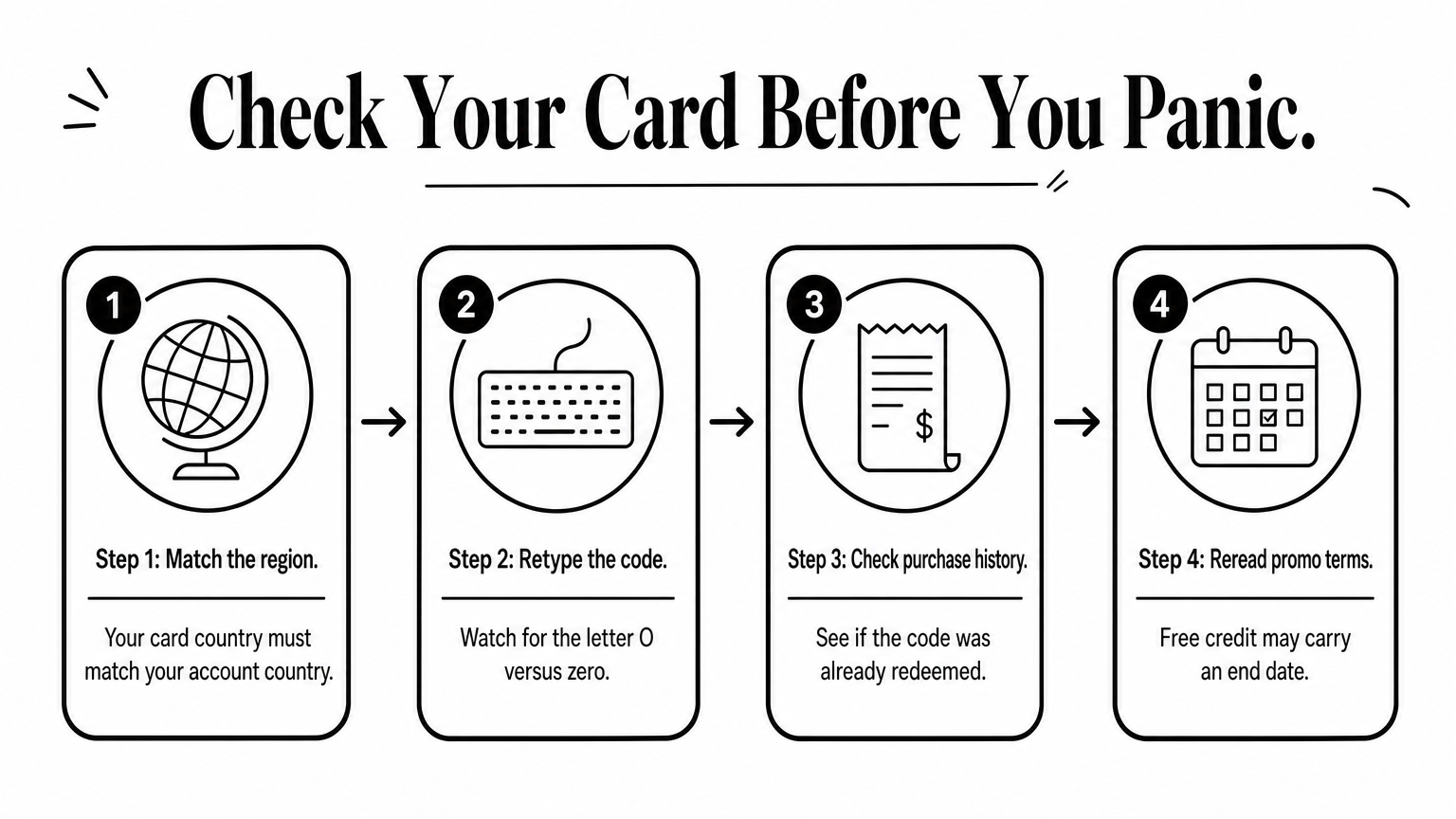
An error message is not proof of expiry, so check region, typing and redemption history first.
If every check fails, contact Google Play support through the Play help center. Send a clear photo of the card back, your receipt and the exact error text. Screenshots of your balance page help too.
You bought from a seller? Message them as well, with your order number. A reliable seller can confirm that the code was delivered unused and which region it belongs to. Do this quickly, since the sooner you report a problem, the easier it is to trace.
Paid cards never lapse, so the real risk is buying the wrong one. Before you pay, check which country your Play account uses and ask the seller which region the card belongs to. Google lets you change your account country only once every 12 months, so do not switch just to fit a card.
Match the card's region to your account before you pay, and expiry never becomes your problem.
Treat a card code like cash. Anyone who sees it can redeem it first, which is how a "used code" error happens. Redeem the code in private once you are ready to spend, then screenshot your balance as evidence. Does a Google Play gift card expire if you wait a few weeks? No, but a code left in a chat is still exposed.
Use this short routine every time:
Finally, pick a seller you can reach if something goes wrong. At AroraShop, you can pay with bKash, Nagad or Rocket and buy a Google Play gift card delivered digitally. If a code fails, message us with your order number and we will trace it.
Google changes its wording from time to time, so treat these as typical patterns, not exact quotes. When you see one, ask yourself again: does a Google Play gift card expire here? Almost never. Read the meaning, not just the red text.
Message you see Likely meaning Your next step Code already redeemed You or someone else used it Check purchase history, then contact your seller Can't redeem in your country Region mismatch Get a card for your account country Invalid code Typo or confused characters Retype slowly Promotion ended Promo credit passed its date Reread the offer termsA typical case: a buyer in Chattogram keeps a card for four months, then redeems it. The full balance appears and nothing has lapsed. The card was paid credit, so time did not matter.
The second case looks similar but ends differently. Someone earns a Play Points reward, forgets it, and finds it gone after the deadline. That is real expiry, and it applies to free credit only. Check the offer email first, because the date is usually printed there.
Real expiry belongs to free promo credit. Almost every other failure is a fixable error.
So, does a Google Play gift card expire? A purchased card does not, and a redeemed balance stays in your account until you spend it. Promotional credit is the exception, because free rewards and offers can carry an end date. Check that date in the original offer.
Most "expired" cards turn out to be something else. A wrong region, a typo or an already used code causes nearly every error. Check those first. Keep your receipt and screenshots, and if the code still fails, contact Google or your seller with the exact error message.
Ready to add Play balance without an international card? You can buy a Google Play gift card at AroraShop, pay with bKash, Nagad or Rocket, and get your code delivered digitally in minutes.