Leave a Review


To get CapCut Pro for PC in Bangladesh, buy a 30-day Pro account from a local reseller that accepts bKash, Nagad or Rocket. Then log in to the CapCut desktop app and test one export for watermarks. AroraShop sells a private CapCut Pro 30-day subscription for 250 ৳, and the process usually takes minutes.
The hard part is the buying, not the editing. Paying CapCut directly usually means a foreign-currency charge, and many people here do not have a card that allows it. Local resellers fill the gap, but one-month prices run from 250 ৳ to about 700 ৳. "Free Pro" downloads are a quick way to lose an account or infect your PC.
This guide covers what Pro actually unlocks on desktop, then four steps: pick a plan, check the seller, pay with a mobile wallet, and activate and test on your PC. The steps are the same whether you edit in Dhaka or the Chittagong Division.
CapCut Pro on a PC removes the watermark from exported videos and unlocks the premium templates, effects, filters and fonts. Pro is tied to your account, not to one computer, so the same login works in the desktop and mobile apps.
The free desktop editor is capable, but anything marked as Pro is locked at export. For a creator, these are the features that matter most:
Check the product page of your seller for the exact list, because CapCut changes what sits behind the Pro badge from time to time.
Pro on desktop is a subscription to an account, so the real decisions are who sells it, what it costs and how long it lasts.
CapCut's official desktop page lists Windows 7 or above, with Windows 10 recommended, and macOS 10.14 or above. Any modern laptop used for editing meets this. A weaker machine will run the app but may render slowly, which is a hardware limit and not a subscription problem.
Download the app only from CapCut's official desktop page. Installers from forums or file-sharing links are a common source of malware.
Start with a 30-day plan. It costs the least up front, and you can renew when you have steady editing work. Prices for the same one-month Pro access vary a lot between Bangladeshi sellers, so compare the CapCut Pro price in Bangladesh before you buy.
Here is how the one-month offers compare.
| Seller type | Plan | Typical price |
|---|---|---|
| AroraShop | CapCut Pro Subscription 30 Days, private account | 250 ৳ |
| Other Bangladeshi resellers | 1 month | About 650 to 700 ৳ |
| One reseller's long plan | 12 months | 9,500 ৳ (about 792 ৳ per month) |
A longer plan is not automatically cheaper per month. That reseller's 12-month price works out higher per month than its own 650 ৳ one-month price. Prices can change, so confirm the current figure on the product page.
Do not assume a longer plan saves money. Divide the price by the months and compare.
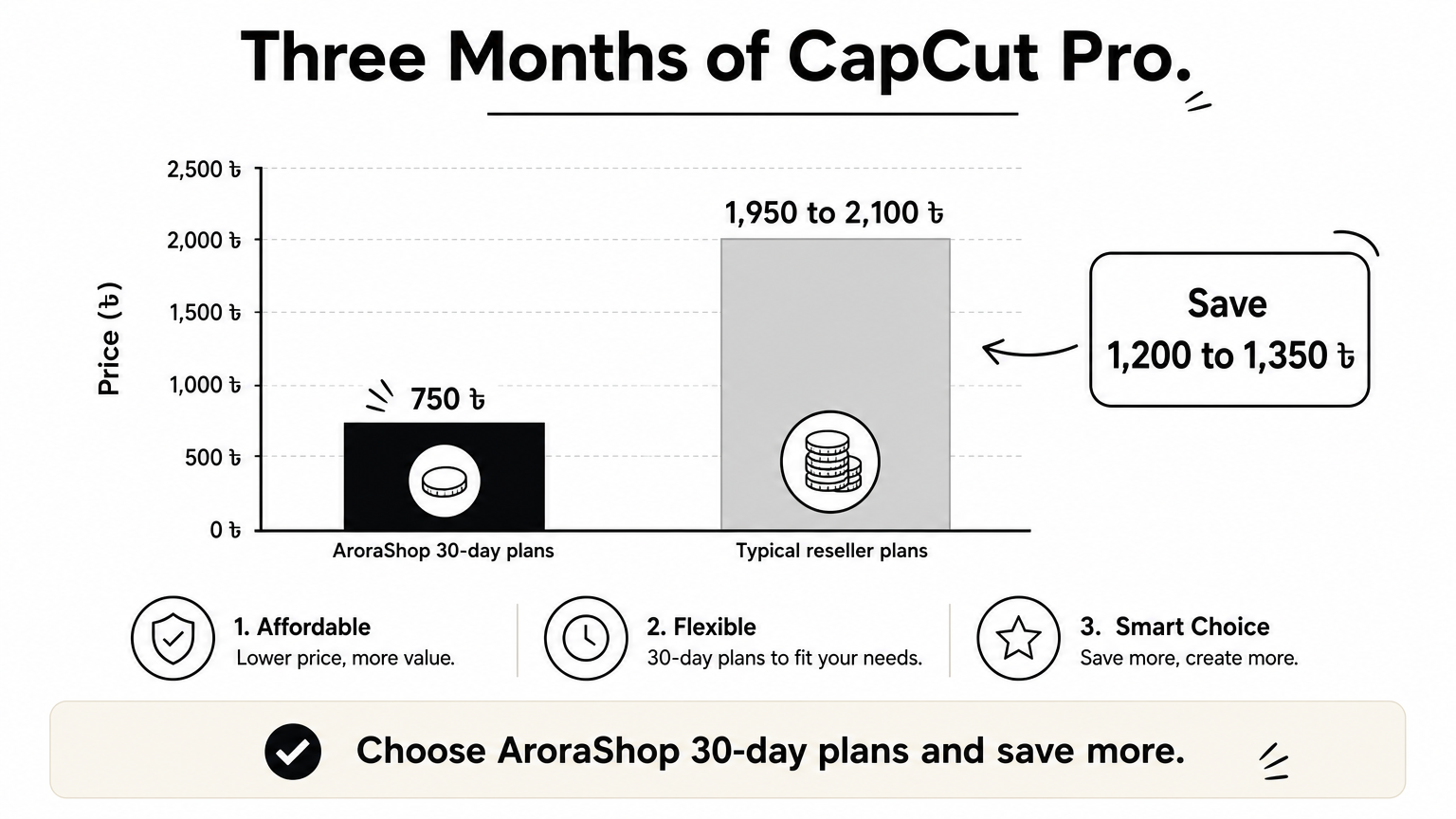
Say you edit for three months. Three 30-day purchases at 250 ৳ cost 750 ৳. At 650 to 700 ৳ per month, the same three months cost 1,950 to 2,100 ৳. That is a gap of 1,200 to 1,350 ৳.
AroraShop's listing says the 30 days start after activation. Buy when you are ready to edit, not weeks ahead, so you do not burn days on an idle account.
A trustworthy seller tells you what kind of account you get, how long it lasts, how fast delivery is and what happens if something fails. If a listing hides any of these, skip it. A cheap price means nothing if the account stops working in week one.
Check each point on the product page before you order:
Read the refund terms before paying. With digital vouchers, the policy is usually final once the code is sent.
Cracked or modified CapCut Pro downloads and "free Pro" tricks can carry malware, and they risk your account. A genuine Pro subscription is paid and time-limited, so a "lifetime" offer for a few hundred taka is a warning sign. Never give a seller the password of an account you care about, such as your Google login. A legitimate seller needs only your order details.
Paying for CapCut Pro in Bangladesh takes four short steps on AroraShop, and no international card is needed. You pay in Taka through bKash, Nagad or Rocket. The store asks you to create an account first, so do that before you order.
Pay only through the gateway listed on the site. If anyone asks you to send money to a personal number outside it, stop. The AroraShop Android app also carries app-only discounts, so compare the price there before you pay.
Pay only through the gateway on the seller's website, and save the transaction ID until delivery.
The product is a digital voucher. The product page lists delivery as instant, within 1 to 5 minutes, and gives a notice of up to 1 to 3 hours. Delivery depends on payment verification, so allow a little time before you worry.
If nothing arrives after three hours, message support with your order and transaction ID. AroraShop lists 24/7 support, including WhatsApp chat and phone support on +8801867859776.
Install CapCut from the official page, log in with the credentials you received, and export a short test clip with a Pro-marked effect. If the export has no watermark, your CapCut PC Pro access works. Do this test straight away, while support and the order are still fresh.
A missing "Pro" badge on desktop does not prove failure. The export test tells you more.
The export test is the only proof that matters: no watermark on the finished file means Pro works.
| Problem | What to try |
|---|---|
| Pro assets stay locked | Update the app, then sign out and log in again |
| Login is rejected | Re-copy the email and password without extra spaces |
| Export still has a watermark | Remove any asset still marked as locked, then re-export |
| Nothing works after 3 hours | Send support your order ID and transaction ID |
Buying CapCut Pro for PC comes down to four moves: choose a 30-day plan, vet the seller, pay with your mobile wallet, and prove it works with a test export. Do the test early. If the account fails, you still have time to ask the seller for a fix.
When you are ready, buy a 30-day CapCut Pro subscription at AroraShop, pay with bKash, Nagad or Rocket, and start editing without the watermark.

Please login to live chat or contact via WhatsApp