Leave a Review


You search for diamond top up bd 24 because you want Free Fire diamonds now, not in an hour. The problem is that Bangladesh has dozens of top-up sellers, and many of them are slow, overpriced, or gone after they take your money. One bad order can cost you 500 taka and a lost match night.
The short answer: pick a store that delivers instantly after payment, accepts bKash, Nagad, or Rocket, and shows real customer reviews you can check yourself. Then double-check your player ID before you pay. Most failed top-ups come from a wrong ID or a fake seller, not from the payment method.
At AroraShop, we handle game top-ups for Bangladeshi players every day, so we know where buyers get burned. This guide walks you through the steps to buy diamonds with bKash or Nagad, the red flags that signal a scam, and how to confirm your order arrived. It also covers other games, like PUBG Mobile and Mobile Legends.
Searching diamond top up bd 24 usually brings up a mix of big stores, Facebook pages, and one-person reseller shops. Before you compare them, learn how a top-up actually works. That basic knowledge helps you spot scams and failed orders before you pay.
Most Free Fire top-ups run on your player ID, also called the UID. The seller sends diamonds straight to that ID, so you never need to log in. A legitimate order needs nothing more than your UID and your payment.
Never give a seller your password or OTP, because a real diamond top-up only needs your player ID.
Keep these items open on your phone so checkout takes under two minutes and you can prove your order if something goes wrong:
Your store choice matters more than the diamond pack you buy. Spend five minutes verifying the seller before you send any money, because a fake shop is the one problem a correct UID cannot fix.
Trust a store you can verify, not one that only promises speed.
AroraShop meets these checks, with review links, local wallet payments, and an Android app.
Prices far below the market rate usually mean stolen cards or a scam. Another warning is a seller asking you to Send Money to a personal number, since real stores use a checkout page. Leave immediately if anyone asks for your password or OTP.
Now for the order itself. On a diamond top up bd 24 style store, packs are listed by diamond count and taka price. Compare the price per diamond, not the total, since larger packs often cost less per unit.
Your UID decides who gets the diamonds, so accuracy matters more than speed. Follow these steps:
Paste your UID instead of typing it, because one wrong digit sends your diamonds to a stranger.
Before tapping pay, read the order summary once more. Confirm the correct game and pack size. For Mobile Legends, enter both the User ID and the Zone ID. Diamonds sent to the wrong ID are very hard to recover, and most stores will not refund them.
Payment is the fastest part of a diamond top up bd 24 order, usually under a minute. Use the wallet you already trust, and stay inside the store's checkout from start to finish.
Every wallet follows the same flow, so these steps work for bKash, Nagad, and Rocket.
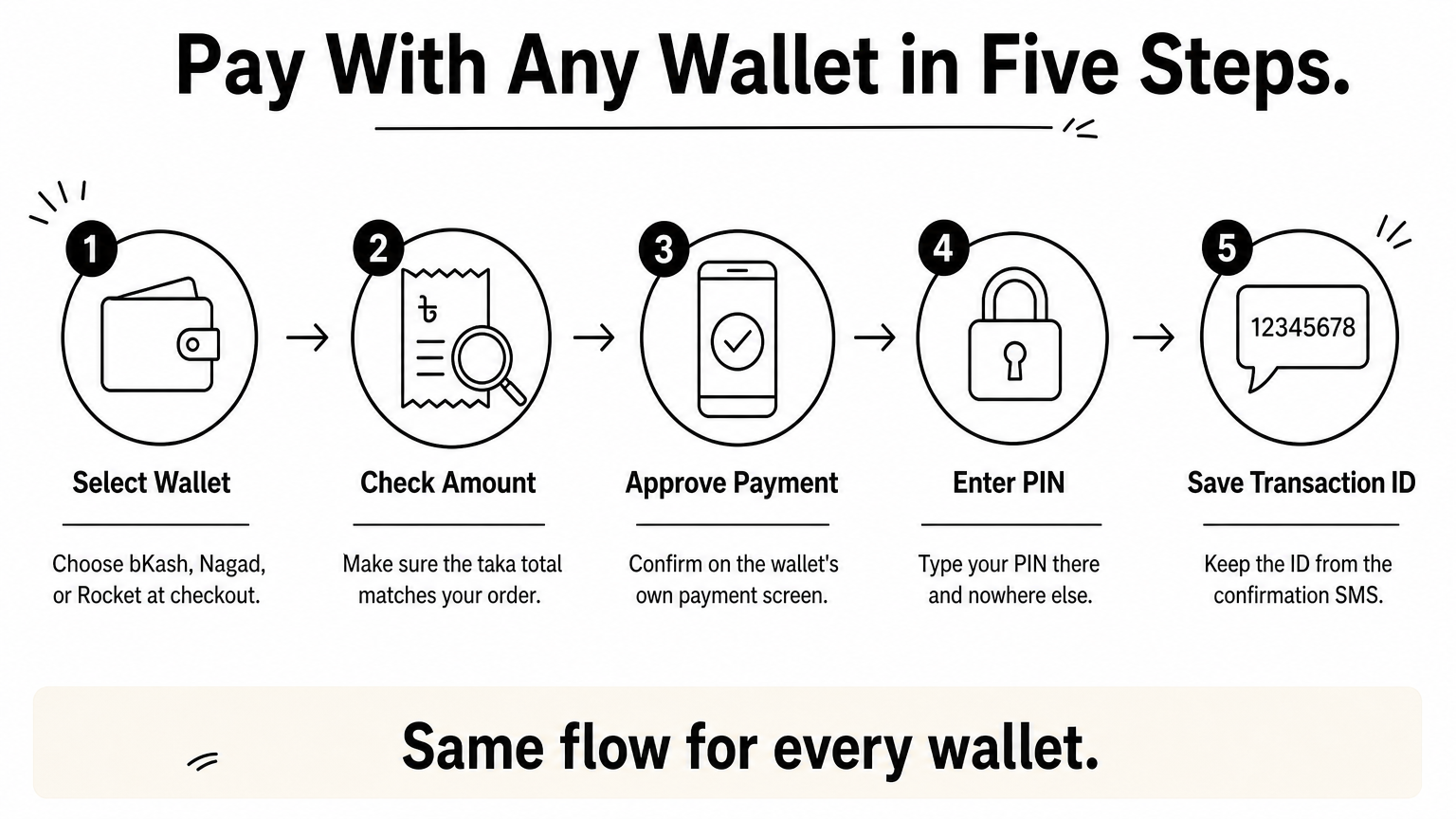
If money leaves your wallet but the order still shows unpaid, do not pay again. Wait two or three minutes, then check your wallet history.
Never pay twice before you have checked your transaction ID.
Then message support with your transaction ID and UID. A store with real support will match the payment to your order quickly.
After a diamond top up bd 24 order, diamonds usually arrive within a few minutes. Don't close your wallet app or delete your SMS yet. Check that the order landed first.
Open Free Fire and look at the diamond balance on the home screen. If the number hasn't changed, close and reopen the game, because the display sometimes lags. Then check that the order status on the store shows completed.
For any of these, send your UID, transaction ID, and order screenshot in a single message. Clear details get a faster fix than a vague "where is my order?"
Send your UID, transaction ID, and screenshot together, and support can resolve your order in one reply.
Buying diamonds in Bangladesh comes down to four checks. Pick a verified store, paste your UID instead of typing it, pay only inside the official checkout, and confirm delivery before you close your wallet app. Also never share your password or OTP. Follow those rules and you avoid nearly every scam and failed order.
Next time you search diamond top up bd 24, you will know what a good order looks like. It takes about two minutes, and you end up with a transaction ID and screenshot as proof. The same routine works for PUBG Mobile UC and Mobile Legends diamonds, so you can reuse it for every game you play.
Ready to try it? Pick your pack, pay with bKash, Nagad, or Rocket, and get instant delivery when you top up your diamonds at AroraShop.