Leave a Review


To complete a free fire diamond top up in Bangladesh, copy your Player ID from the game, pick a diamond pack on a trusted store or app, pay with bKash, Nagad, or Rocket, and wait for the diamonds to land in your account. You never give a password or log in. The whole process takes a few minutes if you enter the right ID.
The hard part is not the payment. Dozens of sites and apps sell diamonds, and they differ in price, speed, and honesty. Some ask for your login, some make you guess whether the order went through, and many players do not own an international card. A single typo in the ID can send diamonds to a stranger. Underage players also need a parent's permission before using a mobile wallet.
This guide walks you through the process in four steps: find your ID and choose a pack, pick a safe store, pay with your mobile wallet, and confirm delivery. Prices come from AroraShop's Free Fire Diamond page, so you can see what a fair price looks like in BDT.
You need four things: your Player ID, a mobile wallet with enough balance, a supported server, and a store account. A UID top up adds diamonds straight to your Free Fire account, so the store only needs your ID, never your password.
Diamonds are Free Fire's premium currency. You spend them on outfits, weapons, pets, Luck Royale, and Diamond Spin. When you buy by UID, the store sends diamonds to the account that owns that ID. Free Fire and Free Fire MAX share one account, so the same ID works for both.
Any store that asks for your Facebook, Google, or game password is not doing a UID top up, so leave.
Gather these before you open a store:
Open Free Fire, tap your profile picture in the lobby, and copy the ID shown under your nickname. Then choose a diamond pack that matches what you want to buy, and compare the cost per diamond before you pay.
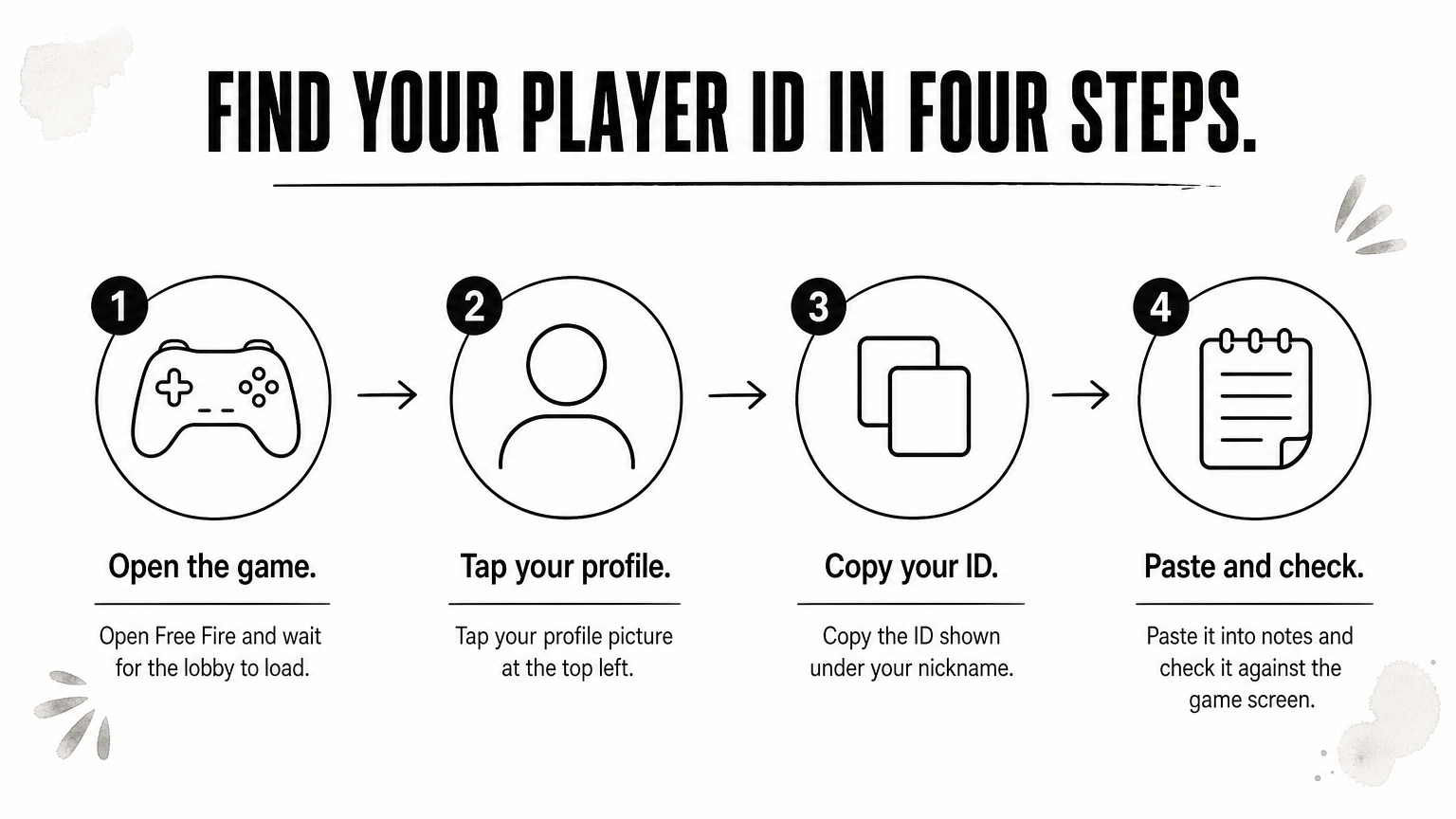
Pasting beats typing because one wrong digit sends your diamonds to another player.
Larger packs cost less per diamond. The table uses approximate prices from AroraShop's Free Fire Diamond page, and prices can change, so check the page before you pay.
| Pack | Approx. price (BDT) | Cost per diamond |
|---|---|---|
| 100 diamonds | ~90 | ~0.90 |
| 310 diamonds | ~260 | ~0.84 |
| 520 diamonds | ~430 | ~0.83 |
| 1,060 diamonds | ~850 | ~0.80 |
Packs run from 60 to 1,800+ diamonds, so a 20 diamond top up is not an option there. Here is a worked example. If you want about 1,000 diamonds, ten 100-diamond packs cost around 900 BDT. One 1,060 pack costs around 850 BDT and gives you 60 more diamonds. The page also lists a weekly membership at 157 BDT, a monthly membership at 780 BDT, and a Level 10 level up pack at 66 BDT.
Buy the largest pack you will actually use, because the cost per diamond drops as the pack grows.
Pick a store that takes only your Player ID, shows your nickname before you pay, accepts bKash, Nagad, or Rocket, and gives you a support channel that answers. A website works fine on any phone, and an app can add discounts.
A top up website needs no installation, and you can check prices on any device. A top up app keeps your orders and ID in one place. AroraShop has an official Android app on Google Play with app-only discounts, while its website requires an account. Garena also runs its own top-up channels. Check whether they accept your wallet before relying on them, since many players in Bangladesh buy from local stores that take bKash directly.
Run through this list before you pay:
A store that asks only for your ID, takes a local wallet, and answers support is safe enough to try with a small pack first.
Select your pack, paste your ID, choose bKash, Nagad, or Rocket, and finish the payment inside the wallet's own screen. The order only counts once the transaction is confirmed.
Never send your PIN or OTP to a support agent, in chat or by phone. A store only needs the wallet's payment screen, and AroraShop asks you to pay through the gateway listed on its website. If you are under 18, get a parent's permission before spending from a family wallet. Some stores cancel orders paid that way without it.
Your PIN belongs on the wallet screen only, never in a chat window.
Open Free Fire, check your diamond balance in the lobby, and compare it with the pack you bought. Most top ups arrive within minutes, and the store's support can trace any order that does not.
AroraShop's Free Fire page says diamonds arrive almost instantly or within minutes. Its general policy says delivery can take 20 to 60 minutes after verification when a transaction needs checking. Wait a full hour before you worry, and restart the game once if the balance looks unchanged.
Work through these in order:
AroraShop's support runs on WhatsApp and replies in under 15 minutes on average. You can also email support@arorashop.com. The store's separate Refunds and Returns policy page covers refund cases.
Send support the ID, TrxID, and receipt together, and your order gets traced faster.
A safe Free Fire diamond top up comes down to four moves: copy your ID, choose a fair pack, pay through a mobile wallet on a trusted store, and check your balance. Start with a small pack if you are testing a new store, then move to bigger packs once delivery works.
When you are ready, you can top up Free Fire diamonds at AroraShop using your Player ID and bKash, Nagad, or Rocket.