If your Free Fire diamonds have not arrived, do not pay again. First, check your order status. Then compare the UID on your order with the UID in your game. Restart Free Fire and look at your diamond balance. If nothing changes after the delivery time on the shop page, send support your order number, UID and payment proof.
This guide covers the two most common problems. One is diamonds that are late. The other is a UID typed wrong. You will also learn what to send to support, so you get help faster.
Quick Checklist: Free Fire Diamonds Not Received
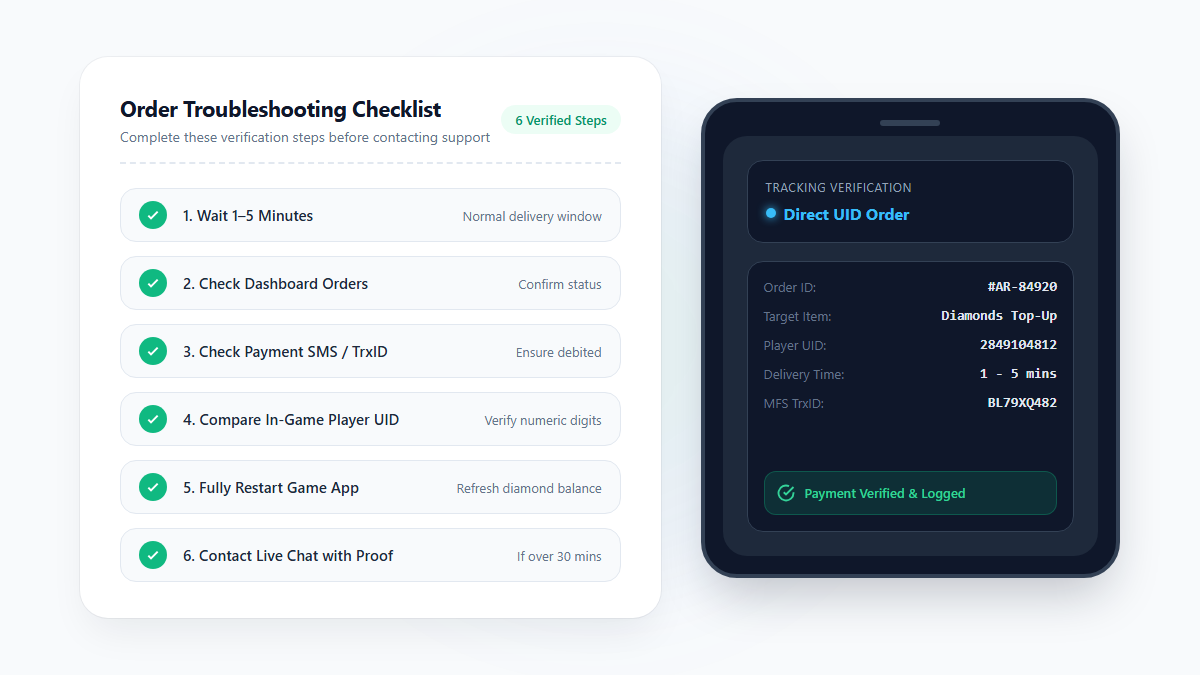
Go through these steps in order. Most problems show up in the first three.
Check your order. The page says you can track it in User Dashboard > Orders.
Check your payment message. Make sure your bKash, Nagad or Rocket payment really went through.
Check your UID. Compare the UID on your order with the one in your game profile.
Restart the game. Close Free Fire fully, open it again and look at the diamond counter.
Contact support. If the order is still late, send your order number and payment proof.
Check the order, the payment and the UID before you contact support.
How Long Should Free Fire Diamond Delivery Take?
The AroraShop Free Fire page says orders go through direct UID top-up. It lists a time of 1 to 5 minutes. The page also shows a notice in Bangla. It says to contact support, with your order number, if delivery takes longer than 5 to 30 minutes.
Time since payment
What it usually means
What to do
0 to 5 minutes
Normal delivery window
Wait. Do not pay again.
5 to 30 minutes
A small delay is possible
Check your order, payment message and UID. Restart the game.
More than 30 minutes
A person should look at the order
Contact support with your order details.
The page's notice gives a range, so the 30-minute step is a safe rule of thumb. Always read the live notice on the product page before you buy.
Find the Problem: What You See and What to Do
Different problems look different. Use this table to match your case.
What you see
Possible reason
What to do
Money taken, order looks pending
The order may still be in progress
Wait for the delivery time. Then contact support if it is late.
Order looks complete, no diamonds
The game has not refreshed, or the UID belongs to another account
Restart the game. Check the UID and the account you are playing on. Then contact support.
Order looks failed or cancelled
The order did not finish
Do not order again yet. Check your payment message first, then ask support.
Money taken, but no order
The payment did not link to an order
Keep your payment screenshot and transaction ID. Read the bKash payment failed guide, then contact support.
You typed the wrong UID
The diamonds may have gone to another account
Follow the wrong UID steps below.
Wrong UID: What to Do Right Away
Your UID is your Free Fire player ID. It tells the shop which account should get the diamonds. One wrong digit can send them to a stranger. Speed matters, so act at once.
Steps to follow
Do not rush to order again. A new order with the right UID costs more money. It does not undo the first one.
Contact support now. Early reports give you the best chance of help.
Send the facts. Include your order number, the wrong UID you typed and your correct UID.
Add proof. Send a screenshot of your payment and the time you paid.
Keep your password private. Support never needs it to fix a UID mistake.
Can you get the diamonds back?
Maybe, but it is not guaranteed. The AroraShop Free Fire page does not state a rule for wrong UIDs. Once diamonds reach another account, a shop may not be able to take them back. Read the AroraShop terms of use and ask support what they can do.
Copy your UID instead of typing it by hand.
How to avoid a wrong UID next time
Open Free Fire and tap your avatar in the top-left corner. Your UID is under your nickname.
Use the copy icon, then paste the number into the order form.
Do not type your nickname. The form needs the numeric UID.
Compare every digit with your profile before you pay.
If you buy for a friend, ask them to send their UID as text.
The AroraShop Free Fire page says the top-up is set up for Global accounts. It asks you to check your server or account region before you pay. If you are not sure that your account fits, ask support first. It is easier to ask before payment than after.
Memberships Are Not the Same as Diamond Packs
AroraShop lists a Weekly Membership and a Monthly Membership next to the diamond packs. These are different items from a pack of diamonds. If you bought a membership, do not look only at your diamond counter. Check what the item gives inside the game.
How to Contact Support and What to Send
AroraShop says it offers 24/7 live chat in Bengali and English. Its site also links to WhatsApp support. Write one clear message with everything in it. That saves time for you and for support. You can also use the AroraShop contact page.
What to send
Why it helps
Order number
Support can find your order at once.
Your Free Fire UID
Support can check where the order was sent.
Payment method and transaction ID
It proves the payment was made.
Time of payment
It shows how long the order has waited.
Payment screenshot
It is clear proof if there is a dispute.
A short note on the problem
For example, "UID typed wrong" or "no diamonds after 30 minutes".
Send your order number, UID and payment proof in one message.
When to Contact Garena
The Garena Free Fire support site is the official help center for the game. It mainly deals with purchases made through Garena's own channels and with account problems. If you bought from a top-up shop, start with the shop. It holds your order and your payment record.
Do Not Fall for Refund or Recovery Scams
When money is missing, people feel stressed. Scammers know this. Watch out for these tricks:
Someone offers to "release" your diamonds for a fee.
A stranger in a comment or chat asks for your password or OTP.
A person asks you to send money to a personal number to "fix" the order.
A site promises free diamonds if you enter your UID.
Never share your password, bKash PIN or OTP with anyone. Talk to support only through the shop's own channels.
How to Avoid Missing Diamonds Next Time
Copy and paste your UID. Then check it once more.
Read the notice and the region note on the product page.
Pay only through the checkout the shop gives you.
Save your order number and payment screenshot until the diamonds arrive.
Do not pay twice while an order is still in progress.
Frequently Asked Questions
How long should I wait for Free Fire diamonds?
The AroraShop Free Fire page lists 1 to 5 minutes. If the order is still not done after a short wait, check your order and UID. Contact support if it passes the time in the page notice.
My money was taken but I see no diamonds. What should I do?
Check your payment message and your order status. Restart the game. If nothing changes, send support your order number, UID and payment proof.
I typed the wrong UID. Can I get my diamonds back?
It is not guaranteed. Contact support at once with your order number, the wrong UID and the correct UID. Read the terms of use to see what applies.
Should I order again while I wait?
It is better not to. A second order means a second payment. Wait for the delivery time, then ask support what to do.
Do I need to share my password to fix an order?
No. A UID top-up needs only your UID. Do not share your password or OTP with anyone.
Where do I find my Free Fire UID?
Open the game and tap your avatar in the top-left corner. Your UID is under your nickname. Tap the copy icon to copy it.
Is a membership the same as diamonds?
No. A Weekly or Monthly Membership is a different item from a diamond pack. Check what it gives inside the game.
Should I contact the shop or Garena first?
Start with the shop if you bought from a top-up shop. It has your order and payment record. Use Garena's support site for account problems or purchases made through Garena.
Final Thoughts
Most missing diamond cases have a simple cause. Check your order, your payment and your UID. Restart the game. If the problem stays, send support one clear message with your proof. Never share your password, PIN or OTP.