Short answer: Steam Wallet code not working? It usually comes down to four problems. The code was typed wrong. The code currency does not match your Steam wallet. The code was already used. Or Steam needs a little time to show the balance.
This guide helps you find your problem and fix it. It also shows what proof to keep and who to contact. Some errors cannot be fixed. We will tell you which ones.
Quick Fix Checklist
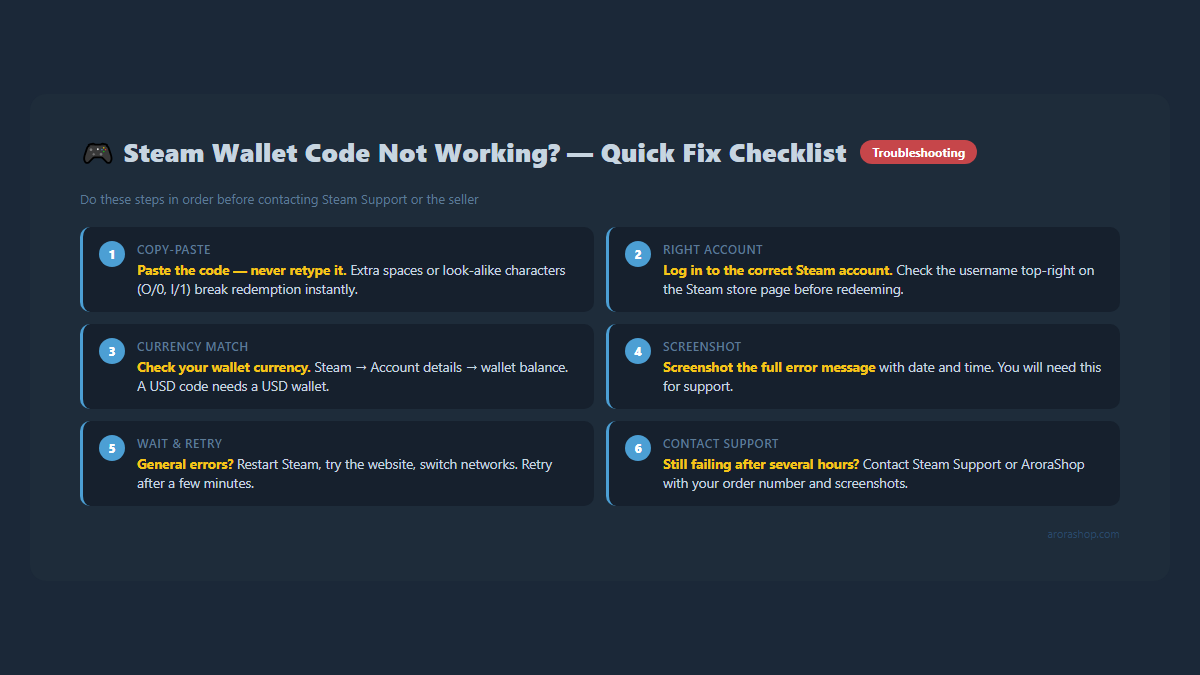
Figure 1 - Run through all six steps before contacting Steam Support or the seller.
Copy and paste the code. Do not type it by hand.
Redeem it on the official Steam page, logged in to the right account.
Check that the code currency matches your Steam wallet currency.
Take a screenshot of the full error message.
Wait and try again later if Steam shows a general error.
Why a Steam Wallet Code May Not Work
Steam checks every code before it adds money. If something does not match, Steam rejects it. Here are the common causes.
What you see
Likely cause
First thing to try
Invalid or incorrect code
Typing mistake, extra space, or wrong brand
Copy and paste the full code again
Error redeeming the code
Currency or region mismatch, or a short Steam problem
Check your wallet currency, then retry later
Already redeemed
The code was used on some account
Check your own wallet history, then call the seller
Accepted, but no balance
Wrong account or display delay
Restart Steam and check Account details
Code never arrived
Payment or delivery delay
Check your order page, then contact the seller
Start Here: Redeem the Code the Right Way
Many failed tries come from a small mistake. Do this first.
Check the account name in the top-right corner. Wallet money stays with the account that redeems the code.
Paste the code into the Steam Wallet Code box.
Click Continue.
You can also use the Steam app. Open your name menu, choose Account details, then pick the option to add funds to your Steam Wallet. Menu names can change after Steam updates.
Error 1: Invalid Code or Wrong Characters
Steam may say the code is invalid or incorrect. Most of the time, one character is wrong.
What to check
Look-alike characters. The letter O and the number 0 look alike. So do I and 1, and B and 8.
Extra spaces. A space at the start or end can break a pasted code.
A half-copied code. Make sure you copied all of it.
The wrong brand. The code must be a Steam code. A code for another store will not work.
Paste the code into a plain notes app first. Zoom in and read it. Then copy it again into Steam. If you bought from AroraShop, copy the code from your order page in your dashboard.
Error 2: Steam Wallet Currency Error or Region Mismatch
This Steam gift card region mismatch is the most common problem for buyers in Bangladesh. Steam warns that you may get an error if a code uses a different currency than your Steam account.
A Steam wallet has one currency. A USD code fits a USD wallet. An HKD code fits a wallet that uses Hong Kong dollars. Steam's redeem page also notes that not all gift card currencies can be redeemed in all regions. So never count on automatic conversion.
How to check your wallet currency
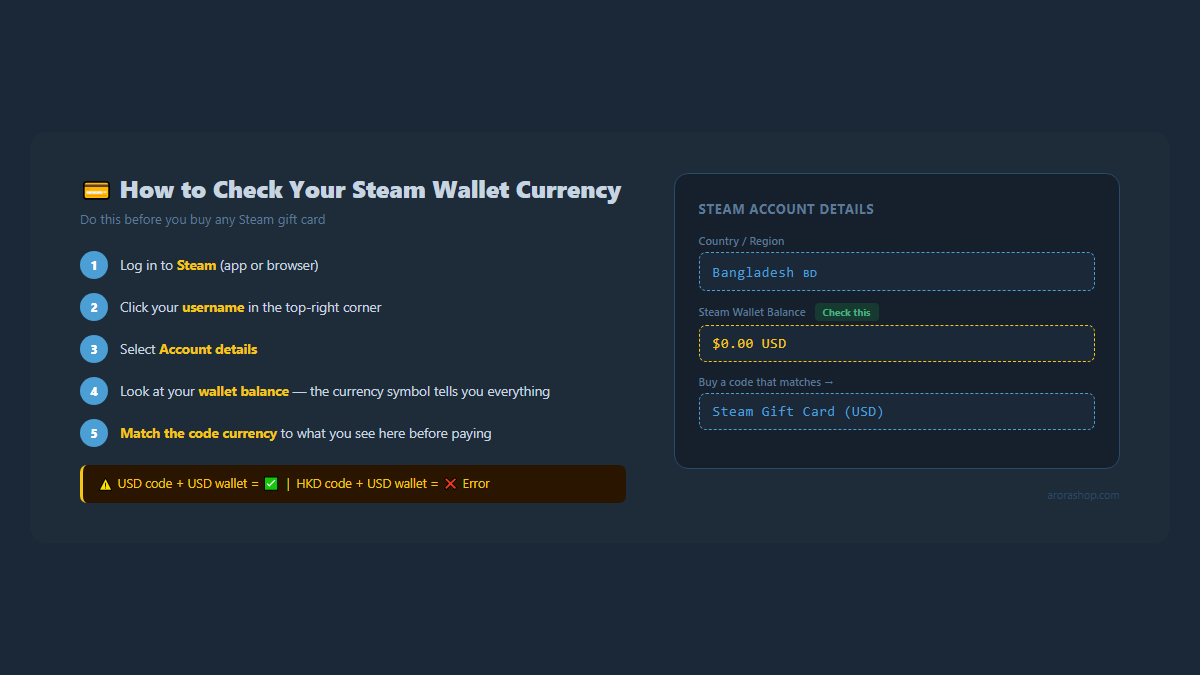
Figure 2 - Check your wallet currency before buying any Steam gift card.
Log in to Steam and click your name in the top-right corner.
Open Account details.
Look at your country and your wallet balance. The currency sign shows what your wallet uses.
Valve puts Bangladesh in a South Asia USD pricing region, so many Bangladeshi accounts see prices in US dollars. But always check your own account. Do not guess.
Steam's error message tells buyers to return a wrong-currency code to the seller. So contact the seller right away. Do not try the same code again and again.
Digital codes are hard to take back once sent. AroraShop product pages say "No Refund after Dispatch." Check the currency before you pay. If you made a mistake, contact support with your order number. A wrong-region code may not be refundable, and we cannot promise a fix.
Error 3: Code Already Redeemed
This message means Steam sees the code as used. It may have been used on your account or on another one.
Check your own wallet history first. You or someone at home may have used it already.
Make sure you did not open the same code from two emails or two orders.
If you never used it, contact the seller with your order number and a screenshot.
In the past, Steam's message on this error said that Steam Support cannot issue a new code. So the seller is usually your first stop. Never post your code in public. Anyone who sees it can use it.
Error 4: A General Steam Wallet Code Error
Sometimes your Steam Wallet redemption fails with a general message and little detail. It can be a currency problem. It can also be a short Steam problem.
Wait a while and try again.
Restart the Steam app, or use the website instead.
Try another device or another network.
Check your wallet currency again.
Steam's help page says to contact Steam Support if the problem stays for several hours. Keep your screenshot ready.
Code Accepted but Balance Did Not Update
Sometimes Steam accepts the code, but you still do not see the money. Try these steps in order.
Check that you are logged in to the account you used.
Restart Steam and look at the balance in the top-right corner again.
Open Account details and check the wallet balance there.
Check your purchase history for a wallet entry.
If Steam showed a success message but the money is still missing after a few hours, contact Steam Support. Send screenshots of your purchase history and your Account details page.
How to Check Your Steam Wallet Transaction History
Under Store & Purchase History, click View purchase history.
Find the date you redeemed the code. Look for a wallet entry.
Entry names can differ. If you cannot find the entry, you may be on the wrong account. Switch accounts and look again.
What Proof to Keep Before You Contact Anyone
Figure 3 - Keep these 5 items and know who to contact first.
A screenshot of the full error message, with the date and time.
Your order number and payment confirmation, such as the bKash or Nagad transaction ID.
A screenshot of your order page or delivery email.
A screenshot of your Steam Account details page, showing country and wallet currency.
A screenshot of your purchase history.
For a physical card, a clear photo of the back and your receipt. Steam asks for these.
Hide the code when you share a screenshot in public. Send the full code only to the seller or to Steam Support.
How to Contact Steam Support and the Seller
Pick the right place to start. This table shows who to contact first.
Problem
Contact first
Code is in the wrong currency
The seller
Already redeemed, but you never used it
The seller
You doubt the code is real
The seller
Code never arrived or order is stuck
The seller
Redeem error lasts for several hours
Steam Support
Success message, but balance is missing
Steam Support
Contact Steam Support
Go to Steam Support and sign in. Choose the wallet or purchase help option. Explain the problem in a few clear lines and attach your screenshots. Steam's own Steam Wallet help page lists the steps it expects.
Contact AroraShop
Use live chat on the website or the contact page. Send your order number and screenshots. AroraShop product pages ask you to contact support if delivery takes more than 5 to 30 minutes. If your payment failed, read this guide on what to do when a bKash payment fails.
Not Every Error Can Be Fixed
Be ready for a hard answer. A used code cannot be used again. A wrong-currency code may stay unusable on your account. Steam may not replace a code that is already redeemed. A seller may not refund a digital code after it is sent.
That is why checking first matters. It costs you one minute. A wrong buy can cost you the full price of the code.
How to Avoid Steam Wallet Code Problems
Check your wallet currency first. Do this before you pay.
Match the product region. Read the region on the product page. Treat the word "global" with care. Look for the stated currency.
Read the refund note. Know the policy before you pay.
Redeem soon. Do it right after delivery, so you can report problems fast.
Copy and paste the code. Never retype it.
Keep proof. Save your order number and screenshots.
Buy a Steam Wallet Code in Bangladesh That Matches Your Account
Pick the code that matches your wallet currency. If your wallet uses US dollars, see the Steam Gift Card (USD) on AroraShop. If your account uses Hong Kong dollars, see the Steam Gift Card Hong Kong (HKD). Both pages show the region and delivery details. You can pay in Taka with local payment methods.
Frequently Asked Questions
Why does Steam say my Steam Wallet code is invalid?
Most often a character is wrong. For example, the letter O was typed as the number 0, or an extra space was copied. Paste the full code again. Also make sure it is a Steam code. If it still fails, contact the seller.
Can I redeem an HKD or other foreign code on my Bangladesh Steam account?
Only if it matches your wallet currency. Steam warns that a code in a different currency may cause an error, and not all currencies work in all regions. Check your Account details before you buy.
What does "already redeemed" mean?
Steam sees the code as used. Check your own wallet history first. If you never used it, contact the seller with your order number. In the past, Steam's message on this error said Steam Support cannot issue a new code.
My code was accepted, but my balance did not change. What should I do?
Make sure you are on the right account. Restart Steam, then check Account details and purchase history. If the money is still missing after a few hours, contact Steam Support with screenshots.
What should I do if my Steam gift card is not redeeming for several hours?
Steam's help page says to contact Steam Support if a redeem error lasts for several hours. Try the basic fixes first. Keep your screenshots ready.
Can I get a refund for a wrong-currency code?
It depends on the seller. AroraShop product pages say there is no refund after dispatch, so check your wallet currency before you pay. If you made a mistake, contact support with your order number. We cannot promise a refund.
How do I check my Steam wallet currency?
Log in to Steam, click your name, and open Account details. Your country and the currency sign next to your wallet balance show what your wallet uses.