Leave a Review


Do you play games on an iPhone or iPad? Do you want to buy a game pass, a skin, or an in-app item? Then an iTunes gift card can help. It adds money to your Apple Account, so you can pay inside the App Store.
But there is a problem. Many people in Bangladesh do not have an international card. The good news is that you can buy an iTunes gift card in Bangladesh with bKash from a local digital shop. This guide shows you how, step by step.
You will also learn about one rule that many buyers miss. It is the region rule. It decides if your card will work or not. Please read that part with care.
Here is the short version:
Arora Shop says it sends the code by email or WhatsApp after it checks your payment. Its page lists delivery as instant, usually in 1 to 5 minutes.
An iTunes gift card is a prepaid card. It adds money to your Apple Account, which many people still call an Apple ID. You do not pay with a bank card each time. You use your Apple balance instead.
Apple now sells a few card types. Some are called App Store & iTunes Gift Cards. Others are called Apple Gift Cards. Many shops still use the old name, "iTunes gift card". That is why people search for the term "itunes gift card bd".
The card has a code. You type that code into the App Store. Then the money shows up in your Apple balance.
According to the Arora Shop page, you can use your balance for apps, games, and subscriptions. This includes Apple Music and iCloud+. It also covers in-game or in-app purchases.
For gamers, this is the useful part. Many iPhone games sell items inside the game. Examples are coins, gems, battle passes, and special packs. If the game uses the App Store to take payment, your Apple balance can pay for it.
Gamers like gift cards for a few simple reasons.
The budget point is a big one. If you are young, it keeps spending small and clear. It is also a good tool for parents who want to set a limit.
This is the most important part of this article. Please do not skip it.
Apple says you cannot redeem an Apple Gift Card or App Store & iTunes Gift Card outside the country or region where it was bought. Apple gives an example. A card bought in France cannot be used in the US App Store. You can read the rule on the Apple Support page about gift cards that cannot be redeemed.
Now let us connect this to Bangladesh. The Arora Shop page lists this iTunes gift card as a United States card. Its FAQ says you can use it in Bangladesh, but your Apple ID must match the card region. It says this is usually the USA.
In simple words: a US card works with a US Apple Account. If your Apple Account is set to another country, the code may fail. Arora Shop also lists a Turkey TRY region card on a separate page. So the shop sells more than one region.

You can check this on your iPhone. The menu names can change after updates. In general, you do this:
If your country does not match the card, stop. Do not buy yet. Ask the shop for help first. You can message Arora Shop on its Facebook page or write to support@arorashop.com.
Changing your Apple Account country has its own rules from Apple. Read Apple's help pages before you try it. Do not change it in a hurry. It can affect your balance and your subscriptions.
Keep these things ready:
You do not need to give your Apple ID password. Arora Shop says it sends you the code only. It says you do not share any login information. That is the right way. A gift card shop never needs your password.
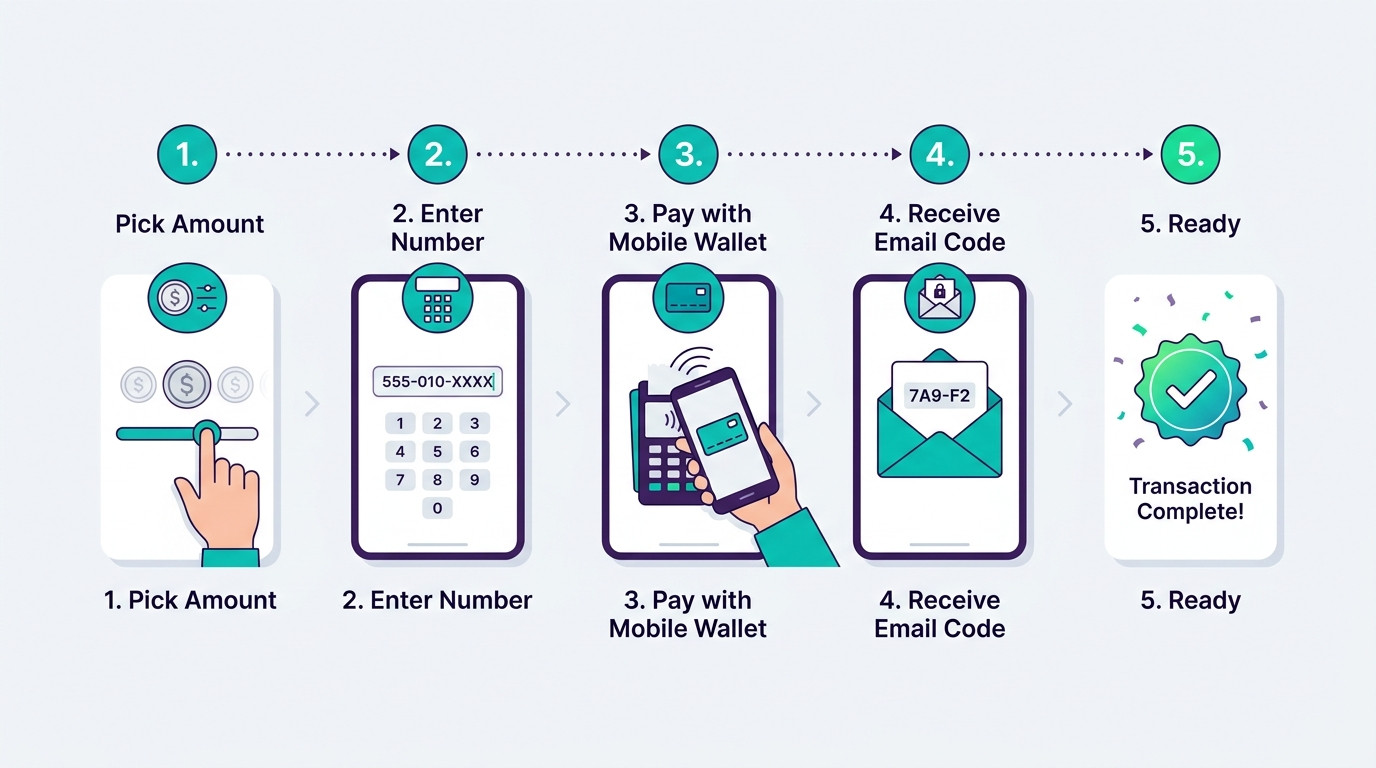
Now let us go through the full steps. The look of the website may change over time. The main steps stay the same.
Go to the Apple iTunes gift card page on Arora Shop. This page shows the amounts, the delivery details, and the shop's help notes. Read the notice on top of the page. It tells you what to do if delivery is late.
The page asks for a contact number. Type a number you can use. If there is an issue, the shop may need to reach you.
Choose the card value you need. The page lists amounts from $2 to $100. Think about what you plan to buy. A small card is fine for a small in-app item. A bigger card may suit a monthly pass or several items.
Choose bKash as your payment method and follow the steps on the screen. The shop says you can also pay with Nagad, Rocket, or bank transfer. Save your payment proof. A screenshot and your transaction ID are enough.
Wait for the shop to check your payment. Then check your email. The shop also says it may send the code by WhatsApp. Look in your spam folder if you do not see it.
Here are the amounts shown on the Arora Shop page when we wrote this article. Prices can change. Always check the page before you pay.
We also did a simple math check. We divided each price by the dollar value. This shows the cost for each $1 of Apple balance.
| Card Value | Price (BDT) | Cost per $1 |
|---|---|---|
| $2 | 260 ৳ | 130 ৳ |
| $5 | 620 ৳ | 124 ৳ |
| $10 | 1,240 ৳ | 124 ৳ |
| $25 | 3,125 ৳ | 125 ৳ |
| $50 | 6,250 ৳ | 125 ৳ |
| $100 | 12,500 ৳ | 125 ৳ |
You can see that the $5 and $10 cards have the lowest cost per dollar on this list. The $2 card costs a little more per dollar. This is a small gap. Choose the card that matches what you really need.
Remember that taxes and fees can apply when you spend your balance in an app. This depends on Apple and the app. Check the final price inside the App Store before you confirm a purchase.
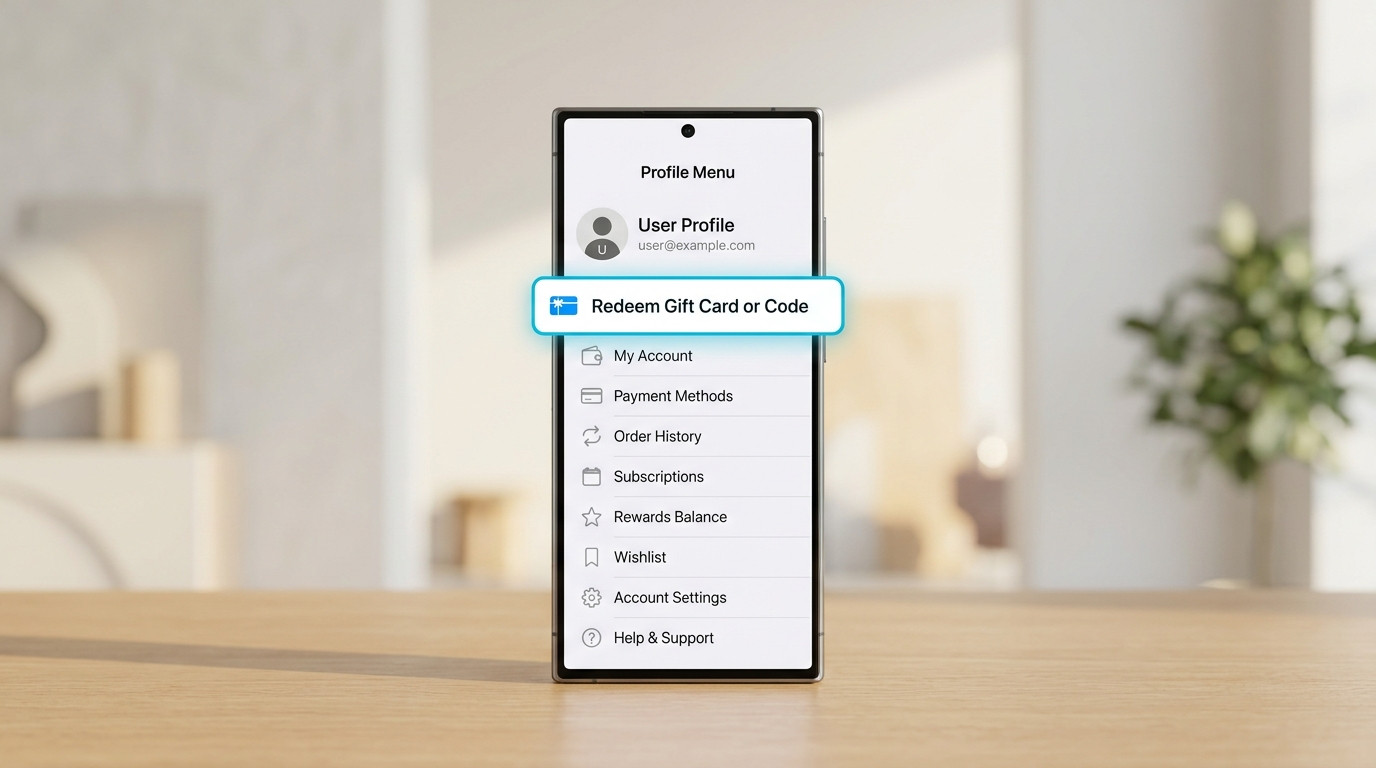
Once you get the code, redeeming is easy. The Arora Shop page gives these steps:
After this, your balance should appear in your Apple Account. Then open your game and buy the item you want. Pick the Apple balance if the app asks how you want to pay.
Tip: copy and paste the code. Typing it by hand can cause a mistake. A code has letters and numbers that look alike.
There are many places to buy digital cards. So why do gamers choose Arora Shop? Here are the reasons. They come from what the shop says on its own gift card page.
The shop lists bKash, Nagad, Rocket, and bank transfer. Most people in Bangladesh already use one of these. You do not need an international payment gateway. The shop also says you can message it for other international products or payments.
The page lists delivery as instant, in 1 to 5 minutes. The code comes by email or WhatsApp after the shop checks your payment. A digital card means no waiting for a courier.
You only get a code. You do not need to share your Apple login. This keeps your account safer.
You can pick from $2 up to $100. A small card is good for a quick buy. A large card fits bigger plans.
The page tells you the delivery method, the delivery time, and the refund rule. This helps you decide with clear facts. Good shops do not hide their rules.
The page says the shop does not give refunds. But it says it will give a new code if the code does not work. You can contact the team by email, WhatsApp, Telegram, or live chat. A top notice on the page also tells you to contact support with your order number if delivery takes longer than 5 to 30 minutes.
If you also play on PC, you may need other cards. Arora Shop has a Steam gift card page. You can see all of its cards on the gift cards page. For direct game credits, check the top-up page.
You can also read reviews of the shop before you buy. Arora Shop links to its Trustpilot page. Checking reviews is a smart habit for any online shop.
Good buyers read the rules first. Here are the key points from the Arora Shop page.
"No refund after dispatch" means you cannot get your money back once the code is sent. This is common for digital codes. So check the region and the amount before you pay. If you are not sure, ask first.
Gift cards are popular with scammers too. Apple warns about this. Apple Gift Cards are only for Apple products and services. If a person asks you to pay a bill, a fine, a tax, or a debt with a gift card, it is a scam.
Follow these simple safety rules:
Also, only buy from the shop's real website. Check the address in your browser before you pay. Fake pages can look like real shops.

This is the number one mistake. A wrong-region code will not redeem. Match the card to your Apple Account first.
Apple Store gift cards are different. Apple says you cannot redeem them in the App Store or iTunes Store. Make sure you buy an App Store & iTunes or Apple Gift Card for digital items.
If the code is late, contact support early. Use your order number. The shop's page says to do this if delivery takes more than 5 to 30 minutes.
Save the email in a safe place. Redeem the code soon. Do not post the code on social media.
Game items can feel exciting. Do not rush. Set a small monthly limit. Spend only money you can spare.
Do not panic. Check these things in order.
Apple lists common reasons why a card fails. The card may not be valid, or it may already be redeemed. It may not be activated. The code may be unreadable. Or it may need to be used in a different country or region. You can see the full list on Apple's help page.
The Arora Shop page says it will give a new code if the code does not work. Tell the team what error you see. This helps them solve it faster.
Yes. Arora Shop lists bKash, Nagad, Rocket, and bank transfer as payment options for its iTunes gift card. Pick bKash at checkout and follow the steps.
"BD" is short for Bangladesh. People use it to find shops that sell iTunes gift cards to buyers in Bangladesh. It does not mean the card is a Bangladesh-region card. The Arora Shop page lists this card as a United States card.
It works only if your Apple Account region matches the card region. Apple does not allow gift cards to be redeemed outside the country or region of purchase. Check your account region before you buy.
No. Arora Shop says it only sends you the code. Never share your password with anyone.
The shop lists delivery as instant, usually in 1 to 5 minutes. Delays can happen. If your code takes more than 5 to 30 minutes, contact support with your order number.
The shop says there is no refund after the code is sent. But it says it will give a new code if the code does not work.
The page lists $2, $5, $10, $25, $50, and $100 cards. Prices were 260 ৳ to 12,500 ৳ when we wrote this article. Check the page for the newest prices.
You can buy apps, games, and subscriptions like Apple Music and iCloud+. You can also pay for in-game or in-app items that use your Apple balance.
Open the App Store, tap your profile, and choose "Redeem Gift Card or Code". Then enter the code and tap "Redeem".
Buying an iTunes gift card with bKash is simple. Check your Apple Account region, pick your amount, pay with bKash, and redeem the code. The whole process can take just a few minutes.
The region rule is the one thing to get right. A US card needs a US Apple Account. If you are not sure, ask before you pay.
Gamers choose Arora Shop for local payment options, fast digital delivery, clear rules, and support. Stay careful every time. Never share your password, and keep your payment proof. Now pick your card, redeem it, and enjoy your next game.

Please login to live chat or contact via WhatsApp