Nintendo eShop Gift Card BD: How to Buy, Check Prices, and Redeem

Looking for a Nintendo eShop Gift Card BD? The idea is simple. You buy a digital code online, pay in taka, and add the money to your Nintendo account. Then you spend it on games.
But there is one big catch. Nintendo gift cards are tied to a region. If the region is wrong, the code will not work.
This guide explains everything in easy words. You will learn how to buy a Nintendo eShop gift card in Bangladesh, what prices to expect, how to redeem it, and how to stay safe.
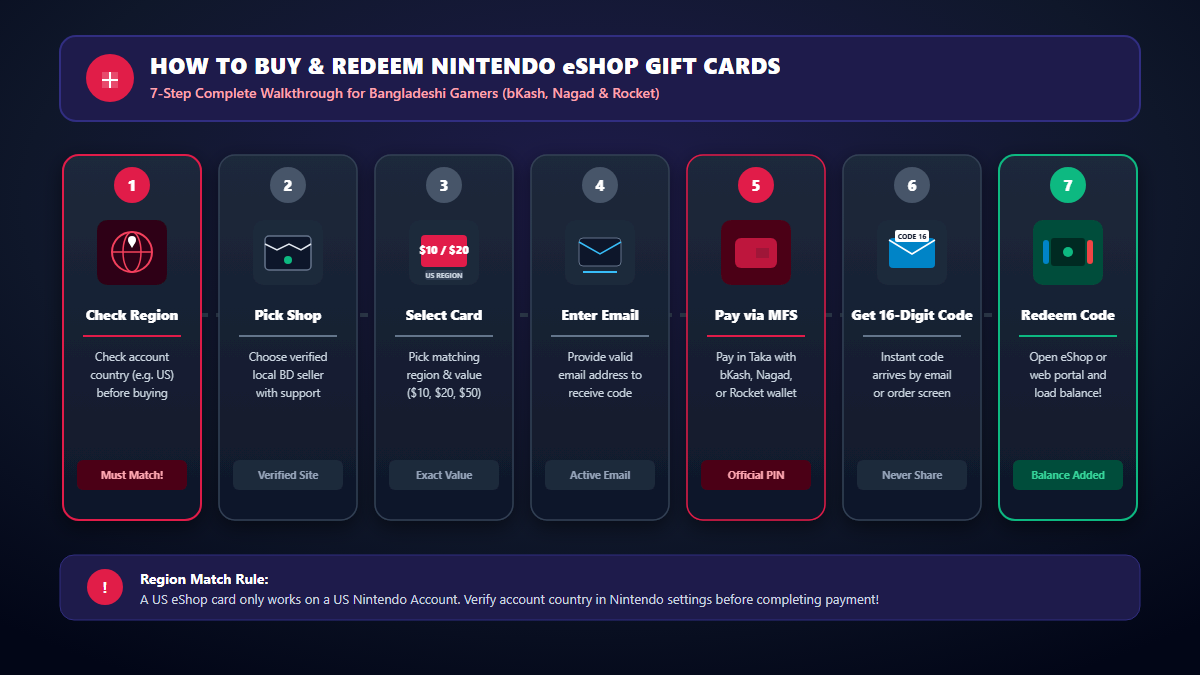
Quick Answer: How to Buy a Nintendo eShop Gift Card in Bangladesh
- Check the region of your Nintendo Account.
- Pick a gift card from the same region.
- Choose an amount, such as $10, $20, or $50.
- Pay with a local method like bKash, Nagad, or Rocket, if the shop supports it.
- Get the digital code by email or on the order page.
- Redeem the code on your console or on the Nintendo website.
Do not skip step one. It saves most people from trouble later.
What Is a Nintendo eShop Gift Card?
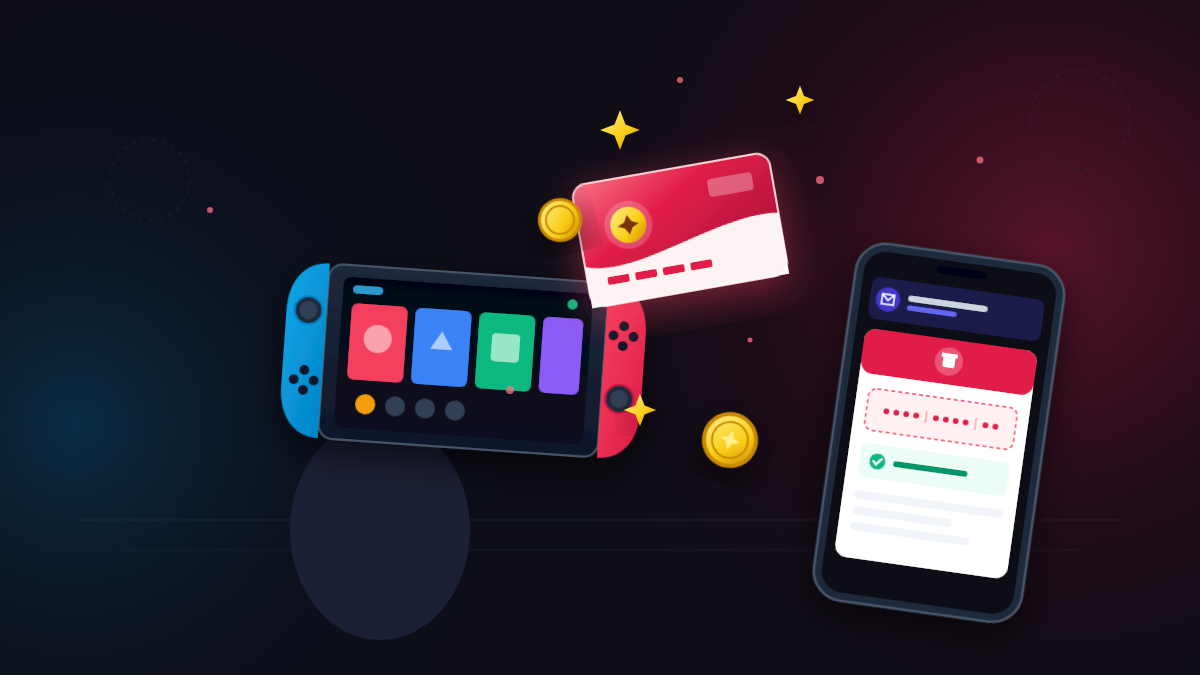
A Nintendo eShop gift card adds money to your Nintendo account. You get a 16-character code. You enter the code, and the amount goes into your account balance.
Think of it like mobile load for games. You top up first. Then you spend as you like.
Online shops sell these cards as a digital code. This is often called a Nintendo eShop digital code. You do not need to wait for a courier. You get the code after payment.
Why gamers like gift cards
- You do not need a credit card.
- You can pay in taka with a mobile wallet.
- You control how much you spend.
- They make easy gifts for friends and family.
What Can You Buy With Nintendo eShop Balance?
Once the money is in your account, you can use it on the Nintendo eShop. Retailer pages and Nintendo's own help pages list these uses:
- Digital games
- Downloadable content, often called DLC
- Apps and other digital items
- Nintendo Switch Online membership
DLC means extra content for a game you already own. For example, it can be a new level or a new character.
What you can buy depends on the eShop of your account's region. Not every game or price is the same in every region. So look at the store before you plan a big purchase.
Which Nintendo Consoles Work With eShop Cards?
Nintendo says eShop cards can still be redeemed on Nintendo Switch 2 and Nintendo Switch. You can also redeem the code on the Nintendo website, using your Nintendo account.
Older consoles are different. Nintendo ended eShop purchases on Wii U and Nintendo 3DS in March 2023. So a new card will not help those systems.
A gift card adds funds to your account, not to a single console. The balance can be used on any compatible Nintendo device where you sign in with that account.
The Most Important Rule: Match the Card Region
Nintendo eShop gift cards are region-locked. A card from one region only works with a Nintendo account set to that region.
For example, a US card needs a US Nintendo account. A Canadian card needs a Canadian account. If you try the wrong one, you will see an error.
What about Bangladesh?
We could not confirm a separate Nintendo eShop made only for Bangladesh. Most local shops list US-region cards. Some sellers in other countries say the same thing, because many players there use a US account too.
Because of this, always check these points before you pay:
- Which country is your Nintendo account set to?
- Which region is the gift card for?
- Do both match?
Nintendo's rules can change. Read the Nintendo User Agreement and the support pages before you create or change an account. Follow the rules for your account and your country.
Changing your account country is risky
Some retailers warn about this. Your old eShop balance does not carry over when you change the country of your Nintendo account. You may need to spend the old balance first.
So do not change your region casually. Think first. Ask Nintendo support if you are not sure.
How to Buy a Nintendo Gift Card Online in Bangladesh
Here is a safe and simple way to do it.
Step 1: Find your account region
Open your Nintendo account settings. Look at the country or region. Write it down. This tells you which card to buy.
Step 2: Pick a trusted shop
Choose a shop with a clear product page. Check that it lists the Nintendo eShop card you need. Look for a support email, a contact page, and clear terms. Do not buy from a stranger in a private chat.
Step 3: Choose the right region and amount
Pick the region first. Then pick the amount. Many shops sell $10, $20, $35, and $50 cards. Not every amount is always in stock.
Step 4: Enter your details
Most shops ask for your name, email, and phone number. Use an email you can open right now. The digital code often arrives there.
Step 5: Pay with a local method
Many Bangladeshi shops accept bKash, Nagad, and Rocket. Some also accept Upay or cards. Pay only on the shop's official checkout and the official wallet screen.
Step 6: Receive and save the code
After payment, the code should arrive in minutes. Delivery time depends on the shop. Some say a few minutes. Others give a longer range. Save your order number in case you need help.
Step 7: Redeem it fast
Redeem the code soon after you get it. Do not share it with anyone. Once someone else uses it, the money is gone.
Nintendo eShop Gift Card Price in Bangladesh
The price in taka changes often. It depends on the US dollar rate, the shop, and how much stock the shop has. So treat any number as a guide.
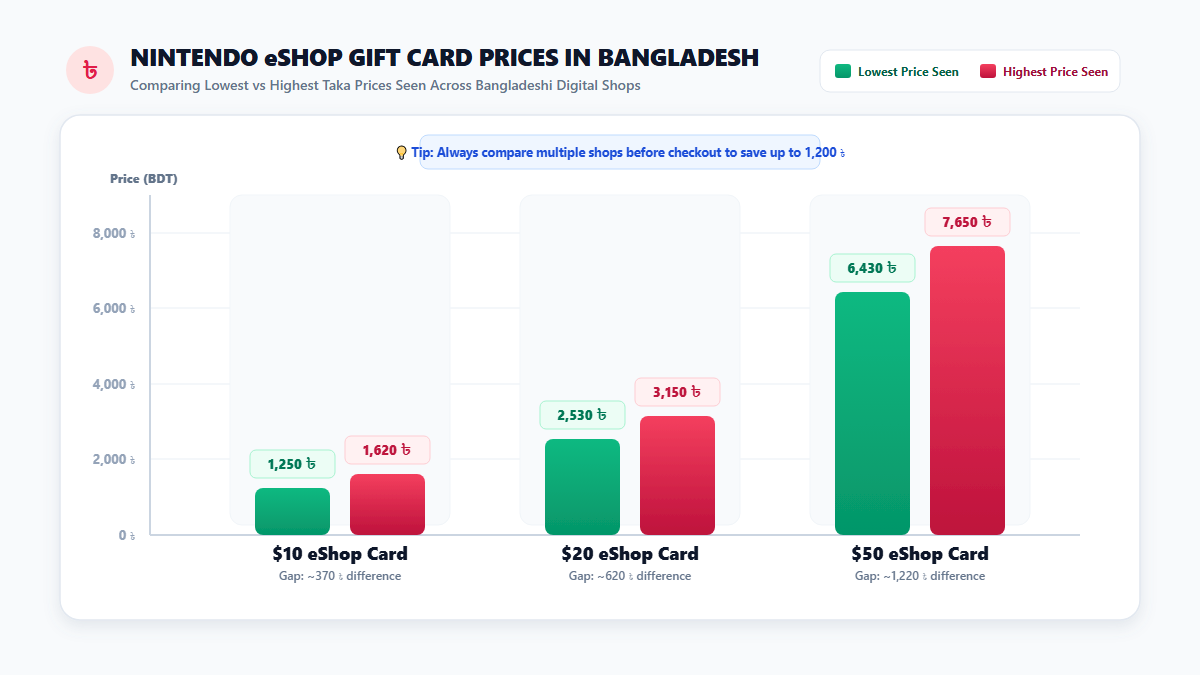
We looked at public product pages from several Bangladeshi digital shops. Here is the range we saw for common US-dollar cards:
| Card Value | Prices seen on BD shop pages | Rough cost per US dollar |
|---|---|---|
| $10 | 1,250 ৳ to 1,620 ৳ | 125 ৳ to 162 ৳ |
| $20 | 2,530 ৳ to 3,150 ৳ | 127 ৳ to 158 ৳ |
| $50 | 6,430 ৳ to 7,650 ৳ | 129 ৳ to 153 ৳ |
These pages were not all updated on the same day. Some may be out of date. A card shown as out of stock on one page was also in this list. So always check the live price and stock on the shop you choose.
Notice how wide the range is. The same $10 card can cost almost 400 taka more on one site than on another. A short comparison can save real money.
Why Do Prices Differ From Shop to Shop?
- Dollar rate: Cards are priced in US dollars. When the rate moves, taka prices move too.
- Shop costs: Each seller buys stock at a different cost.
- Payment fees: Some shops add a fee for wallets or cards. Others do not.
- Stock: Low stock can push prices up.
- Timing: A price from last month may not be true today.
Do not pick a shop only because it has the lowest price. Check support, delivery time, and reviews as well. A tiny saving is not worth a lost code.
How Much Should You Buy?
It depends on what you want to play. Think about it like this.
$10 card: for a small game or DLC
This works for a cheap indie game or a small add-on. It is also a good first card if you are testing a new shop.
$20 card: for one mid-price game
Many games cost around this range, but prices differ by region and by game. Look at the eShop page of the game first.
$50 card: for bigger plans
Choose this if you want one large game or several small ones. A bigger card often costs a little less per dollar. But only buy it when you are sure.
Another tip: you can add funds more than once. There is no need to load a huge amount at the start. Nintendo also sets balance limits. In the US, Nintendo's support page says your total balance cannot go above $800.
How to Redeem a Nintendo eShop Gift Card
You can redeem your code in two ways. Both add money to the same Nintendo account balance.
Redeem on your Nintendo Switch
- Connect your Switch to the internet.
- Open the Nintendo eShop from the HOME Menu.
- Select the account you want to add funds to.
- Select "Redeem Code" or "Enter Code" on the left side of the screen.
- Enter the 16-character code, then select OK.
- Select Confirm, then Add. The funds appear in your balance.
The button name can change a little between regions and updates. Nintendo's help pages use both "Redeem Code" and "Enter Code." Look for the one on your screen.
You can read the official steps on the Nintendo support page called How to Add Funds on Nintendo eShop. For US, Canada, and Mexico accounts, see the Nintendo Americas support article.
Redeem on the Nintendo website
- Open ec.nintendo.com/redeem in your browser.
- Sign in with your Nintendo account.
- Enter your code.
- Confirm to add the funds.
Some guides say your account must have opened the Nintendo eShop on a Switch at least once before web redemption works. If the website does not accept your code, try the console first.
Typing the code correctly
Codes mix letters and numbers. Some characters look alike. A 5 can look like an S. A 0 can look like an O. Go slowly. Copy and paste from your email if you can.

What to Know About Your Balance
After you redeem a code, the balance belongs to that one Nintendo account. Nintendo's card terms, as shown by retailers, say a few important things:
- The balance is linked to a single account.
- It cannot be moved to another account.
- The card cannot be reloaded.
- Nintendo or the seller will not replace a lost or stolen card.
So redeem the code on the account you really plan to use. Think twice before you press confirm.
Retail pages also say that unused balances do not expire and have no fees. Still, read the current terms on Nintendo's support site before you buy a large card. Rules can change.
How to Pay Safely With bKash, Nagad, or Rocket
Many buyers in Bangladesh pay with a mobile wallet. It is simple and quick. But you must stay careful.
- Never share your PIN. bKash says its team will not ask for your PIN, secret code, or security code at any time.
- Never share an OTP. A code sent to your phone is for you only.
- Use your own wallet. Do not use someone else's account for your order.
- Read the payment screen. Check the name and the amount before you confirm.
- Ignore "gift" offers. Fake posts may ask you to fill a form with your PIN.
- Call 16247 if unsure. This is the bKash helpline. Use it to check any strange call or SMS.
Read the full advice on the official bKash security tips page. You can also see common scams on the bKash fraud awareness page.
How to Spot Fake Sellers and Scam Offers
Gift card codes are like cash. That makes them a favorite target for scammers. Watch for these signs.
Red flags
- "Free" Nintendo codes. Free eShop code generators do not work. They often try to steal your details.
- Prices far below the market. If it looks too good to be true, it probably is.
- A request for your Nintendo password. A gift card seller never needs it.
- Pressure to pay fast. Scammers want you to act before you think.
- No clear region. A seller who cannot tell you the card region is a risk.
- No support contact. A real shop shows clear ways to reach them.
- Payment to a personal number in a private chat. Use a proper checkout page when you can.
Good signs
- A clear product page with the card region and prices in taka
- A working support email or contact page
- A privacy policy and terms
- Reviews from real buyers on public sites
- Clear notes on delivery time

Common Problems and How to Fix Them
"This code is not valid"
Check each character again. Make sure you did not mix up similar letters and numbers. Then check that the card region matches your account region.
The region does not match
You cannot force a card to work in a different region. Contact the seller. Ask about a fix. Do not change your account country in a hurry, because your old balance will not follow you.
The code did not arrive
- Wait a few minutes.
- Check your spam or junk folder.
- Look at the order page on the shop's website.
- Confirm that you typed your email right.
- Contact the shop with your order number and payment proof.
You cannot add funds because of a balance limit
Nintendo limits how much balance an account can hold. Spend some of your funds first, then add the rest.
The code was already used
Contact the seller at once. Send your order number and a screenshot of the error. Do not try the code again and again.
You entered a wrong code on a fake page
Stop. Change your Nintendo account password. Then contact Nintendo support. If you also shared any wallet details, call the bKash helpline on 16247.
Tips to Protect Your Code and Your Account
- Do not share the code. Do not post it in a group or send a photo of it.
- Redeem it quickly. This lowers the chance of loss.
- Use a strong password. Add extra sign-in protection to your Nintendo account if it is available.
- Keep your email safe. The code often goes to your inbox. Protect it with a strong password.
- Keep proof. Save the order number, the payment message, and a screenshot of the product page.
- Start small. Try a small card with a new shop first.
Smart Ways to Save Money on Nintendo Games
- Compare shop prices. We saw large gaps for the same card value.
- Check the eShop sales. Many games get price cuts from time to time.
- Use the wishlist. Add games to a list and wait for a sale.
- Plan before you buy. Pick the game first. Then buy the card amount you need.
- Do not rush. A day of waiting often saves money.
Gift Cards for Other Gamers
Do you game on other platforms too? AroraShop lists many digital gift cards for Bangladesh. You can browse the full gift card section. It includes cards such as PlayStation, Xbox, and Steam. You can also see game top-ups on the top-up page.
The buying steps are alike for most cards. Check the region, pick the amount, pay safely, and redeem the code.
Frequently Asked Questions
What is a Nintendo eShop gift card?
It is a prepaid card or digital code. It adds money to your Nintendo account. You can then spend it on the Nintendo eShop.
Can I buy a Nintendo eShop gift card in Bangladesh?
Yes. Several Bangladeshi digital shops list Nintendo eShop cards, mostly in US dollars. Always check the card region, the live price, and the stock before you pay.
Which region should I choose?
Choose the region that matches your Nintendo account. A US card works with a US account. If the regions do not match, the code will fail.
How much does a Nintendo eShop gift card cost in Bangladesh?
Prices change. On several public shop pages, a $10 card ranged from 1,250 ৳ to 1,620 ৳. A $20 card ranged from 2,530 ৳ to 3,150 ৳, and a $50 card from 6,430 ৳ to 7,650 ৳. Some pages may be old, so check the live price.
Can I pay with bKash?
Many shops accept bKash, Nagad, and Rocket. Not every shop supports every wallet. Check the payment list on the shop's page.
How long does delivery take?
It depends on the shop. Digital codes often arrive in minutes. Some shops give a longer window. Read the delivery note on the product page.
How do I redeem the code?
Open the Nintendo eShop on your Switch, choose your account, select Redeem Code or Enter Code, and type the 16-character code. You can also redeem it at ec.nintendo.com/redeem.
Does the balance expire?
Retail pages that quote Nintendo's card terms say balances do not expire and have no fees. Check the current terms on Nintendo's support site, because rules can change.
Can I use a Nintendo eShop card on Nintendo Switch 2?
Yes. Nintendo support says eShop cards can be redeemed on Nintendo Switch 2 and Nintendo Switch.
Can I use it for Nintendo Switch Online?
Yes, in many cases. Retailer and help pages say you can use eShop funds to pay for Nintendo Switch Online. The price and plans depend on your region.
Can I move my balance to another account?
No. Nintendo's card terms say the balance is tied to a single account and cannot be transferred.
Are free Nintendo eShop codes real?
No. Free code generators and "giveaway" links are common scams. Do not enter your password or wallet details on those pages.
Final Thoughts
Buying a Nintendo eShop Gift Card BD is easy once you know the rules. Match the card region to your account. Compare prices. Pay on official screens. Redeem the code on the account you really plan to use.
Stay careful with your code, your PIN, and your Nintendo password. Never trust free codes. Start small if you are new to a shop.
Do this, and your next game purchase will be smooth. Happy gaming.
Prices in this article come from public shop pages seen in October 2026 and may be out of date. Always confirm the live price, region, and terms before you pay.