



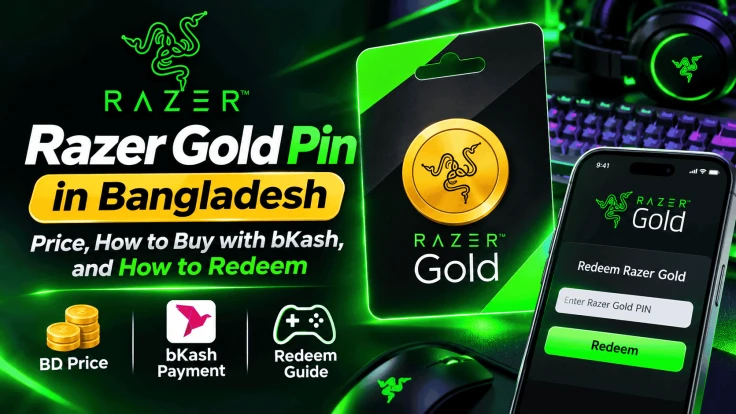
Razer Gold Pin in Bangladesh: Price, How to Buy with bKash, and How to Redeem
AroraShop Editorial & Fulfillment Team
Digital Gaming & FinTech Specialists (Dhaka, BD) • UpdatedWant to buy a Razer Gold Pin in Bangladesh? You can buy one on AroraShop and pay in Taka with bKash, Nagad, Rocket, or Upay. You do not need a dual-currency card. The code usually comes in 1 to 5 minutes.
This guide shows you the current price, how to buy, how to redeem the PIN, and how to avoid common mistakes.
What Is a Razer Gold Pin?
Razer Gold is a digital wallet for games. It is made by Razer, a well-known gaming brand. You add money to this wallet, and then you use that money to pay inside games and apps that accept Razer Gold.
A Razer Gold Pin is a code. When you enter the code in your Razer Gold account, money is added to your wallet. Think of it like a mobile recharge card, but for games.
Here is why many gamers in Bangladesh like it:
- You do not need a credit card or a dual-currency card.
- One wallet can pay for many games and apps.
- You earn Razer Silver when you spend Razer Gold. You can swap Silver for rewards.
Razer Gold Pin Price in Bangladesh
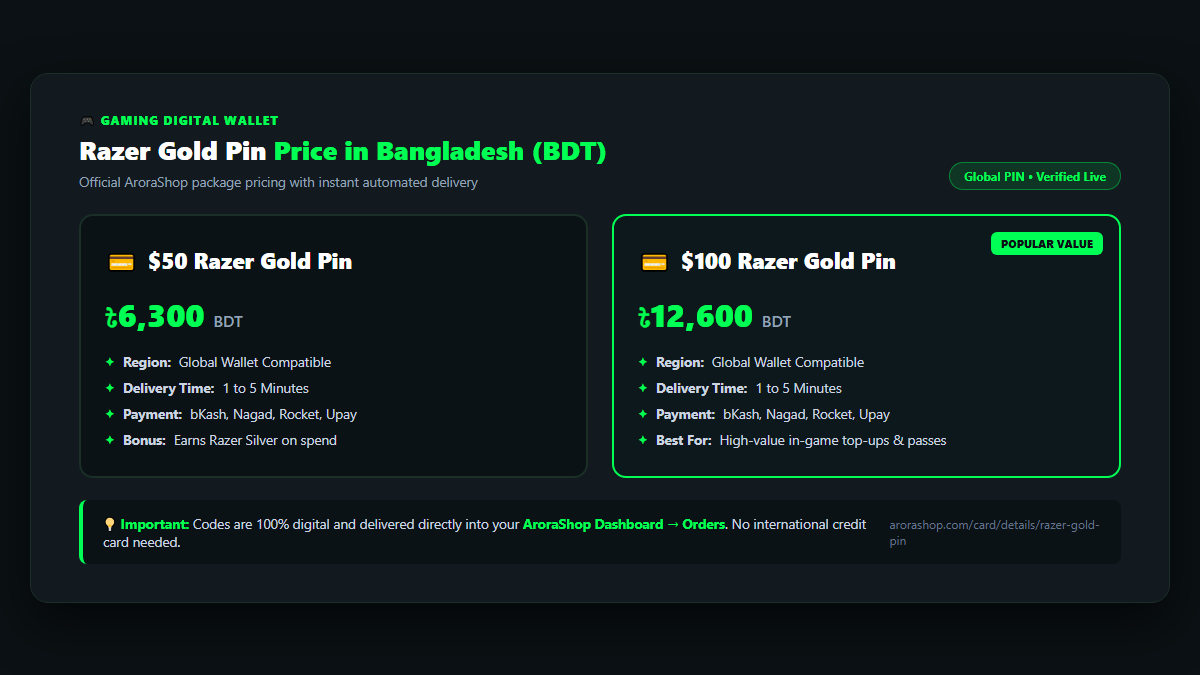
AroraShop sells the Global Razer Gold Pin. Here are the current packages:
| Package | Price in BDT | Region | Delivery |
|---|---|---|---|
| $50 Razer Gold Pin | ৳6,300 | Global | 1 to 5 minutes |
| $100 Razer Gold Pin | ৳12,600 | Global | 1 to 5 minutes |
Prices can change. Always check the live price on the Razer Gold Pin page on AroraShop before you pay.
Global vs Country Razer Gold Pin: Why Region Matters
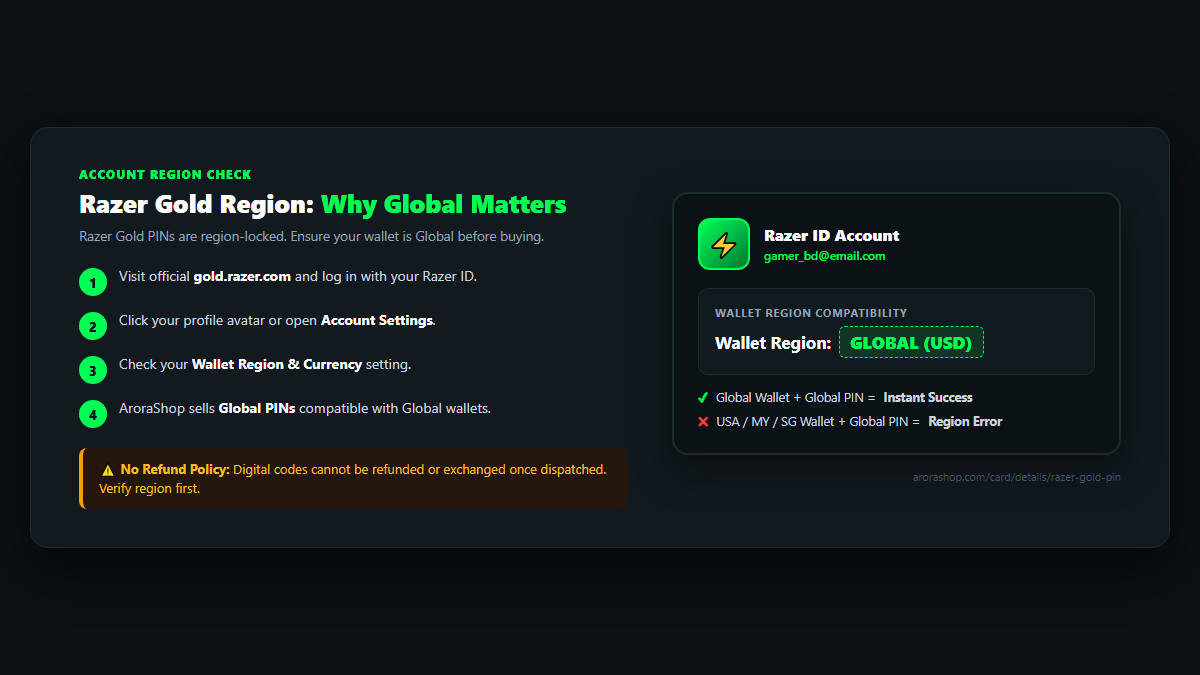
This is the most important part. Razer Gold Pins are locked to a region. A PIN only works on a wallet from the same region.
The PIN on AroraShop is a Global PIN. So your Razer Gold wallet should also be set to Global.
If the region does not match, you may see an error like "region mismatch" or "invalid PIN." The money will not go in.
How to check your wallet region
- Go to the official Razer Gold website.
- Log in with your Razer ID.
- Look at your wallet details or account settings. You will see the region or currency there.
Do not make a new account in another region just to use a PIN. It can cause problems with your account. If you are not sure about your region, ask AroraShop live chat before you buy.
How to Buy a Razer Gold Pin in Bangladesh with bKash
Buying on AroraShop is simple. Follow these steps:
- Open the product page. Go to the Razer Gold Pin page.
- Add your contact number. Type a phone number where the shop can reach you.
- Pick a package. Choose $50 or $100.
- Set the quantity. You can buy from 1 to 10 at a time.
- Click Buy. You will go to checkout.
- Pay in Taka. Use bKash, Nagad, Rocket, or Upay.
- Get your code. After payment, open your Dashboard and go to Orders. Your PIN will be there.
Most orders arrive in 1 to 5 minutes. Your code stays saved in your order history, so you can find it again later.
How to Redeem a Razer Gold Pin
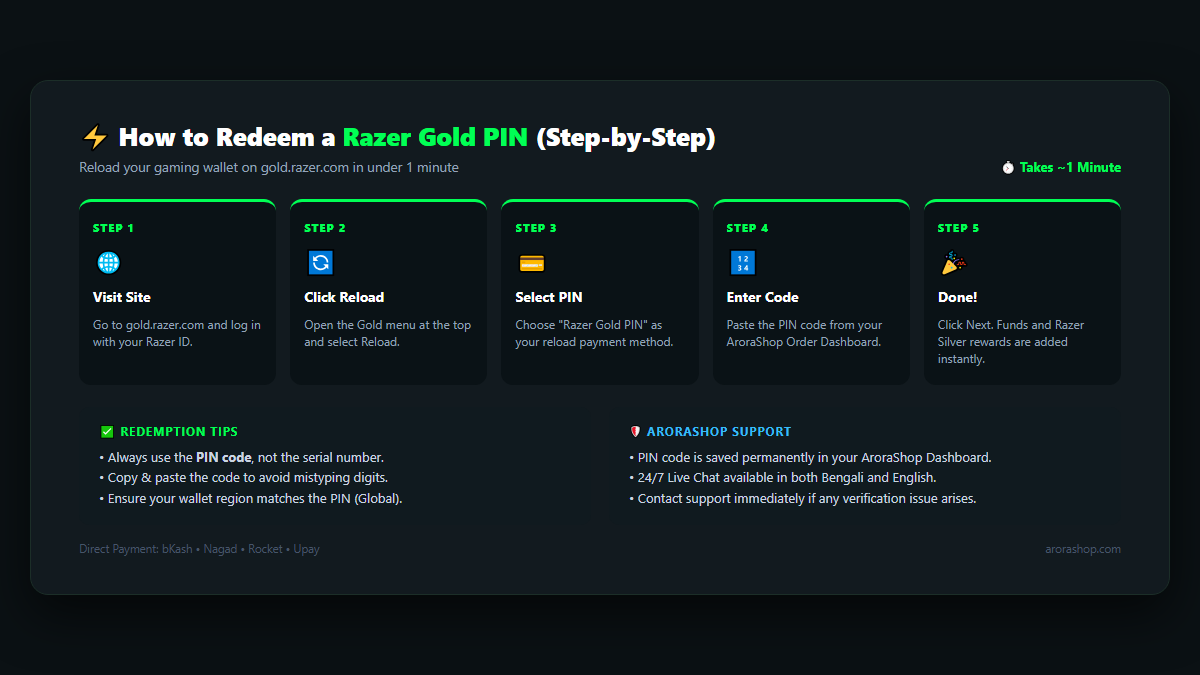
Now let's add the money to your wallet. It takes about one minute.
- Go to gold.razer.com.
- Log in with your Razer ID. If you do not have one, sign up for free.
- Open the Gold menu at the top and click Reload.
- Choose Razer Gold PIN as the reload method.
- Type or paste your PIN. Use the PIN, not the serial number.
- Click Next. If Razer asks for a code sent to your email or phone, enter it.
- Done! Your wallet balance will go up.
How to Use Razer Gold After Reloading
Once your wallet has money, you can use it in games and stores that support Razer Gold. Here is the basic way:
- Open the game or app where you want to buy something.
- Go to its store or top-up page.
- Choose Razer Gold as the payment method.
- Log in to your Razer ID and confirm.
Not every game takes Razer Gold. Check the payment options in your game first. If your game supports direct top-up by Player ID, you may find it easier to buy that instead. See our game top-up page for options.
Common Problems and Quick Fixes
| Problem | Likely Cause | What to Do |
|---|---|---|
| Region or currency error | Wallet is not Global | Check your wallet region. Contact support before trying again. |
| Invalid PIN | Typo, or serial number used | Copy and paste the PIN from your order. Do not use the serial number. |
| Code not in my order yet | Payment still checking | Wait a few minutes. Then share your Order ID in live chat. |
| Verification code not coming | Email or phone issue | Check spam. Make sure your Razer ID email or phone is correct. |
Having trouble with a different card? Our guide on Steam wallet codes that are not working has more tips that also help with other gift cards.
Safety Tips Before You Buy
- Buy from a trusted shop. Cheap PINs from strangers on Facebook can be fake or already used.
- Never share your PIN. Anyone with the PIN can use your money.
- Check the region first. Digital codes have no refund after they are sent.
- Keep your Razer ID safe. Use a strong password and do not share your login.
Want to learn more? Read our guide on how to protect your gaming account from scams.
Is a Razer Gold Pin Right for You?
A Razer Gold Pin is a good pick if:
- Your game or app accepts Razer Gold.
- You want one wallet for many games.
- You do not have an international card.
If you only play one game, a direct top-up may be faster. If you shop on Steam, PlayStation, or Xbox, those stores have their own gift cards. You can find them all in our gift cards section.
Frequently Asked Questions
How much is a Razer Gold Pin in Bangladesh?
On AroraShop, the $50 Global Razer Gold Pin costs ৳6,300 and the $100 PIN costs ৳12,600. Prices may change, so check the product page.
Can I buy a Razer Gold Pin with bKash?
Yes. AroraShop accepts bKash, Nagad, Rocket, and Upay. You pay in Taka and do not need a dual-currency card.
How long does delivery take?
Most codes arrive in 1 to 5 minutes after payment. You will find the PIN in your Dashboard under Orders.
Will a Global Razer Gold Pin work on my account?
It works on a Razer Gold wallet set to the Global region. Check your wallet region before you buy.
Can I get a refund for a Razer Gold Pin?
No. AroraShop does not refund digital codes after they are sent. Check the region and package carefully first.
What is Razer Silver?
Razer Silver is a reward point. You earn it when you spend Razer Gold, not when you reload. You can swap Silver for rewards on Razer's site.
Where do I enter my Razer Gold Pin?
Go to gold.razer.com, log in, open Gold, click Reload, choose Razer Gold PIN, and type your code.
Conclusion
Buying a Razer Gold Pin in Bangladesh is easy now. Pick your package, pay with bKash or Nagad, and get your code in minutes. Just make sure your wallet is set to Global before you redeem.
Ready to fill your wallet? Buy your Razer Gold Pin on AroraShop and start playing today. Need help? Our live chat team can answer your questions in Bangla or English.
Sponsored
Categories
Sponsored
Recent Posts

Sponsored

