Leave a Review


The word "Root" has always made tech enthusiasts' eyes light up. The thought of having absolute, unrestricted control over your hardware — completely erasing unremovable system bloatware, disabling ads system-wide, installing custom ROMs, and squeezing maximum performance from the battery — feels undeniably thrilling.
However, the deeper you delve into Android's modern architecture, the clearer a reality becomes: rooting is simply not meant for everyday smartphone users anymore.
In this guide, we take an honest, balanced look at both sides of the coin: the genuine advantages that tempt power users, the steep security and financial penalties you pay, and why you likely don't need root access today.

By default, Android's security sandbox prevents standard applications and end-users from modifying protected core operating system files. This sandbox protects your device against malicious apps tampering with system binaries or hijacking sensitive cryptographic keys.
Rooting grants you superuser (administrative) authority. It unlocks the system partition, allowing you to edit system files, swap kernels, and adjust hardware voltages. To achieve root on modern Android, you must first unlock the bootloader — an irreversible action on many models that immediately factory-resets the entire phone and wipes all stored data. Before even beginning, a complete external backup is strictly mandatory.
Many carrier-locked and OEM devices come packed with dozens of pre-installed partner apps and vendor utilities that cannot be uninstalled through standard settings. With root access, you can completely purge unwanted system packages from the storage drive.
Standard Android cloud backups only sync contacts, photos, and a handful of app settings. Root utilities (such as Swift Backup or Neo Backup) allow you to snapshot exact application states — including offline game progress, login sessions, and database configs — and restore them seamlessly.
When manufacturers abandon software support for older smartphones after 2 or 3 years, third-party development communities (like LineageOS or Pixel Experience) build lightweight, modern Android versions. Flashing a custom ROM breathes years of fresh life into otherwise abandoned hardware.
Privacy purists can install microG to replace proprietary Google Mobile Services (GMS), set up system-level firewalls (like AFWall+), and block tracking packets before they ever leave the device antenna.
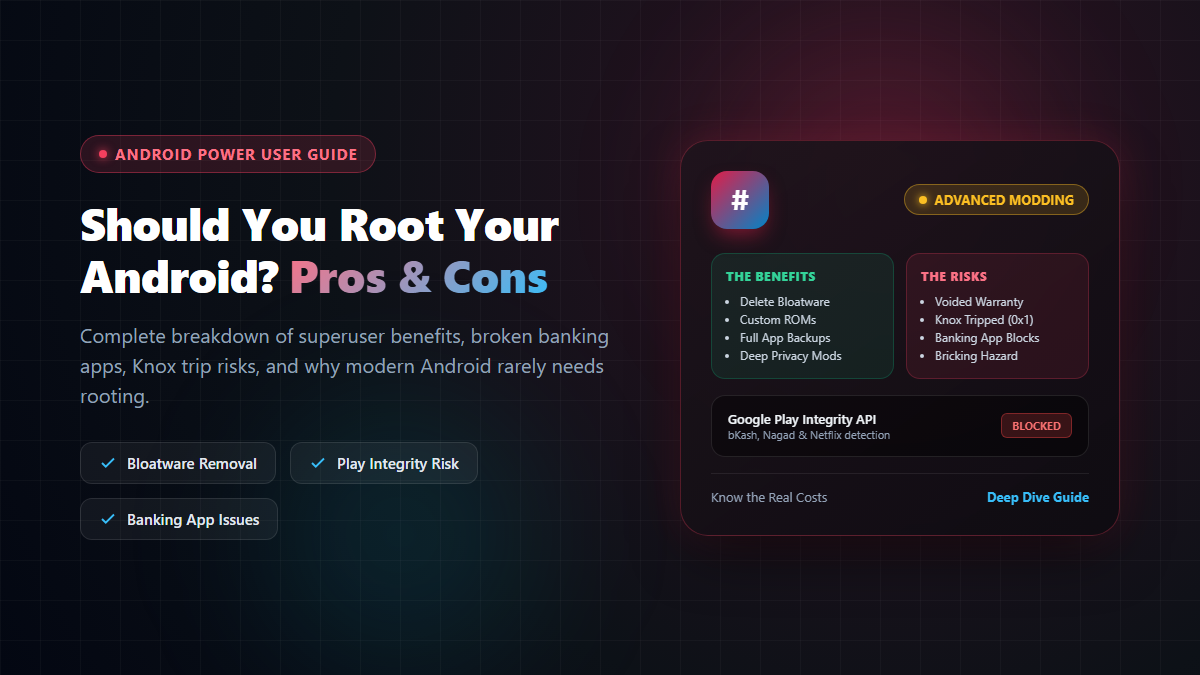
Unlocking the bootloader voids the official manufacturer warranty in most jurisdictions. On Samsung devices, rooting blows an e-fuse called Knox (Knox 0x1). Once Knox trips, it is physically impossible to revert; premium security features like Samsung Pay, Samsung Pass, and Secure Folder are disabled forever, drastically reducing the resale value of the phone.
Modern fintech and financial apps — including bKash, Nagad, cellfin, banking portals, and work profiles — rely heavily on Google's Play Integrity API (formerly SafetyNet) to verify device tampering. If root binaries or an unlocked bootloader are detected, the app refuses to launch outright.
While root-hiding modules (like Zygisk, MagiskHide, or KernelSU modules) can temporarily mask root, it is an exhausting, endless game of cat-and-mouse. A quiet background update from Google Play Services can break your banking app right when you need to make an urgent payment at a store counter.
Furthermore, streaming services like Netflix and Disney+ frequently downgrade playback resolution from Full HD/4K to standard 480p SD because Widevine L1 DRM security drops to L3.
One wrong flash in recovery, an incompatible kernel module, or an interrupted system update can result in a "bootloop" or hard brick, transforming a pricey smartphone into an unresponsive paperweight. Additionally, automated official Over-The-Air (OTA) system updates are disabled; every security patch must be manually patched and flashed through a computer.
A decade ago during the early days of Android, rooting was almost essential to get basic functionality like screenshot shortcuts, dark themes, custom fonts, or decent battery management.
Today, Android has matured tremendously. Custom launchers, Private DNS ad blocking, Digital Wellbeing, and granular per-app permissions give you immense personalization without risking your device security or breaking your banking apps. Root access remains a formidable, powerful tool — but before you unlock that bootloader, make sure the benefits truly outweigh the heavy price.

Please login to live chat or contact via WhatsApp