Leave a Review


The only safe way to add diamonds with a Free Fire diamond UID is a top-up from a store that asks for your UID and nothing else. Copy your UID from your profile, choose a pack, pay, and the diamonds arrive in your account. No website can create free diamonds from your UID alone. Sites that claim to are generators, and they exist to steal your login or your time.
You probably landed here after seeing a "Enter your UID to get free diamonds" page. They look official, show a loading bar, and then send you to a survey, an APK download, or a login form. Meanwhile you can't use an international card, so buying from Garena's own store feels out of reach. That gap is exactly where scam pages grow.
This guide walks you through four steps: find your UID, avoid generators and use official codes, order from a trustworthy UID top-up store, and confirm delivery. We run AroraShop, a Bangladesh store that sells Free Fire Diamonds for bKash, Nagad and Rocket, so we explain the process as we see it from the store side.
A UID is a numeric ID that identifies your Free Fire account, so a store can deliver diamonds to it without your password. It works like a delivery address. Anyone can send diamonds to a UID, but nobody can log in with it.
A Free Fire UID diamond top-up sends currency to the account that owns that number. The store never needs your Facebook, Google or VK login, and it never needs a verification code. If a page asks for any of those, close it.
Free Fire and Free Fire MAX share one linked account through Garena's Firelink. Diamonds are the same currency in both apps, so a top-up to your UID shows up in whichever one you open.
Your UID is a delivery address for diamonds, never a key to your account.
Gather these first, so you can finish in one sitting:
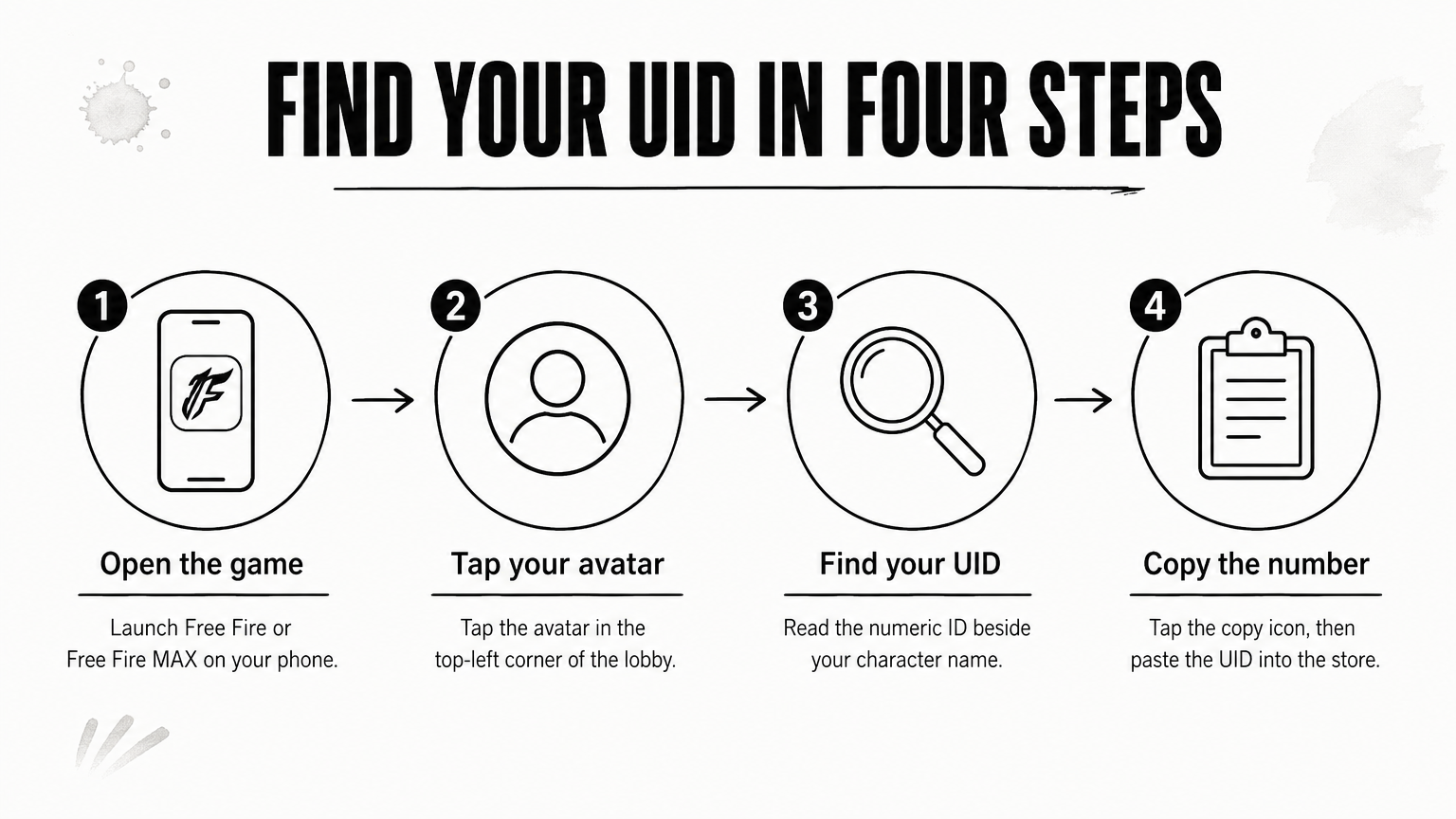
Open your in-game profile and copy the numeric ID shown there. It takes about ten seconds, and one wrong digit sends diamonds to a stranger.
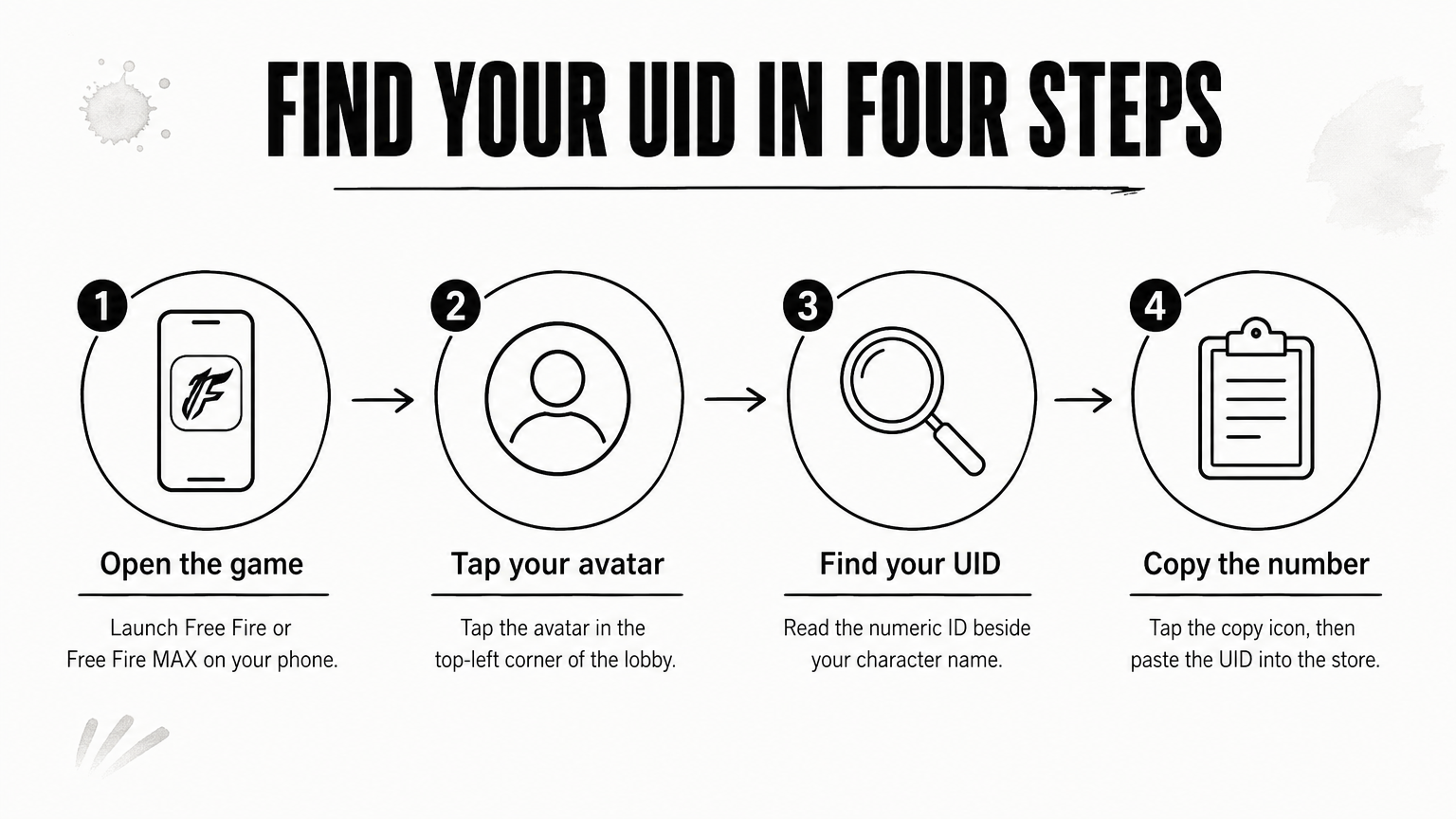
Your character name is not a UID. Stores cannot deliver by name, because many players share the same one.
Paste the UID, then compare it digit by digit with the number on your profile. Do this before you pay, not after. Delivered diamonds cannot be pulled back out of another player's account.
If you buy for a friend, ask them to send a screenshot of their profile. A typed-out UID is where most mistakes happen, so copy and paste rather than retyping it.
Compare every digit of the pasted UID with your profile before you press pay.
Free diamond generators do not work, because diamonds are issued by Garena's servers and not by a third-party page. Your realistic free options are official redeem codes and in-game events.
Generators share the same pattern: you enter a UID, pick an amount like 50,000 diamonds, and watch a fake progress bar. Then comes a "human verification" step.
Method What it asks for Does it add diamonds? Risk Free diamond generator or "hack" site UID, then surveys, APKs or a login No High: account theft, malware, spam Garena redeem code Code, entered on Garena's own rewards site while logged in Depends on the code, often items Low UID top-up store UID only, plus payment Yes, the amount you buy Low if the store is reputableTreat anything that wants your password, a one-time code, or an APK download as hostile. Banned or hijacked accounts are the usual result.
Garena runs an official rewards site at reward.ff.garena.com. Log in there with the account linked to your game, enter the code, and check your in-game mail or vault. What a code gives varies, and many give cosmetics or vouchers instead of diamonds.
Codes expire quickly and can be region-locked. Never pay for a code, and never trust a list that asks you to enter your UID before showing it. Garena's events and in-game missions also hand out small amounts of diamonds from time to time, so play them if you want free currency.
If a site promises diamonds for your UID alone, it is a generator, so leave.
Choose a store that takes only your UID, accepts a payment method you actually have, and shows how long delivery takes and how to reach support. Then place the order in a few minutes.
Run the store through this checklist before paying:
This is the flow on our store. Exact pack sizes and prices change, so check the product page before you pay.
The Android app on Google Play carries app-only discounts, so it is worth checking there before you pay on the website.
Pick the store by what it asks for: UID only is safe, passwords are never safe.
After your payment is verified, delivery on AroraShop takes 20 to 60 minutes. Open the game afterward and check your diamond balance in the lobby.
The clock starts at transaction verification, not at the moment you tap pay. Say your payment is verified at 8:00 pm. You should then expect your diamonds between 8:20 pm and 9:00 pm. Delivery time can vary with location, so give it the full hour before you worry.
Restart the game if the balance looks unchanged. Free Fire sometimes needs a fresh login to show the new total.
If the hour has passed, contact support instead of placing a second order. Our support team is on WhatsApp and averages under 15 minutes for a first reply. Send everything in one message so nobody has to ask you twice:
Order number: [your order number] Free Fire UID: [your UID] Payment method and transaction ID: [bKash/Nagad/Rocket + TrxID] Time of payment: [time and date] Problem: Diamonds not delivered after 60 minutesIf you entered the wrong UID, say so right away and do not reorder. Refund questions are covered on the Refunds and Returns policy page, so read it before you buy.
Never reorder while an order is pending, because a duplicate payment makes the problem harder to fix.
You do not need a generator, a hack, or a password handover. You need your UID, a store that asks for nothing more, and a payment method you already use. Copy the UID, check every digit, ignore any page that promises free diamonds, and keep your order details until the balance appears in the game.
When you are ready, you can top up Free Fire diamonds on AroraShop with bKash, Nagad or Rocket. Start from the Top Up section, paste your UID, and let support handle anything that goes wrong.