Leave a Review


To get a Google Play gift card working, buy a card issued for the same country as your Play account, then enter the code in the Play app or at play.google.com/redeem. The country match matters more than the price or the seller. When the two match, redemption takes under a minute and the value appears as Play balance on your account.
The problem is that Google issues cards country by country, and its terms say a card is valid only in the country where it was bought. Many people grab a $10 US card or an Indian card because the price looks low, then hit a "this code can only be used in..." error. A VPN does not fix that, and Google can deactivate a code that breaks its terms.
AroraShop is a Bangladesh-based marketplace that sells digital gift cards. This guide explains why region matters, how to check your account country, how to buy a card online or in a shop without overpaying, how to redeem it, and what to do when redemption fails.
A Google Play gift card works only on an account whose Play country matches the country the card was issued for. Get this wrong and no seller, price or redemption method can rescue the code.
Google issues each card in one country and one currency. When you redeem, Google compares the card's country with your account's Play country. It also expects you to be in that country at the time. After redemption, the balance stays locked to that country and cannot be moved to another account.
| Situation | Likely result |
|---|---|
| US card, account country US, you are in the US | Redeems normally |
| US card, account country Bangladesh | Rejected as a country mismatch |
| US account on paper, but you are in Bangladesh | Often rejected, because location is checked too |
| Any card redeemed through a VPN | Rejected, and the code may be deactivated |
A Google Play code is only as good as its match with your account country.
Questions like how to redeem a US Google Play gift card in Bangladesh have a blunt answer. A US or India card is not meant for a Bangladesh account, and it often fails even when the account region was changed. Do not buy one just because it is cheaper.
Before you pay, confirm the region printed on the product page and ask the seller in writing whether the code redeems on your account country. On AroraShop, check the Google Play listing before you order.
Open the Play Store and look at the country your account is set to. That country decides which card you can use, so check it before you spend anything.
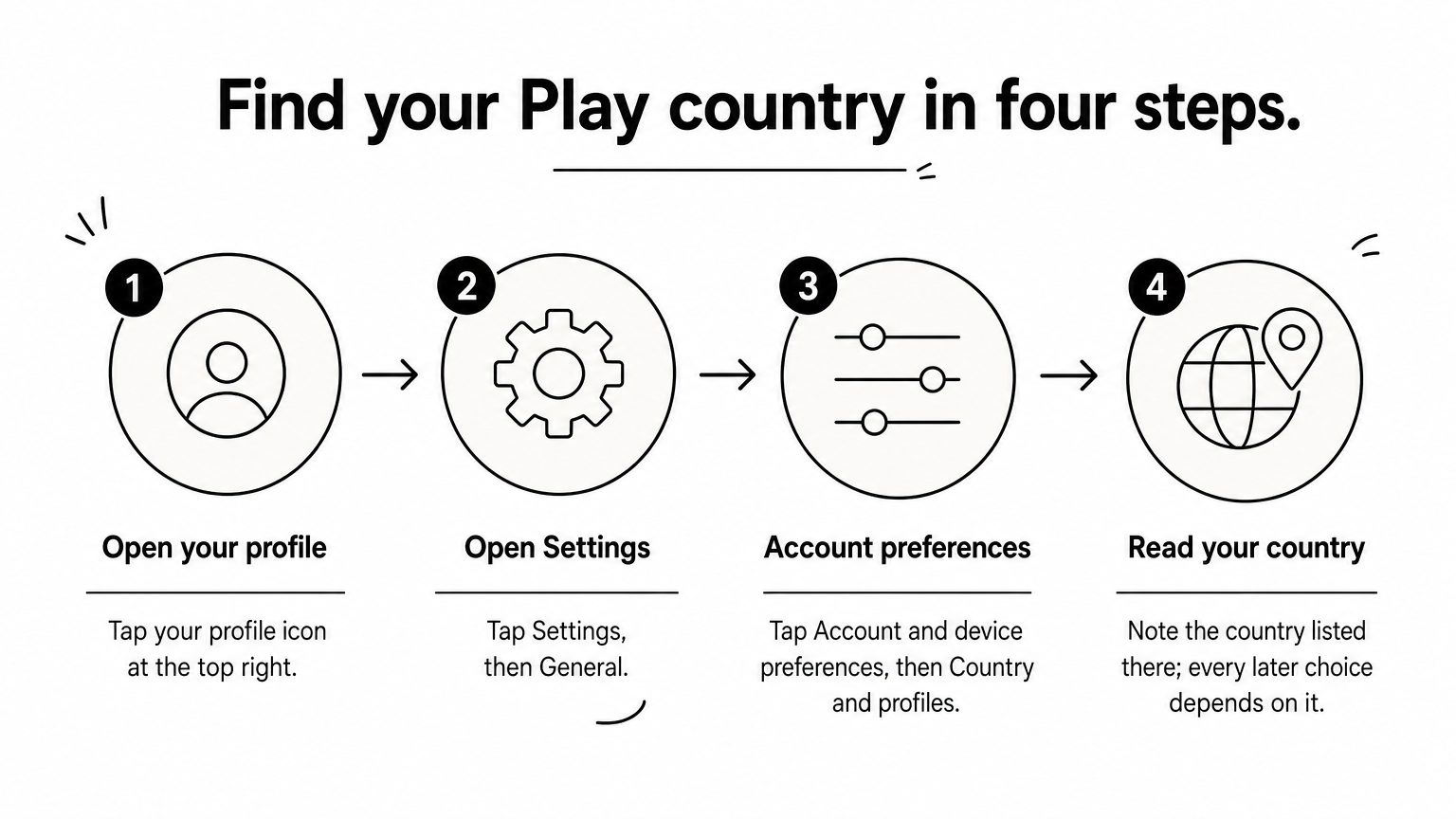
Menu names shift slightly between app versions, but the country setting always sits under Settings. Write down the country, because every later choice depends on it.
Google lets you change your Play country only about once every 12 months, and you need a payment method that belongs to the new country. Your old balance stays tied to the old country.
A country switch made only to use a cheap card is a poor trade. If the account is yours for daily use, buy a card that fits the country you have.
Check the account country first, because the card has to be bought to match it.
Buy a card in the right region from a seller that delivers the code instantly and shows the region clearly. Online is usually faster, and shop cards follow the same country rule.
On AroraShop, the flow is short. Open the website or the Android app and find the Google Play gift card page. Pay with bKash, Nagad or Rocket. The code is delivered digitally, so copy it from your order.
US cards come in dollar amounts such as $5, $10, $25, $50 and $100, while India cards use rupee amounts. If you only want a $10 card, that is a normal denomination. A small top-up avoids leaving unused balance.
A shop card must be activated by the cashier at purchase, so keep the receipt. It also works only in the country of the shop. Google lists the retailers for each country on its gift card pages.
For a cheap Google Play gift card, compare the price per dollar of face value. Suppose one seller asks Tk 1,300 for a $10 card, which is Tk 130 per dollar. Another asks Tk 1,150, which is Tk 115 per dollar. The gap is Tk 150 on the card. A gap that large is worth a check on the region, the seller's reviews and the delivery promise before you pay. Buy from sellers who state the region plainly and avoid private deals through strangers.
The cheapest card is the one that redeems on the first try.
You redeem in the Play app or on the web, and both add the value to whichever Google account is signed in. Confirm the account name before you enter anything, because redemption cannot be undone.
For a digital card, paste the code straight from your order instead of retyping it. That avoids look-alike mistakes such as the letter O for a zero.
The web route also works on a computer, iPhone or iPad. Once redeemed, your Play balance appears at checkout for eligible Play purchases such as apps, games, movies and subscriptions. Google gift cards do not expire, so you can keep the code until you need it. The balance cannot be sent to a different account.
Always check the signed-in Google account before you press Redeem.
Most failed redemptions come from a country mismatch, a typo or an unactivated card. Match your error to the table, and stay alert to scams that ask for your code.
| What you see | Likely cause | What to do |
|---|---|---|
| Code can only be used in another country | Card country differs from account country | Buy a card for your account's country, and skip VPN workarounds |
| Code already redeemed | Used on another account, or entered twice | Check other accounts you are signed in to, then contact the seller with your order number |
| Invalid code | Typo, space or look-alike character | Re-enter without spaces, or paste the code |
| Card will not redeem from a shop | Cashier never activated it | Return with the receipt |
Use the code only inside Google Play. Anyone who asks you to read out or send a Google Play code as payment, for a fee, tax, prize or job, is running a scam. Google explains this at play.google.com/giftcardscam.
Share a code only after you have decided to redeem it yourself, never through screenshots sent to strangers.
A real Google Play code is spent on Google Play, never as payment to a person.
The whole process comes down to one rule: match the card's country to your Play account's country. Check the account country, buy a card with a stated region, redeem it in the app or at play.google.com/redeem, and use the error table if anything fails.
When you are ready, you can buy a Google Play gift card at AroraShop and pay with bKash, Nagad or Rocket.