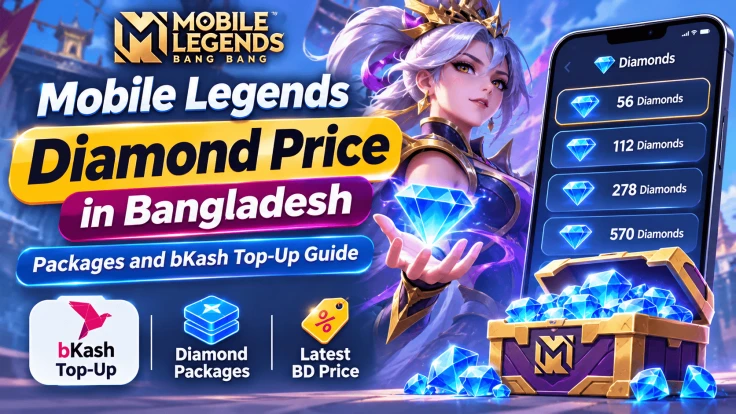
Want to buy Mobile Legends diamonds in Bangladesh? On AroraShop, packs start at ৳120 for 55 diamonds. The biggest pack is 1,770 diamonds for ৳3,600.
You pay in taka with bKash, Nagad, Rocket, or Upay. You only need your User ID and Zone ID. You do not share your password.
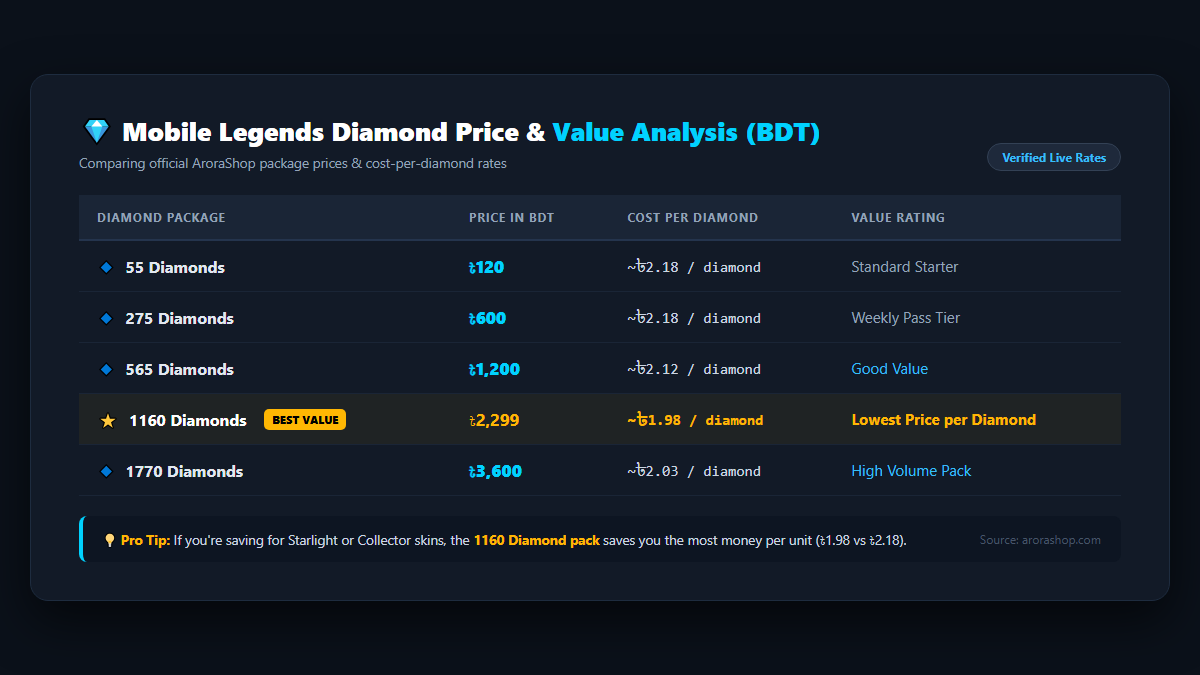
Quick answer: The 1160 diamond pack has the lowest cost per diamond on the list. It works out to about ৳1.98 for each diamond. Always check the product page for today's price before you pay.
Diamonds are the premium money in Mobile Legends: Bang Bang (MLBB). Players use them to get Starlight Passes, Weekly Diamond Passes, Collector skins, and heroes.
You can top up diamonds with your User ID and Zone ID. The game does not need your password for this.
Figure 1 - Official AroraShop MLBB diamond packages, BDT pricing, and value rating.
Note: The cost per diamond is our own math from the listed prices. Prices can change, so check the product page before you order.
Which Diamond Pack Is the Best Value?
Look at the last column of the table. The 1160 pack costs the least for each diamond. The 1770 pack is close behind. The 55 and 275 packs cost the most per diamond.
That does not mean you should buy the biggest pack. Buy what you need. Here is a simple way to choose:
Open the in-game shop and find the skin, pass, or hero you want.
Note how many diamonds it costs.
Pick the pack that covers it. Choose a bigger pack only if you will really use the extra diamonds.
Small packs are fine for a quick top-up. A bigger pack makes more sense if you plan to buy several things.
How to Find Your User ID and Zone ID
MLBB needs two numbers to find your account. These are your User ID and your Zone ID. You can see both in your profile.
Open Mobile Legends: Bang Bang.
Tap your profile picture in the top-left corner.
Look under your nickname. You will see numbers like 12345678 (1234).
The long number is your User ID. The short number in brackets is your Zone ID. These are example numbers only. Use your own.
Figure 2 - Your User ID (long number) and Zone ID (in brackets) sit directly under your nickname.
Tip: Copy the numbers and paste them. This helps you avoid typing mistakes.
Figure 3 - 4 simple steps to top up Mobile Legends diamonds safely in Bangladesh.
Check Your Region First
The AroraShop product is set up for Global accounts. Check that your account region matches before you order. If you are not sure, ask AroraShop support first.
Mistakes to Avoid When You Top Up
Wrong Zone ID. If the IDs are wrong, diamonds may go to another player. Check both numbers twice.
Most orders should arrive in a few minutes. The product page says to contact support with your order number if delivery takes more than 5 to 30 minutes.
Keep your order number, your bKash or Nagad transaction ID, and a screenshot of the payment ready. This helps support check your order faster.
How much are 55 Mobile Legends diamonds in Bangladesh?
On AroraShop, the 55 diamond pack is listed at ৳120. Check the product page for the latest price.
Can I buy MLBB diamonds with bKash?
Yes. The product page lists bKash, Nagad, Rocket, and Upay as payment options.
Do I need my password to top up diamonds?
No. The order needs only your public User ID and Zone ID. Never share your password, PIN, or OTP.
How long does delivery take?
The product page says orders usually finish in 1 to 5 minutes. If your order is late, contact support with your order number.
Where do I find my Zone ID?
Tap your profile picture in the top-left corner of the game. Your Zone ID is the number in brackets next to your User ID.
Which diamond pack costs the least per diamond?
From the listed prices, the 1160 diamond pack costs the least per diamond, at about ৳1.98.
Will these diamonds work on my account?
The product is made for Global accounts. Check your account region before you order.
Final Thoughts
Mobile Legends diamonds start at ৳120 on AroraShop. Pick your pack by what you want to buy. Check your User ID and Zone ID twice. Then pay with bKash, Nagad, Rocket, or Upay.