Leave a Review


The CapCut Pro price is $19.99 per month or $179.99 per year when you subscribe on capcut.com. The yearly plan works out to about $15 a month. Prices change with your country, device and any running promotion, so the figure at your own checkout is the one that counts. In Bangladesh, you can also buy 30 days of Pro as a voucher for 250 ৳ at AroraShop and pay with bKash, Nagad or Rocket.
CapCut Pro is the paid tier of CapCut, the video editor from ByteDance. It unlocks the premium templates, effects, sounds, AI tools and cloud storage that the free plan locks. It also removes the watermark that those premium assets trigger.
This guide gives you the current plans and what they cost, then shows you how to check the real price in your account. It then tells you whether Pro is worth paying for, how to buy it from Bangladesh, and what to know about trials, renewals and refunds.
The price looks inconsistent because CapCut restructured its paid plans, and because it also prices by region and platform. Many pages still quote numbers from before the change.
On capcut.com in 2026, Pro costs $19.99 a month or $179.99 a year. Pro includes 1,200 AI credits a month and about 1 TB of cloud storage. Here is how the plans compare.
Plan Price on capcut.com Best for Standard $9.99 per month Mobile editors who mainly want watermark-free exports Pro monthly $19.99 per month Short projects, or testing before you commit Pro yearly $179.99 per year Regular editors Teams From about $24.99 per month Shared projects Ultra $79 per month Heavy AI video generationThe Standard and Ultra figures come from 2026 coverage of the restructure. Confirm them at checkout before you pay.
A worked example shows what the yearly plan saves. Twelve monthly payments of $19.99 come to $239.88. The yearly plan costs $179.99, so you save $59.89, about 25 percent, or roughly three months free. There is no lifetime licence, so $239.88 a year is the number to weigh against the free plan.
Pro costs $19.99 a month or $179.99 a year on capcut.com, and every other number is a regional, platform or older-plan variation.
Before the restructure, Pro was the only paid tier, at $9.99 a month or $89.99 a year. CapCut then split its paid offering in two. The old price point became Standard, and a new, more capable Pro launched at $19.99.
An article that lists "Pro at $9.99 with 4K export and the full AI toolkit" is therefore describing a plan that no longer exists at that price. Check the publish date of any pricing page you read. If it is older than the restructure, the numbers are stale.
Open the upgrade screen while you are logged in. CapCut shows the price for your region and device there, and no third-party page can know that number for you.
Follow the path for your device.
The screen lists every plan available to you, along with the monthly and yearly options. Compare the yearly figure against twelve times the monthly one to see your real saving.
Platform matters most. Apple and Google take a 15 to 30 percent cut of in-app purchases, and CapCut passes it on. Subscribing through an app store typically costs $1 to $3 more per month than subscribing on capcut.com. That is $12 to $36 more over a year for the same product.
Region matters too. CapCut sets local prices and cites taxes, currency movement and market strategy. Do not use a VPN to buy from a cheaper region. It breaches the terms of service, and losing your account mid-project costs more than you save.
Subscribe on the website rather than in an app store, then sign in on your phone, and you avoid the markup.
Pro is worth it if you export in 4K, use the AI tools every week, or edit paid work. Most casual creators do fine on the free plan or a lower tier.
The free plan gives you the full timeline editor, multi-track editing, keyframes, chroma key, filters, transitions, text, stickers and 1080p export. That is the whole job for many creators.
The watermark surprises people. It comes from the assets you use, not from your export resolution. Build an edit from free elements and you can export clean. Add one Pro-tagged template, effect, sticker or sound, and the export carries a watermark.
Before you pay, open your last project and count the Pro-tagged items. Often it is a single sticker you can swap out in half a minute.
Pro pays off in three cases. The first is 4K export for client deliverables or YouTube long-form where you want room to crop. TikTok, Reels and Shorts compress hard, so 1080p looks the same there.
The second is weekly use of AI tools like vocal isolation, captions and tracking. If you publish several talking-head videos a week, captioning alone can justify the fee. The generative tools run on monthly credits, not unlimited use.
The third is cloud storage and team workflows, which matter once projects get large or shared.
If you earn money from your videos, note that CapCut restricts commercial use on the free plan. A Pro plan is also not a blanket licence. Paid materials are licensed for the export you paid for, and cancelling removes Pro assets from existing projects. For client work, read CapCut's current terms before you invoice.
Pay for Pro when a specific feature blocks your work, not because the upgrade banner keeps appearing.
You have two practical routes. You can subscribe directly on capcut.com, or you can buy a 30-day voucher from a local store and pay with a mobile wallet.
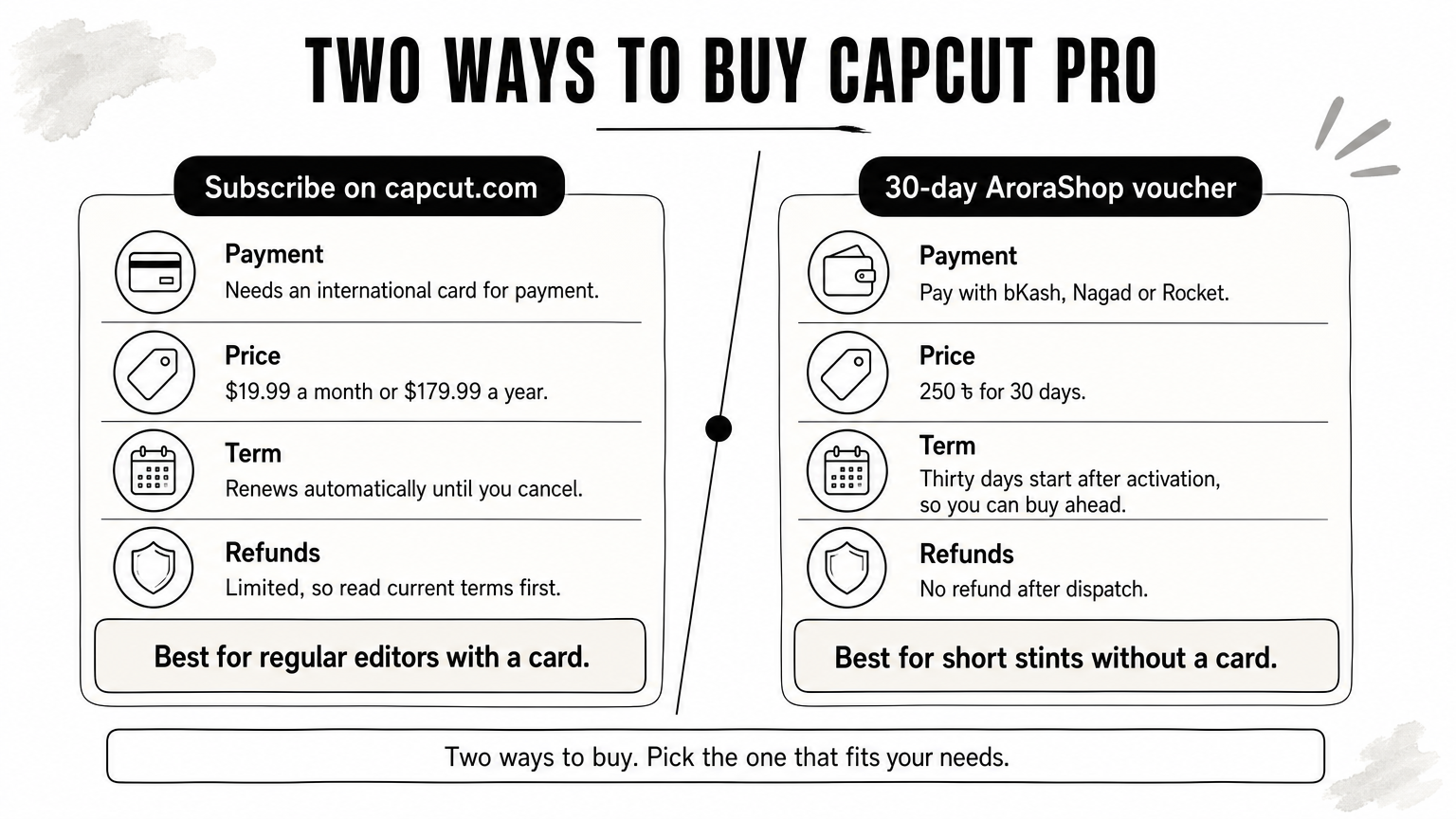
The direct route gives you the official plans in the table above. The catch is payment. You need a card that works for international transactions, and many Bangladeshi buyers do not have one. If yours does, subscribe on the website instead of an app store and take the yearly plan only after a month of use.
AroraShop sells a CapCut Pro Subscription 30 Days for 250 ৳. You pay with bKash, Nagad or Rocket, so no international card is needed. The product page lists these details:
To buy, create an account on arorashop.com, which the site requires for full service. Then choose the product and pay with your wallet. If delivery is delayed, contact support through WhatsApp or email support@arorashop.com.
Check the product page for what the voucher includes beyond watermark-free export, such as AI credits and cloud storage, before you compare it with the full capcut.com plan.
Here is a worked comparison. It assumes an illustrative rate of 120 ৳ per dollar, so substitute today's rate. It ignores card fees.
Route Dollar price Approximate cost in ৳ Pro monthly on capcut.com $19.99 2,399 ৳ Pro yearly on capcut.com $179.99 21,599 ৳ Twelve 30-day AroraShop vouchers n/a 3,000 ৳If you need Pro for a few months a year, a 30-day voucher fits better than a yearly plan.
Know these rules before you pay, because subscription mistakes are hard to undo. A trial is available in some regions, subscriptions renew automatically, and refunds are limited.
New subscribers in supported regions can get a 7-day trial with full Pro access. If you start it through an app store, your account is charged automatically when the trial ends, so set a reminder for day six.
A student discount has also been reported at up to 50 percent off Pro, verified with a school email. It depends on your region and changes often, so check CapCut's pricing page rather than a coupon site.
CapCut subscriptions auto-renew. To avoid the next charge, cancel at least 24 hours before the renewal date. You cancel where you subscribed: the Apple ID subscriptions list on iPhone, Google Play subscriptions on Android, or your CapCut account on web and desktop.
Refunds are limited. CapCut's terms describe a 14-day window if you have not used premium features, but its help pages say subscriptions generally cannot be refunded once the benefits are available. App store purchases follow Apple's and Google's rules. AroraShop vouchers carry no refund after dispatch, so buy a single 30-day voucher first if you are unsure.
Cancel early and buy short terms first, because refunds on digital subscriptions rarely come through.
The CapCut Pro price is $19.99 a month or $179.99 a year on capcut.com. App stores charge more, and your region can change the figure again. Free covers more than the upgrade prompts suggest, and Pro pays off for 4K export, weekly AI use and paid client work. Check the upgrade screen in your own account before you trust any number you read.
If you want Pro without an international card, you can get a 30-day CapCut Pro voucher at AroraShop for 250 ৳ and pay with bKash, Nagad or Rocket.