Leave a Review


YouTube Premium is YouTube's paid membership. It removes ads from most videos, lets you download videos to watch offline, keeps audio playing when you lock your phone or switch apps, and includes YouTube Music Premium in the full plan. Google sells it in several forms: Premium for individuals, families and students, a cheaper Premium Lite with fewer interruptions, and a Music Premium plan for people who only want music.
This article explains what each plan includes, who should pick which one, what a subscription costs, and how to sign up from Bangladesh. Paying Google directly can be hard without an international card, so the buying section covers both routes. You will also see the limits of Premium, so you know what it does not fix before you pay.
AroraShop sells YouTube Premium as a digital voucher that you pay for with bKash, Nagad or Rocket. The cost section therefore puts real package prices from our store next to Google's own reference prices. Read the article from start to finish, or jump to the table that fits your situation.
YouTube Premium changes how you use YouTube every day. You get no ad interruptions, playback that continues when you leave the app, and videos you can watch without a connection. If you open YouTube several times a week, those three things add up quickly.
A full Premium membership bundles features that free YouTube makes you work around. These are the ones you will notice most:
Exact features can differ by country, device and plan, so treat this list as the full Premium baseline.
The real value of Premium is not one feature but the end of interruptions: no ads, no stopped audio, no buffering on a weak connection.
Students and self-learners get a lot out of it. A two-hour tutorial or lecture without ad breaks is easier to follow, and you can download lessons on Wi-Fi and watch them later. Freelancers and video editors use it the same way, with reference videos saved offline and a playlist running in the background while they work.

Mobile gamers and commuters benefit from background play. You can keep a stream, a podcast or a music mix going while you switch to a game or a messaging app. Households with several heavy users benefit from the family plan, which splits the bill across up to six people.
Free YouTube is enough if you watch a few videos a week and the ads do not bother you. It is also enough if you mostly watch on a TV that you rarely use for long sessions, or if you already pay for a music app and use YouTube only for the occasional clip.
Premium makes sense when you watch daily or when ads break your concentration. If you only want fewer ads and nothing else, the cheaper Lite tier below may fit better than the full plan.
Choose by who will use the account and which features you need. One person who wants everything takes Individual. Two to six people in one home take Family. An enrolled student takes Student. Someone who mainly wants fewer ads takes Lite, and someone who only listens to music takes Music Premium.
The table below lists Google's reference prices in US dollars. Prices differ by country and change over time, so sign in at youtube.com/premium to see what Google offers for your account. Google's help page on signing up explains the official flow.
| Plan | Best for | US reference price | Main inclusions |
|---|---|---|---|
| Premium Individual | One person | $15.99 per month | Ad-free YouTube, background play, downloads, YouTube Music Premium |
| Premium Family | Up to six people at one address | $26.99 per month | Same as Individual, with a separate account for each member |
| Premium Student | Eligible students | $8.99 per month | Same as Individual, with proof of student status |
| Premium Annual | One person paying yearly | $159.99 per year, about $13.33 per month | Same as Individual, available for the individual plan only |
| Premium Lite | Light viewers who want fewer ads | $8.99 per month | Most videos ad-free, no YouTube Music Premium |
| Music Premium | Listeners who only use YouTube Music | Below full Premium, see the pricing page | Ad-free music, background play, music downloads |
Answer these questions in order and stop at the first yes:
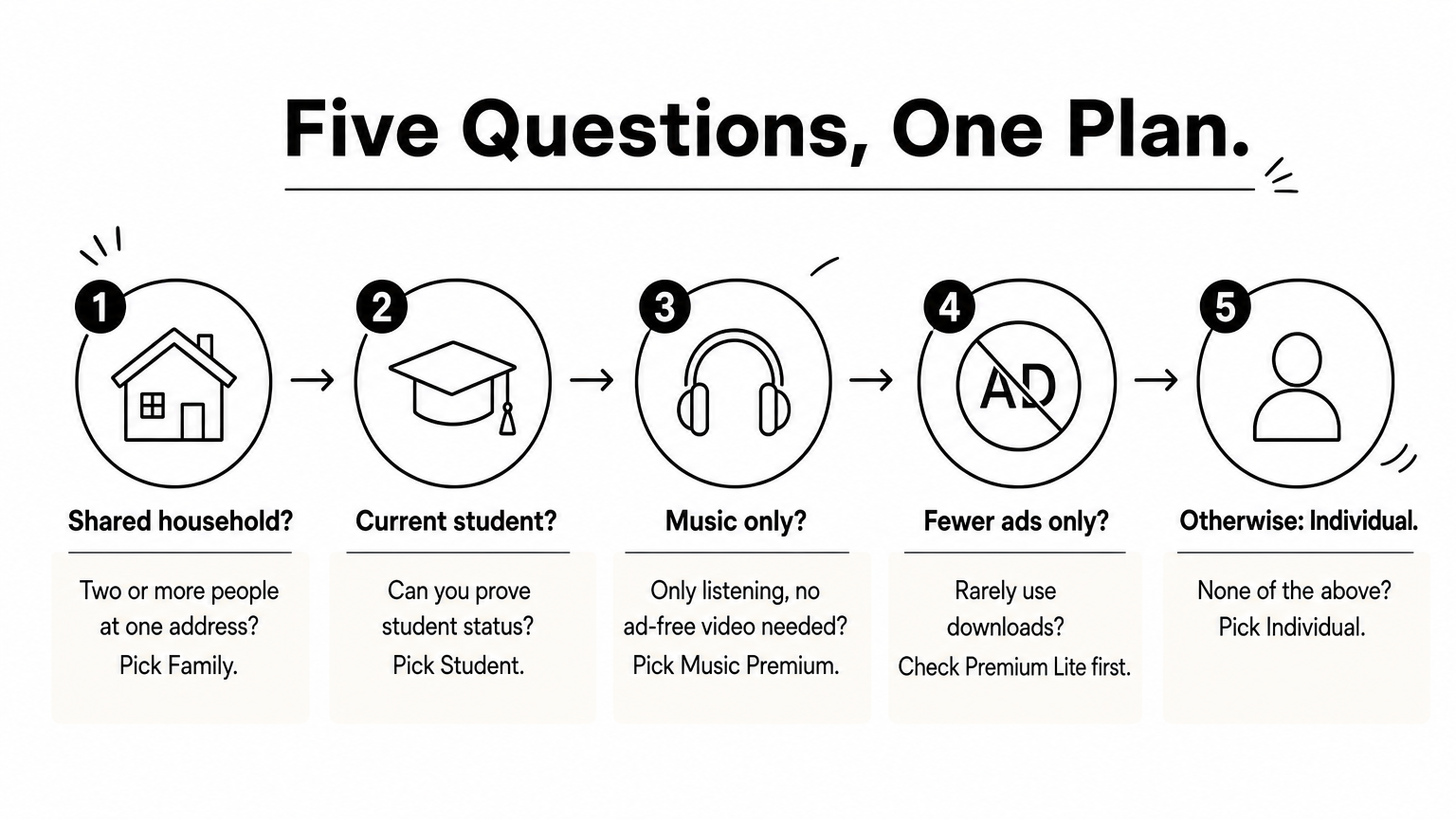
Lite's feature list is narrower than full Premium's, and it leaves out YouTube Music Premium. If you want background play and downloads on video, confirm them on the Lite page before you choose it.
If you will share the bill with even one other person, the Family plan almost always beats two separate plans.
A Family membership has one family manager who pays and sets it up. The manager can add up to five other members, all aged 13 or older and all living at the same address, which makes six people in total. Each member keeps a personal account, so recommendations, watch history and playlists stay separate.
Treat the same-address rule seriously. Google may ask the manager to confirm the home address, and a member who moves out of the household can lose access. Do not build a family group out of friends in different homes.
You have two routes. You can subscribe officially through your Google account if you have a payment method Google accepts for your country. Or you can buy a voucher locally and pay with bKash, Nagad or Rocket. Choose the route that matches the payment method you actually have.
Go to the YouTube Premium page, sign in with your Google account and pick a plan. Then add a payment method and confirm. The page shows the plans and prices Google offers in your country, and it tells you if a plan is not available to you.
Many readers in Bangladesh stop at the payment step because they have no international credit or debit card. If the page rejects your card or does not offer the plan you want, the voucher route is the practical alternative.
AroraShop lists YouTube Premium as a digital voucher. The purchase takes about five minutes, and delivery is listed as instant, usually 1 to 5 minutes. Here is the process:
Read the product page before checkout. Note the package length, the plan type, the region (listed as Global) and the delivery method. The refund policy matters most: the listing says no refund after dispatch, so a wrong choice cannot be reversed once the voucher is sent.
If delivery is late, contact support. AroraShop offers chat through WhatsApp and states an average response time under 15 minutes. Keep your order details ready so support can find your voucher fast.
The cost depends on the plan, the length and the route you buy through. Google's US reference price for Individual is $15.99 per month. On AroraShop, the YouTube Premium price in Bangladesh is 250 ৳ for the 1 month package and 3,650 ৳ for the 1 year package. The store can change prices without notice, so the product page always shows the live price.
The table mixes dollars and taka on purpose. Google bills in its own currency, and the store prices in taka, so compare the monthly cost within each column group, not across them.
| Option | Price | Effective monthly cost |
|---|---|---|
| AroraShop, 1 month package | 250 ৳ | 250 ৳ |
| AroraShop, 1 year package | 3,650 ৳ | about 304 ৳ |
| Google US, Individual | $15.99 | $15.99 |
| Google US, Annual (individual only) | $159.99 per year | about $13.33 |
| Google US, Family for 4 people | $26.99 per month | about $6.75 per person |
| Google US, Family for 6 people | $26.99 per month | about $4.50 per person |
Say you want one full year of Premium from AroraShop. Buying the 1 month package twelve times costs 12 × 250 = 3,000 ৳. The 1 year package costs 3,650 ৳, which is 650 ৳ more. On these listed prices the yearly package is not a discount, so choose it only if you want a single purchase and a locked price. Check the product page for what the year package includes before you decide.
Google's own annual plan works the other way. Twelve months at $15.99 comes to $191.88, and the annual plan at $159.99 saves you $31.89. Always compare the monthly total with the yearly price on the same route before you commit.
Do the monthly math twice: the cheapest-looking package is not always the cheapest per month.
Premium removes most interruptions, but not all of them, and some features come with rules. Knowing the limits stops you from blaming the service or the seller for things that were never promised.
Premium blocks YouTube's own ads. It does not remove sponsor segments that a creator records inside a video, because those are part of the video itself. On Premium Lite, some content may still show ads, such as music, so read Google's Lite page for the current exceptions.
Premium also does not turn YouTube into a download tool for files. You cannot export a video to your gallery or share it with another phone.
Downloaded videos play only inside the YouTube app. They are tied to your account and your device, and your device must connect to the internet regularly to keep them valid. Google's rule is at least once every 30 days. Some videos are not available for download at all, depending on how the creator or owner set them up.
Background play works for Premium members on mobile. Check that it is switched on in your app settings if audio stops when you lock the screen.
Through Google's official billing you can cancel at any time, and you keep your benefits until the paid period ends. A prepaid voucher works differently, because you pay for a set package up front. Write down the date your package ends and decide before then whether to buy again, so you do not lose ad-free viewing by surprise.
Most problems with digital subscriptions come from rushed checkout, not from the product. A few habits prevent nearly all of them.
Never send your Google password to a seller. A real activation should not need it. Treat any request for your password as a reason to stop and contact support.
Buy from a seller with verifiable reviews. AroraShop shows a 4.9/5 rating from Trustpilot and Google reviews and states that it has delivered more than 10K orders. Whichever seller you pick, read independent reviews first, and check that the store accepts only its listed payment gateway.
Plan mistakes are easy to make and hard to undo. Work through this checklist before you pay:
YouTube Premium is worth paying for if you watch YouTube daily, want ads gone, and use background play or downloads. Pick Individual for one user, Family for two or more, Student if you qualify, Lite for fewer ads at a lower price, and Music Premium if you only listen. Compare monthly totals before you commit to a longer package.
To buy without an international card, you can get YouTube Premium at AroraShop and pay with bKash, Nagad or Rocket. Start with the 1 month package, confirm that ads are gone in your YouTube app, and then decide if a longer package suits you.