Leave a Review


Paying for ChatGPT from Bangladesh is harder than it should be. OpenAI bills in US dollars and wants an international Visa or Mastercard, and many local cards get declined or have no dollar limit at all. If you want a ChatGPT subscription BD that works with the money you actually have, you need another route.
Here is the short answer. You can buy ChatGPT Plus or ChatGPT Go through a local reseller and pay in BDT with bKash, Nagad or Rocket. You skip the card problem entirely. At AroraShop, both ChatGPT Plus and ChatGPT Go are in the catalog, and delivery is digital. Always check the live price on the product page, because dollar rates and plan prices change.
This guide walks you through the process step by step. You will see what each plan includes, how ChatGPT subscription prices in Bangladesh compare for monthly and longer plans, and which plan fits students, freelancers or developers. Then we cover the exact steps to pay with bKash and activate your account safely.
OpenAI sells ChatGPT in tiers, and the ChatGPT subscription price in BD depends on the tier you pick and the dollar rate that day. Official prices are in US dollars, so the taka figure shifts as the exchange rate moves.
The price you pay in BDT is the official dollar price times the exchange rate, plus any reseller margin.
The table below converts official prices at roughly Tk 120 per dollar. Treat the taka numbers as estimates.
Plan Official price Approx. in BDT Best for Free $0 Tk 0 Casual questions Go Low-cost tier, set by region Check the live price Students, daily chat Plus $20/month About Tk 2,400 Freelancers, developers Pro $200/month About Tk 24,000 Heavy professional workPlus is what most people mean when they search ChatGPT Plus subscription BD. It gives you higher usage limits and the newest models. Go costs less and suits lighter daily use.
Official billing is monthly, so the ChatGPT yearly subscription price in Bangladesh is about 12 times the monthly price. For Plus, that is roughly $240, or Tk 29,000. Some resellers sell multi-month bundles, so compare the cost per month, not the headline total.
You may also see searches for a ChatGPT 4 or ChatGPT 5 subscription price in Bangladesh. There is no separate fee. Newer models arrive inside your plan, and Plus gives you more access than the free tier.
Start with what you actually do in ChatGPT. If you chat a few times a day for homework or quick answers, a ChatGPT Go subscription BD is enough and costs less. If you write code, analyze files or keep hitting free-tier limits, buy ChatGPT Plus BD instead.
Monthly is the safest first purchase. Pay for one month, confirm the account works, then think about going longer.
When a seller quotes a ChatGPT 1 year subscription price in Bangladesh, check the cost per month and the refund or replacement terms. Longer bundles can save money, but you pay everything upfront.
Buy one month first, and commit to a longer plan only after it works.
Resellers sell two things. One is an upgrade on your own account, applied to the email you already use. The other is a shared or pre-made login. Pick your own account whenever you can. Your chats stay private and nobody else controls the password.
Shared logins cost less, but you can lose history or access without warning. For a long-term ChatGPT BD subscription, that risk is rarely worth the savings.
Choose your own account and a seller with visible reviews and clear replacement terms.
Run this checklist before any order:
AroraShop links its Trustpilot and Google Maps reviews, so you can check feedback first. Never share your OpenAI password in a public message.
Paying is where most buyers hesitate, but it takes about two minutes. A local reseller accepts bKash, Nagad and Rocket, so you never need an international card for your ChatGPT subscription BD order.
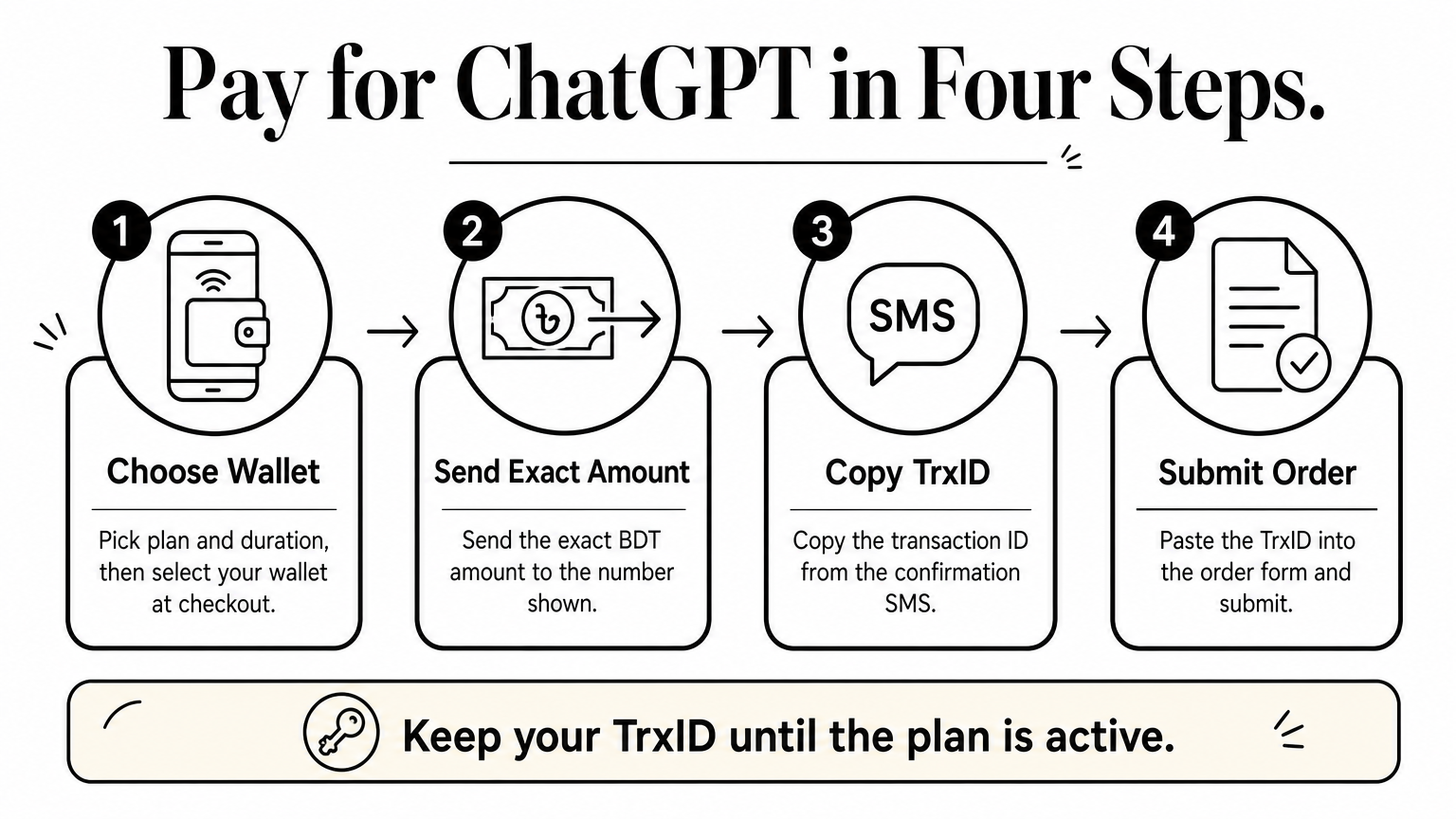
Open your wallet app with the order page beside you. The flow is nearly identical on all three services, so use whichever balance you have.
Never send money to a number a stranger gives you in chat. Use only the number shown at checkout and keep the TrxID and SMS until your plan is active.
Pay only the number shown at checkout, and keep your TrxID until the plan is active.
Compare the total with the live product page before you confirm. Wallet fees can change the final amount, and a wrong amount is the most common reason an order gets delayed.
Delivery usually lands within minutes of the seller confirming your TrxID. Then you verify it yourself, because a ChatGPT subscription BD order is only done when the plan shows inside your account.
Log in at chatgpt.com and open your profile menu. Your account settings should show the plan name and a renewal or end date. Run one quick test, such as opening the model picker, to confirm the upgrade works.
Verify the plan inside your account on the same day, while your payment proof is fresh.
If you still see the free plan, log out and back in first. Check that the email on your order has no typos, since a wrong address is the most common cause.
Still nothing? Message the seller with your order number, TrxID and account email. Never post your password in a public chat, and keep your payment screenshot until the first renewal date passes.
Buying a ChatGPT subscription BD does not require an international card. Pick the plan that fits your work, choose a seller with real reviews and clear replacement terms, pay the exact amount through bKash, Nagad or Rocket, then check the plan inside your account.
Most problems come from skipping one of those steps. Start with one month, keep your TrxID and payment screenshot, and use your own account so your chats stay private. Do that and the whole process takes minutes, not days.
Ready to upgrade? You can buy ChatGPT Plus or ChatGPT Go at AroraShop, pay in BDT from your mobile wallet, and get digital delivery without a dollar card. Check the live price on the product page before you order, since dollar rates move.