Leave a Review


A Free Fire diamond UID top-up needs only your player ID and a mobile wallet payment. You copy your UID from the game, pick a diamond pack at a trusted store, pay with bKash, Nagad or Rocket, and the diamonds go to your account. You never share your password.
The problem is that this simple process is also where most scams happen. Fake "free diamond" sites ask for your UID and give nothing back. Some sellers ask for your Facebook login. Others deliver to the wrong ID because nobody checked the number. One typo, and your money is gone. Most players in Bangladesh also have no international card, so wallet payment is the only realistic route.
This guide walks you through the whole process in four steps: finding the right UID, choosing a store and a pack, paying with your wallet, and confirming delivery. AroraShop sells Free Fire diamonds for Bangladeshi players with bKash, Nagad and Rocket, so the examples follow how it works. The same checks apply at any store.
A UID top-up credits diamonds directly to the Free Fire account tied to your player ID. The store never needs to log in as you, which is why it is safer than older methods that required your account credentials.
Your UID is the numeric player ID shown in your profile. When you enter it at checkout, the store sends diamonds to that account. Because the ID is not secret, it is safe to share. Your password, OTP and wallet PIN are not.
Free Fire and Free Fire MAX use the same account, so one UID covers both. Diamonds bought for that account show up whichever version you open. That answers the common question about a Free Fire MAX diamond UID: you do not need a separate ID.
A legitimate UID top-up asks for your player ID and payment, and nothing else.
Check any store against this list before you pay:
There is no generator that creates free diamonds. Sites and videos that claim otherwise collect UIDs or push you toward malware. Official in-game events and redeem codes from the game publisher are the only free source.
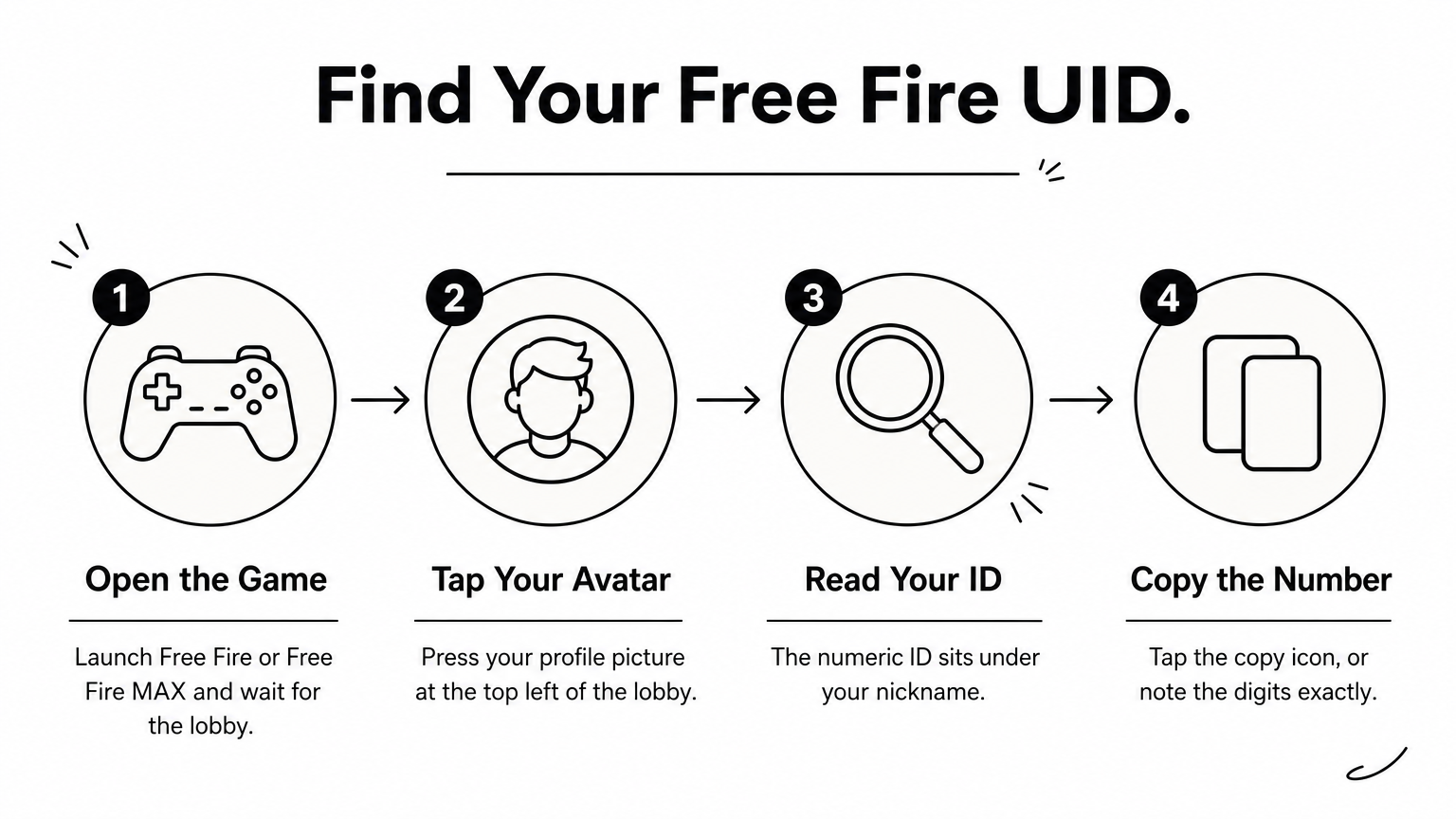
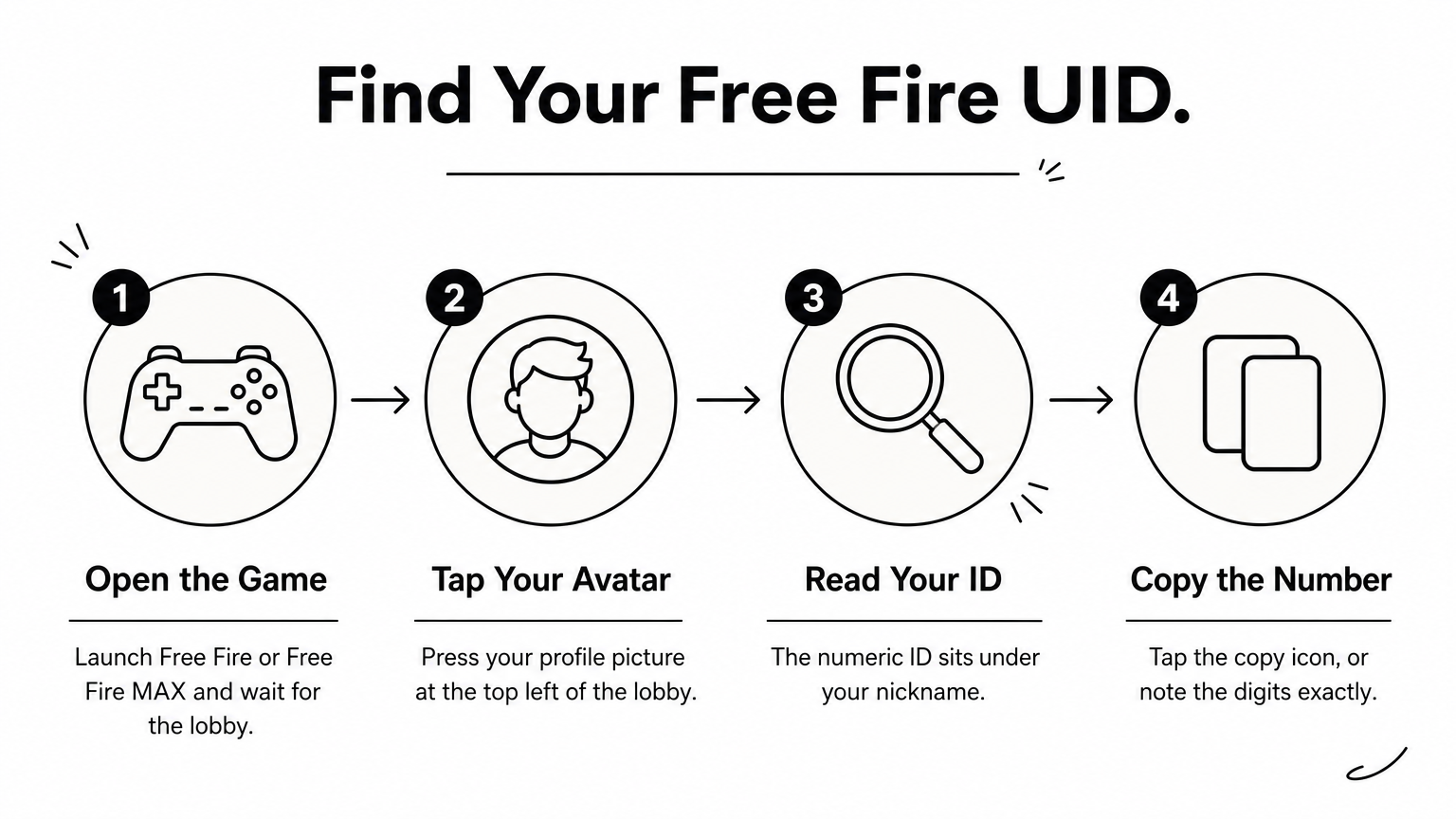
Open Free Fire, tap your profile picture at the top left of the lobby, and your numeric ID appears under your nickname. Copy it with the copy icon beside it. Pasting is safer than typing, because one wrong digit sends diamonds to a stranger.
Keep your nickname in mind too. If a store shows a nickname after you enter the UID, it should match yours.
A Free Fire UID diamond gift works the same way. You enter your friend's UID at checkout instead of yours, and the diamonds go to their account.
Ask your friend to send a screenshot of their profile, not a typed number. Then compare the UID and nickname before you pay. Top-ups are delivered to the ID you submit, and a wrong ID is hard to fix afterward.
Always paste the UID instead of typing it, and match the nickname before you pay.
Choose a store that accepts your wallet, shows clear support contacts and asks only for your UID. Then pick the pack that covers what you want to buy, with the least waste.
AroraShop meets these checks. It accepts all three wallets, publishes its refund rules on a Refunds and Returns policy page, and shows a 4.9/5 rating with Trustpilot and Google review links. You create an account on the site to get full service. The Android app on Google Play carries app-only discounts, which are worth a look if you top up often.
Garena's official top-up center lists packs of 25, 100, 310, 520, 1,060, 2,180, 5,600 and 11,500 diamonds. Local stores may group them differently, so look at the store's own list.
Here is a worked example. Say a bundle costs 600 diamonds. Buying 520 and 100 gives you 620, enough with 20 left over. Buying the 1,060 pack would leave 460 unused. Compare the price per diamond in the store's list before you decide, since bigger packs are often cheaper per diamond but only help if you will spend them.
Pick the smallest combination of packs that covers your purchase, then compare the price per diamond.
Enter your UID, select the pack, choose your wallet, and complete payment on the gateway page the website provides. Follow the prompts, then keep your transaction ID until the diamonds arrive.
AroraShop requires payment through the gateway listed on its website. It states that all transactions run through encrypted, secure local payment channels. If someone asks you to send money outside that checkout, stop.
Enter your wallet PIN and OTP only inside the official bKash, Nagad or Rocket screen. No store, chat agent or "reseller" needs them. Take a screenshot of the payment confirmation, since support will ask for the transaction ID if anything goes wrong. Avoid paying from a wallet balance you cannot afford to lose on an unfamiliar store. Test a small pack first, then buy larger ones once delivery works.
Pay only through the checkout gateway, and never type your PIN or OTP anywhere else.
Open Free Fire and check your diamond balance in the lobby. AroraShop states an average delivery time of 20 to 60 minutes after it verifies your transaction, and says timing depends on location. If the balance has not changed, restart the game once before you contact anyone.
Delivery is not always instant, because the store verifies your payment first. Restart the game, wait a few minutes, and check again. If you are topping up for a friend, ask them to check their own balance rather than yours.
Gather three things before you contact support: the UID you entered, the transaction ID and the payment screenshot. AroraShop offers 24/7 support, with WhatsApp chat, phone support on +8801867859776, email at support@arorashop.com and an average response time under 15 minutes.
Problem What to do Balance unchanged after 60 minutes Contact support with UID and transaction ID Diamonds went to the wrong UID Contact support at once with both IDs Payment taken, no order shown Send the payment screenshot to support Want to know refund eligibility Read the Refunds and Returns policy page firstContact support early, with your UID and transaction ID ready, and delays get solved faster.
The process comes down to four habits. Copy your UID exactly, pick a store that asks for nothing else, pay only through its checkout, and check your balance afterward. Do that and a UID top-up is one of the safest ways to buy diamonds in Bangladesh. Skip any step and you risk a wrong delivery or a scam.
When you are ready, make your Free Fire diamond top up at AroraShop with bKash, Nagad or Rocket. Start with a small pack, confirm the diamonds arrive, and then buy bigger packs with confidence.