Leave a Review


Buying Robux in Bangladesh is harder than it should be. Roblox accepts international cards and PayPal, and most players here have neither, unless they go through the trouble of applying for a Fasset debit card in Bangladesh. So you end up asking friends, trusting random Facebook sellers, or giving up. A Roblox gift card BD buyers can pay for in taka solves this, as long as you buy from a seller who delivers a real code.
The short answer: you can buy a Roblox gift card from AroraShop, pay with bKash, Nagad or Rocket, and get the code digitally right after payment. No international card is needed. You then enter the code on the Roblox website to add Robux or credit to your account.
This guide walks you through the whole process in order. You will see where to find the Robux gift card BD listing, how to choose the right amount, how to pay with your mobile wallet, and how to redeem the code. I also cover a few checks that help you avoid fake sellers, so your money and your account stay safe.
Roblox sells its cards worldwide, but you normally pay in a currency your local wallet cannot send. A reseller fixes that. You pay in BDT, and the store gives you a digital code on screen or by message. Nothing is shipped, so you never wait for a courier.
Every robux gift card BD listing should show the card's face value, usually in US dollars, and its price in taka. Read both before you pay. Look for a region note too, because a code bought for the wrong region may not work on your account. Choose the amount that matches what you want to spend, since a code is single use and cannot be split or refunded once redeemed.
Fake sellers are the main risk, and they are easy to spot if you know what to check. Run through this list before you send any money:
Above all, protect your login. A real seller needs nothing from you except payment, and you only ever type the code into Roblox yourself.
A Roblox gift card never needs your password, only the code.
If a seller asks for your username and password to "load Robux manually," walk away. That is an account takeover scam, not a gift card sale. AroraShop delivers the code, and you redeem it on your own device.
Start with what you actually want to buy. Open Roblox, find the item or pass, and note its Robux price. Then pick a card value that covers it with a small buffer for the next purchase. If you play often, one larger card is usually better than several small ones, but compare the taka price per dollar on each listing first.
Choose the amount before you pay, because a redeemed code cannot be changed.
Not every roblox gift card bd listing gives you the same thing. Some cards add Robux directly, while others add Roblox credit that you spend on Robux or Premium. Read the title and description so you know which one you are buying, and confirm the region matches your account.
Run through this quick checklist:
If any detail is unclear, message the store's support before you order. A real seller answers this kind of question quickly, and the answer costs you nothing.
Open AroraShop in your browser or in the Android app, which also carries app-only discounts. Use the gift cards collection or search for "Roblox" to reach the Roblox gift card BD listing. Then follow these steps:
Before you pay, read the order summary line by line. Confirm the face value and region, the price in BDT, and the phone number or email where the code will arrive. A typo in your contact details is the most common reason a code seems to go missing.
Check the order summary twice, because the code goes exactly where you tell it.
Stock is the other thing to verify. If your amount is not listed, use the store's request-a-product option or the Contact Us page instead of buying a different card. Asking first is cheaper than guessing, and support can usually tell you whether the robux gift card bd you want is coming back.
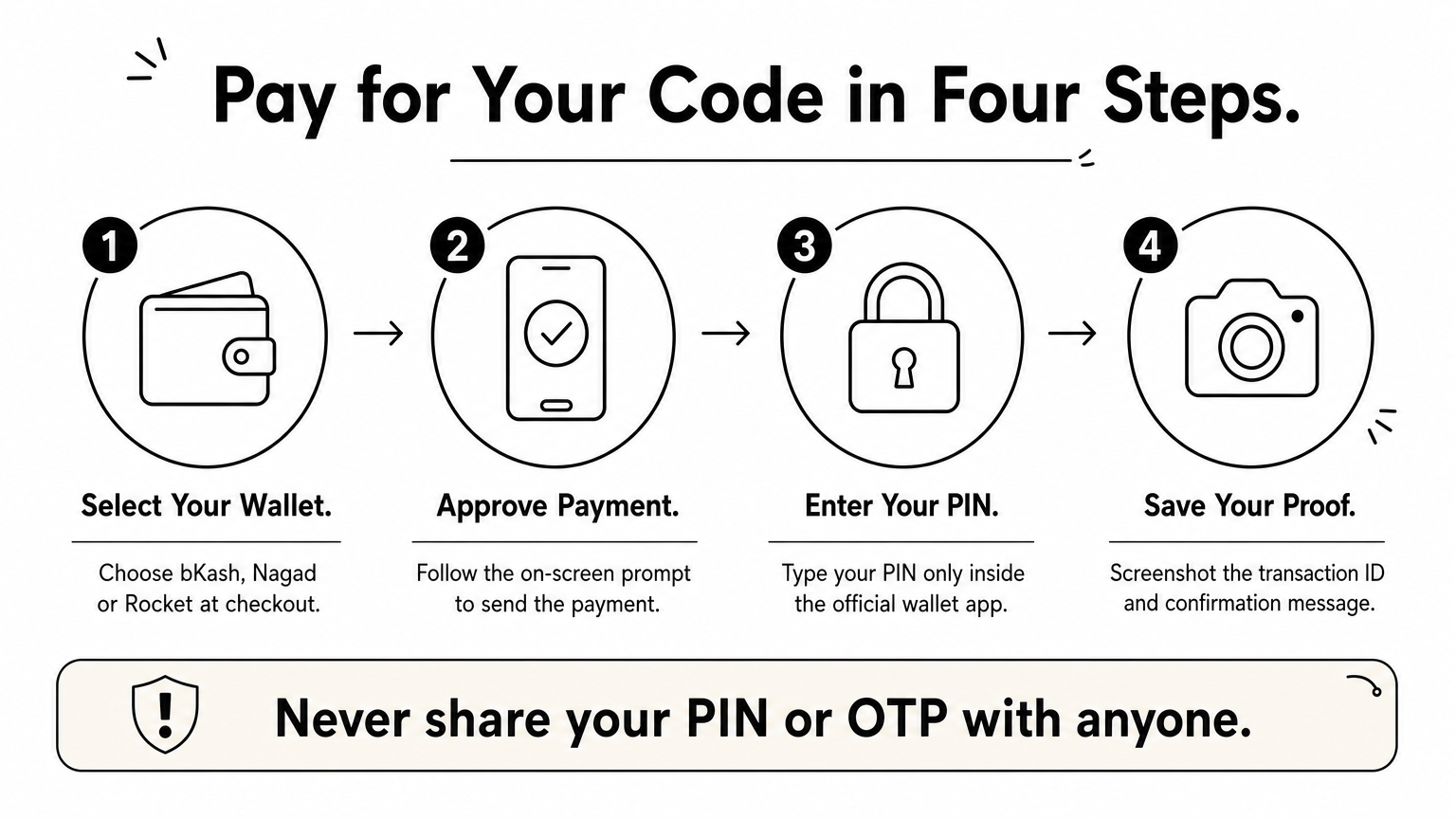
Pick the wallet that has enough balance. AroraShop accepts bKash, Nagad and Rocket, so you can pay for your Roblox gift card BD order without an international card. Make sure the balance covers the full price in BDT, plus any fee your wallet app adds.
Once the payment goes through, take a screenshot of the transaction ID and the confirmation message. Delivery is advertised as instant, but if your code is late, that ID is what support needs to find your order quickly.
Security matters here too. No store, agent or "support person" should ever ask for your wallet PIN or OTP. If someone does, stop the payment and report it to the wallet provider.
Your wallet PIN and OTP belong to you alone, and no seller needs either one.
After payment, check the order page and your email or phone messages for the code. If nothing shows up after a few minutes, contact support with your order number and the screenshot instead of paying a second time.
Your code is in hand, so the last step takes about a minute. Always redeem it on the official Roblox website, never through a link a seller or stranger sends you. Type the address yourself and follow these steps:
Redeem your code only on roblox.com, logged in to your own account.
After redeeming, check your balance. Depending on the card, you will see Robux added directly or Roblox credit that you then spend on Robux or Premium. Either result means your Roblox gift card BD purchase worked.
If you get an error, first look for a typo or stray space in the code. Then confirm you are logged in to the right account and that the card region matches it. Still stuck? Reach out to AroraShop support with your order number and a screenshot of the error. Do not keep retrying the code, because that only makes the problem harder to trace.
Buying Robux in Bangladesh comes down to four moves. Choose the right amount, order from a store you can verify, pay with your mobile wallet, and redeem the code yourself on roblox.com. A Roblox gift card BD purchase stays safe when you follow two rules: never share your password, and never share your wallet PIN or OTP. Everything else is routine, and the whole process takes only a few minutes.
You no longer need an international card or a friend abroad. Open the store, buy a Roblox gift card in Bangladesh, pay with bKash, Nagad or Rocket, and get your code right after payment. Keep your transaction ID until the Robux show up in your account. If anything looks off, contact support with your order number before you try again. Then get back to playing.