Leave a Review


To buy eFootball coins in Bangladesh, pick a trusted source (the in-game store, Konami's official web store, or a local top-up shop), enter your account details exactly, pay with bKash, Nagad, Rocket or a card, and check your balance in the game. If you only have mobile wallets, a local shop is the simplest route. Never use a "free coin generator", because those are scams.
Most buyers get stuck on the same problems. Many players in Bangladesh have no international card, so the in-game store is closed to them. Prices differ between stores, and fake sellers are easy to find. Konami has also warned that repeating a failed coin purchase can lead to several charges being processed at once. One rushed payment can cost you money or put your account at risk.
This guide walks you through the process in four steps: choosing where to buy, paying with local methods, confirming delivery, and finding legitimate free coins. AroraShop is a Bangladesh-based digital marketplace that sells eFootball coins, so the payment steps below come from the local buyer's side.
eFootball Coins are the game's premium currency. You spend them in the in-game store, mainly on Game Packs and other store items. They belong to your game account, so always buy for the account you actually play on.
The same game runs on mobile, console and PC, and each platform has its own store. Check that the store you use delivers coins to the platform you play on. If you play on Android, buy mobile coins. If you play on Steam, buy through the PC route.
The Steam item store lists five official coin packs. The table shows how much you get per US dollar.
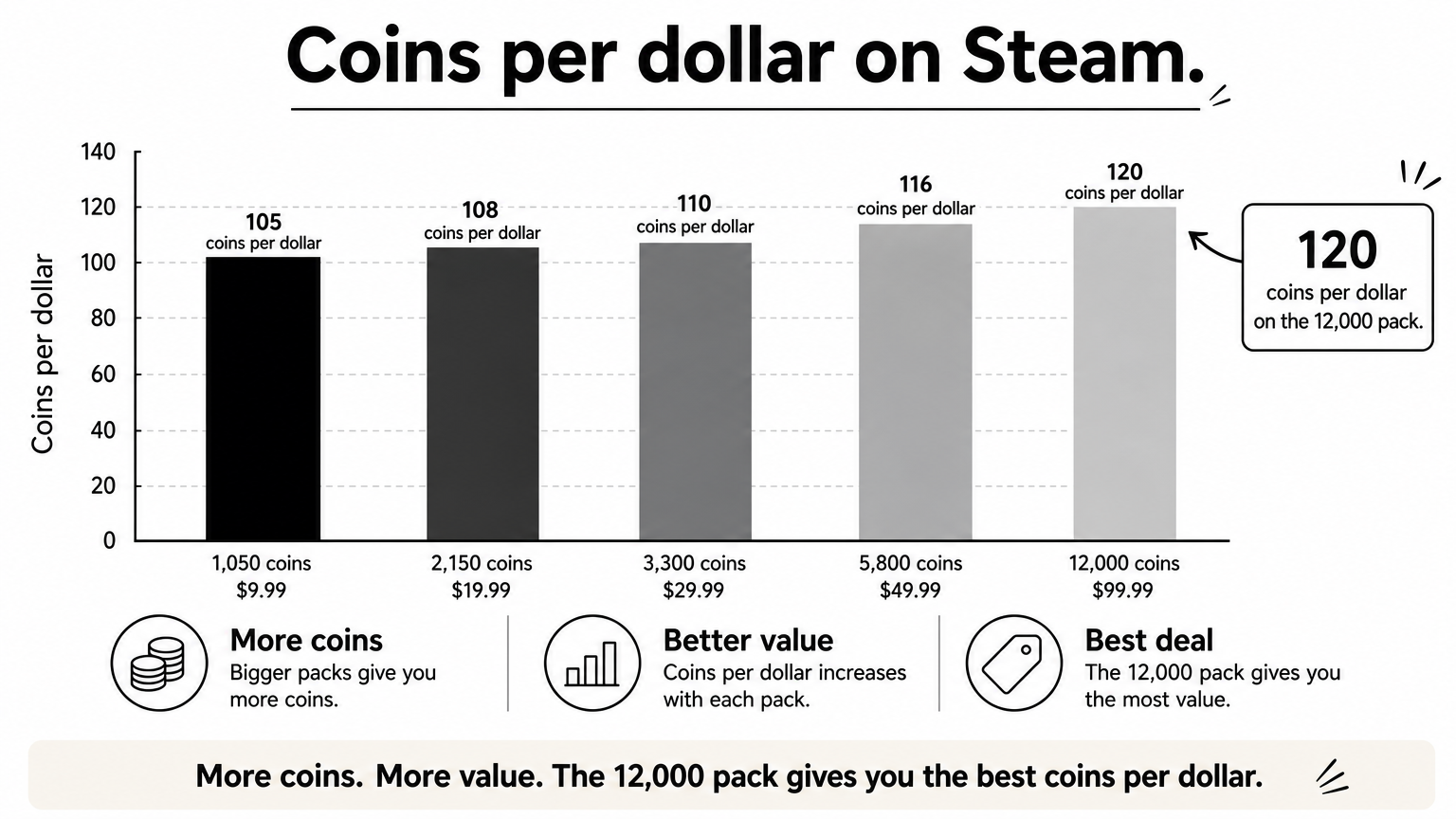
| Pack | Price (USD) | Coins per dollar |
|---|---|---|
| 1,050 coins | $9.99 | about 105 |
| 2,150 coins | $19.99 | about 108 |
| 3,300 coins | $29.99 | about 110 |
| 5,800 coins | $49.99 | about 116 |
| 12,000 coins | $99.99 | about 120 |
Bigger packs give better value. Five 1,050 packs cost $49.95 and give 5,250 coins. The single 5,800 pack costs $49.99 and gives 550 more coins. Prices on other stores differ, and Konami has changed coin prices on Google Play in some countries because of exchange rates, so check the current price before you pay.
Buy one larger pack instead of several small ones, because the coins per dollar rise with pack size.
Buy from a source that delivers to your account and accepts a payment method you actually have. There are three realistic options for players in Bangladesh.
| Source | How you pay | Best for | Watch out for |
|---|---|---|---|
| In-game store (Google Play, App Store, PlayStation, Xbox, Steam) | Card or store balance | Players with a working card | Card rejections, store price changes |
| Konami's official web store | Methods vary by country page | Web store specials | Payment methods may not include mobile wallets |
| Local top-up shop such as AroraShop | bKash, Nagad, Rocket | Players without an international card | Only buy from shops with clear reviews and support |
If you want the store route but have no card, a store gift card from a local shop can fund your balance. For direct coin delivery, a local shop is faster to set up.
Walk away if you see any of these signs:
A real top-up never needs your password, so any seller who asks for it is a red flag.
Paying locally takes a few minutes. Get your account details ready first, then place the order on the shop's website or in its Android app.
Open eFootball and find your user ID in your profile. Confirm which platform the account runs on, and note your current coin balance so you can verify the top-up later. Copy the ID rather than typing it, because one wrong character sends coins to the wrong account.
The app offers app-only discounts, so compare the app price with the website price before you pay. Check the details once more before you confirm, since a mistyped ID is hard to reverse.
Double-check your user ID before paying, because delivery goes to whatever ID you typed.
Delivery from a digital shop is meant to be instant, so check your balance within a few minutes. Restart the game if the new coins do not show up right away.
Open the in-game store and compare your coin total with the number you noted earlier. If the pack was 1,050 coins, your balance should be exactly 1,050 higher. Keep a screenshot of the payment confirmation until you have checked.
Avoid disputing a payment through your bank or wallet while an order is pending. Konami's site carries a notice on negative coin balances and functional restrictions, so treat a reversed payment as something that can put your account at risk. Talk to the seller first.
If a payment fails, stop and contact support before you try again.
You can earn some coins without paying, but only through Konami's own channels. No outside tool can create coins for your account.
Free coin generators and "hack" sites ask for your login or push you to install apps. They cannot add coins to your account, and they risk your account and your data. Skip them completely.
For discounts, check the official web store's specials and the in-game offers. Compare any "sale" price with the regular price per coin from the table above. A large pack at a modest discount is usually a better deal than a small pack with a big banner.
Free coins come only from Konami's campaigns, and any site claiming to generate them is a scam.
Buying eFootball coins safely comes down to four habits. Choose a trusted source, copy your account details exactly, pay with a method that suits you, and confirm the balance before you close the order. For free coins, stick to Konami's own events and points. If you pay with a mobile wallet and want instant delivery, you can top up eFootball coins at AroraShop with bKash, Nagad or Rocket.