Leave a Review


A working product key for Windows 10 Pro 64 bit has to be genuine, match your edition, and belong to a license you can prove you own. For most readers in Bangladesh, that means buying a key from a trusted local seller such as AroraShop. If you only want to test Windows, Microsoft's generic keys install Pro without activating it. If you manage an office network, KMS or volume keys are the right path. Reusing a license you already own is the cheapest option of all.
Most people reach this search after seeing the "Activate Windows" watermark or after a fresh install that asks for a key they do not have. The usual result is a PDF or forum list of keys that are blocked, mismatched, or bundled with malware. Windows 10 also reached end of support on October 14, 2025, so it pays to choose your license route carefully before you spend money on it.
This guide covers seven legitimate routes, from buying a key to moving to Windows 11. Each one explains how it works, who it suits, and what it costs or limits. You also get the generic and KMS keys for Home, Pro, Education and Enterprise, and a step-by-step section on entering a key and fixing errors. AroraShop sells Windows license keys with bKash, Nagad and Rocket payments, so it comes first.
AroraShop sells Windows license keys as digital goods, so a purchase ends with a code on your screen within minutes instead of a package in the mail. You choose the listing, pay, and enter the key in Windows. Activation then happens online, the same as with any retail key.
Edition matters more than anything else. A Windows 10 Pro key will not activate Home, so read the listing and confirm it names Windows 10 Pro before you pay. The 64-bit part is simple. A license key is not locked to 32-bit or 64-bit, and the installation media you boot from decides the architecture.
A genuine key only helps if its edition matches the Windows you installed.
This route fits gamers and PC builders in Bangladesh who finish a build and find no activation key in the box. Paying with bKash, Nagad or Rocket removes the usual blocker, which is the lack of an international card for foreign stores.
Students and freelancers who reinstall Windows on a laptop also benefit. The same shop sells ChatGPT Plus, CapCut Pro, NordVPN and gift cards, so one account covers several purchases. Companies deploying dozens of PCs should look at volume licensing in item 6.
Prices vary by listing, so check the current price on the product page and compare it with Microsoft's own price for the same edition. OEM keys cost less than retail keys, so a lower price is normal for them. Ask which type you are buying and whether it can move to another PC later.
The shop displays public reviews on Trustpilot and Google Maps and has a contact page for support. Read recent reviews before ordering. Keep your order confirmation, because it is your proof of purchase if activation ever needs support. You can browse the catalog at AroraShop.
Generic keys are default keys that tell the Windows installer which edition to set up. They do not prove you own a license, so Windows installs but stays unactivated. These are the keys for the four editions people search for most.
Windows 10 edition Generic installation key Home YTMG3-N6DKC-DKB77-7M9GH-8HVX7 Pro VK7JG-NPHTM-C97JM-9MPGT-3V66T Education YNMGQ-8RYV3-4PGQ3-C8XTP-7CFBY Enterprise XGVPP-NMH47-7TTHJ-W3FW7-8HV2CType the Pro key during setup, or choose I don't have a product key and pick Pro from the list. Either way you get a 64-bit Windows 10 Pro install that waits for a real key. These keys are static values built into Windows, so a 2026 install uses the same ones as older installs.
A generic key installs Windows. It never activates it.
Testers, virtual machine builders and technicians gain the most. If you want to try Pro before buying, or you need the right edition on a PC while the license is still on its way, a generic key gets you there.
It also helps when a PC came with Home and you plan to buy a Pro key. Install Pro with the generic key, then activate with the purchased key later. Nobody should expect permanent free activation from this route, because it does not exist.
The keys are free, and so are the limits. Unactivated Windows 10 still runs, but it shows an Activate Windows watermark and locks the personalization settings. You cannot change the wallpaper or theme from Settings.
Treat this as a temporary state. Lists that claim a generic key is a "working activation key" are wrong, and PDF collections that mix these keys with random codes only add blocked keys to the pile. If you want a Windows 10 Pro 64 bit key that sticks, move on to another item.
KMS client setup keys are published by Microsoft so that a Key Management Service host inside a company network can activate client PCs. The key only names the edition. The host does the activating, and a PC with no host to talk to cannot activate. You can see the full list in Microsoft's KMS client key documentation.
Windows 10 edition KMS client setup key Home TX9XD-98N7V-6WMQ6-BX7FG-H8Q99 Pro W269N-WFGWX-YVC9B-4J6C9-T83GX Education NW6C2-QMPVW-D7KKK-3GKT6-VCFB2 Enterprise NPPR9-FWDCX-D2C8J-H872K-2YT43A KMS host needs at least 25 client computers before it starts activating Windows clients. Activated clients must also reconnect to the host at least every 180 days, or they fall back to unactivated.
A KMS key is a client setting, not a license. The license comes from your volume agreement.
IT administrators running a domain, a school lab or an office with enough PCs to meet the threshold are the target. They already hold a volume license, and the KMS key points each machine at the host.
Home users searching for a free product key for Windows 10 Pro 64 bit often land on these keys. They will not work on a standalone PC. Windows will simply fail to find a KMS server.
The key costs nothing, but the license behind it does. Your organization pays through a volume agreement, and KMS only automates the activation step.
On a home PC, the typical result is error 0xC004F074, which means Windows could not reach a KMS host. Do not look for public KMS servers or third-party activators to work around it. They breach Microsoft's license terms, and activator downloads are a common way to pick up malware.
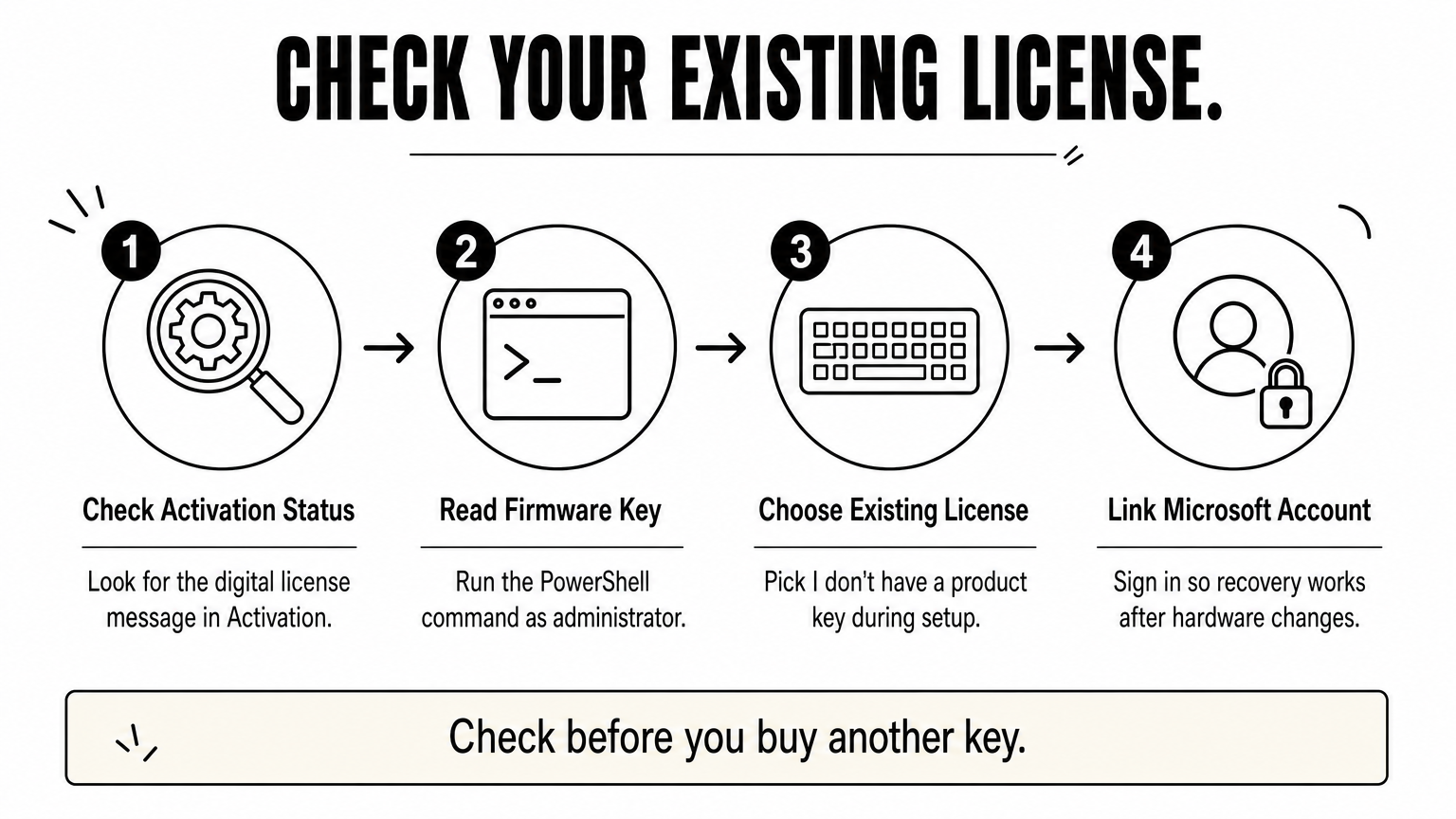
If Windows 10 was ever activated on your PC, your hardware may already hold a license. Windows 10 uses a digital license linked to the device, and many PCs sold with Windows 8 or later also carry an OEM key in the firmware. A reinstall of the same edition on the same hardware usually activates by itself once you are online.
During setup, choose I don't have a product key. To read a firmware key from a running PC, open PowerShell as administrator and run this command.
(Get-WmiObject -query 'select * from SoftwareLicensingService').OA3xOriginalProductKeyIf the output is blank, the PC has no firmware key, and your license is a digital one. Check Settings, Update & Security, Activation for the message "Windows is activated with a digital license."
Before you buy anything, check whether the PC already holds a license for the edition you want.
People who reinstall Windows on a laptop or desktop that came with Windows, or one they activated years ago, should start here. It also suits anyone who upgraded a Windows 7 or 8 PC to Windows 10 and wants a clean install of the Pro edition they had.
The firmware key is edition-specific. If your laptop shipped with Home, the key will only activate Home. A Pro product key for Windows 10 64 bit has to come from another route.
This route costs nothing. The limit is that the license is tied to the hardware, usually the motherboard. After a major hardware change, Windows may lose activation. Use the Activation troubleshooter and choose "I changed hardware on this device recently", then sign in with the Microsoft account linked to the license.
Link your Microsoft account to the license while it works. That one step makes recovery after a motherboard swap far easier.
A retail license is a full license you can move between PCs. An OEM or system builder license is cheaper but ties to the first PC it activates. Both arrive as a 25-character key, and both work with the 64-bit Windows 10 Pro installer.
Buy from Microsoft or an authorized reseller, and you get a clean key with a clear chain of ownership. Since Windows 10 reached end of support, stock and listings change, and Microsoft promotes Windows 11 instead. Check what is currently available before you plan around it.
Retail keys follow you to a new PC. OEM keys stay with the first one.
Retail suits anyone who upgrades hardware often, such as enthusiasts who replace a motherboard every few years. OEM suits a one-off build that will stay in one case.
Buyers with local payment needs should compare authorized sellers on price and payment options. If an international card is the problem, a local shop with bKash or Nagad solves it, as in item 1.
Retail costs the most, OEM less, and the gap is the price of transferability. Be careful with very cheap listings on open marketplaces. Keys of unclear origin can be blocked later, and error 0xC004C003 is the typical sign.
Keep the receipt and the key. A legitimate seller can show where the key came from, and Microsoft support can only help if you can show proof of purchase.

Windows 10 Enterprise and Education are not retail products. Organizations get them through volume licensing, academic volume licensing, or subscriptions such as Microsoft 365 plans that include Windows rights. Activation then runs through KMS, a Multiple Activation Key (MAK), or subscription activation.
A MAK activates a fixed number of PCs through Microsoft's servers, which suits small groups. Subscription activation upgrades Pro machines to Enterprise when a licensed user signs in. Microsoft 365 Business Premium includes Windows Business upgrade rights for Pro devices.
Enterprise and Education keys come with a contract, not with a shop checkout.
Schools, universities, companies with a managed fleet, and IT resellers need this route. If you search for a Windows 10 Enterprise product key or a Windows 10 Education activation key for one personal PC, you are in the wrong place. A Pro license covers an individual far better.
Education editions are meant for qualifying academic institutions. Students normally get access through the school's agreement, not by buying a key themselves.
Costs depend on your agreement and the number of seats. Volume contracts reward scale, and a one-PC purchase rarely makes sense. The product key for Windows 10 Pro 64 bit that an individual buys will always be simpler and cheaper.
Plan for admin work too. KMS needs a host and network access, and MAK activations are counted against a limit. Ask your Microsoft partner which method fits your size before you buy.
Windows 10 passed end of support on October 14, 2025, so security updates have stopped for standard installs. Microsoft offered consumers a one-year Extended Security Updates option that ends in October 2026. Windows 11 is the path that keeps receiving updates.
Eligible Windows 10 PCs can upgrade to Windows 11 for free, and a licensed Windows 10 PC activates Windows 11 through its digital license. Run the PC Health Check app first. Windows 11 requires TPM 2.0, Secure Boot and a supported processor.
A key for a dead-end Windows version is a poor investment if your PC can run Windows 11.
Anyone who already holds a licensed Windows 10 Pro PC that meets the hardware requirements should upgrade. It is also the better choice for new installs, because you get current security updates without extra cost.
If your hardware is too old for Windows 11, stay on Windows 10 and treat it as a short-term plan. Keep sensitive work off that machine and plan a hardware refresh.
The upgrade is free for eligible, licensed devices. The cost appears if your PC fails the requirements, because you then need new hardware or a paid support plan.
An unlicensed install is not fixed by upgrading. Windows 11 still needs a genuine license, so use item 1, 4 or 5 to get one first. Then a product key for Windows 10 Pro 64 bit also helps you reach Windows 11 Pro.
Open Settings, System, About and read the "System type" line. It should say 64-bit operating system, x64-based processor. The edition shows under "Windows specifications". Check that this edition matches your key before you try to activate.
If it says 32-bit on a 64-bit processor, you installed from 32-bit media. A key does not convert it. You need a clean install with 64-bit media.
Use the Settings route first. Go to Settings, Update & Security, Activation, Change product key, type the 25 characters, and follow the prompts. If Settings rejects the key, use an elevated Command Prompt.
slmgr /ipk XXXXX-XXXXX-XXXXX-XXXXX-XXXXX slmgr /atoThe first command installs the key, and the second attempts online activation. Run slmgr /dli afterward to see the license status and the last five characters of the installed key.
Most failures are edition mismatches, blocked keys, or KMS keys used on standalone PCs.
Error What it means What to do 0xC004F050 The key is invalid for this edition or build Recheck each character, confirm the edition in Settings, and retry with slmgr /ipk 0xC004C003 The activation server says the key is blocked Contact the seller, or buy a different genuine key 0xC004F074 Windows cannot reach a KMS host You used a KMS key on a standalone PC, so use a retail, OEM or digital license 0xC004F034 The license was not found Run the Activation troubleshooter and sign in with the linked Microsoft accountMost activation errors trace back to the wrong edition, not to a bad key.
The facts are simple. Generic keys install Windows and never activate it. KMS keys need a company host. For a lasting activation, reuse a license you already hold, buy a genuine retail or OEM key, or use a volume agreement. If your PC qualifies, move to Windows 11.
For most people in Bangladesh, the fastest legitimate route is buying a key and paying locally. Confirm the edition, match it to your install, and keep your proof of purchase. When you are ready, you can buy a Windows license key at AroraShop and pay with bKash, Nagad or Rocket.