Leave a Review


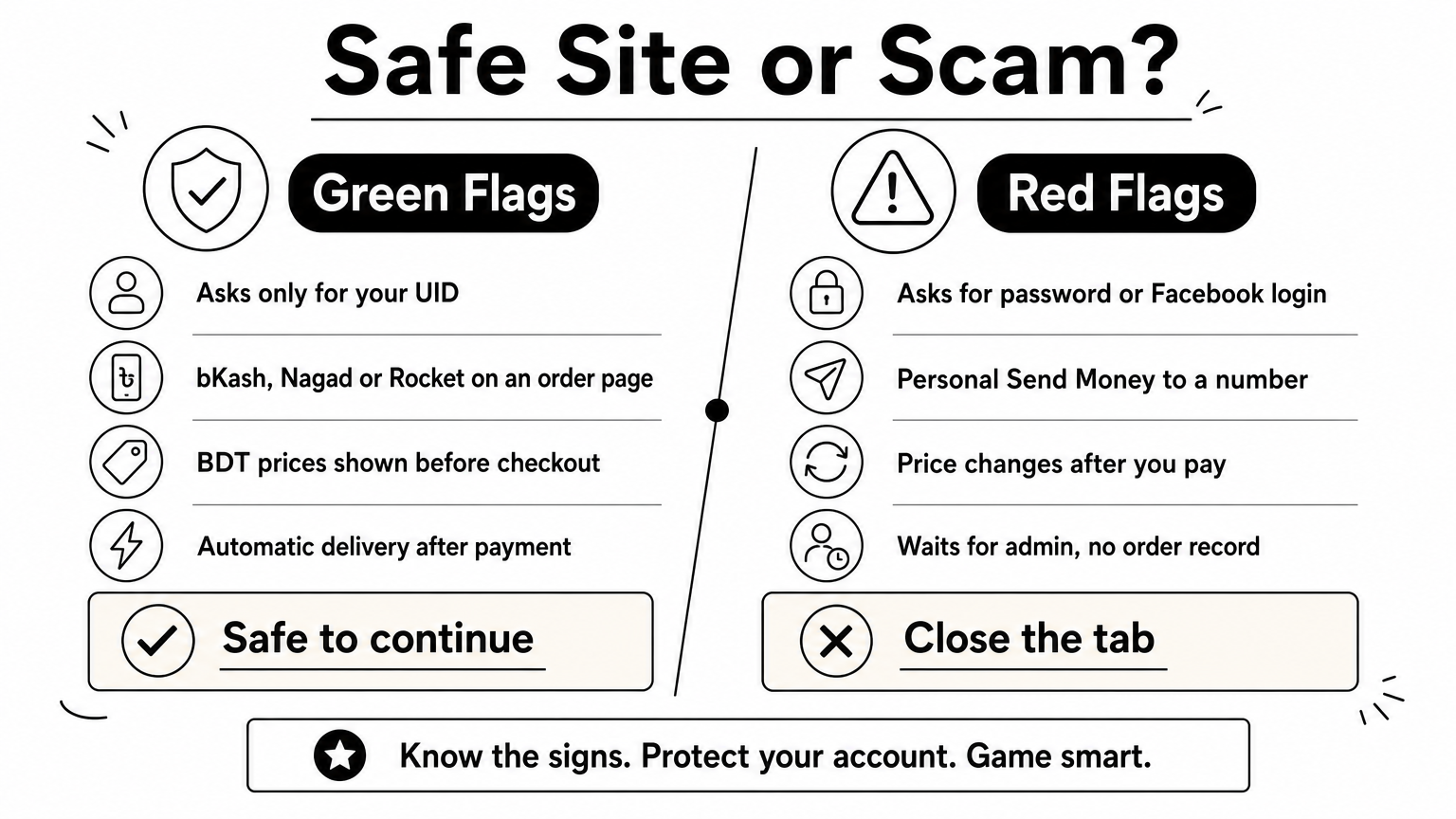
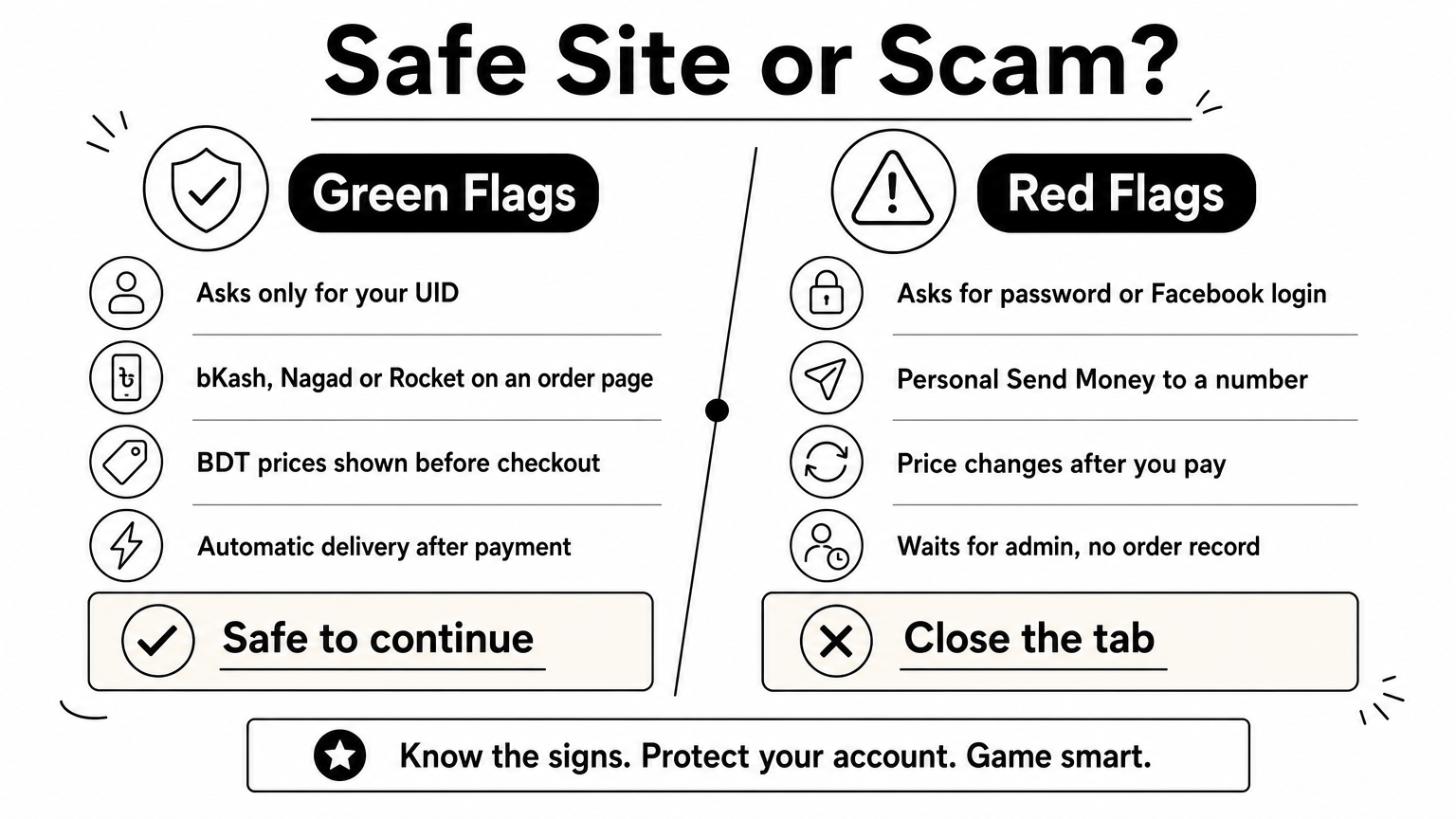
To buy diamonds from a free fire diamond top up bd bkash website, copy your Player ID (UID) from the game, choose a pack, pay in BDT with bKash, Nagad or Rocket, and check your balance a few minutes later. A trustworthy site needs only your UID. It never needs your password, your Facebook login, or a code sent to your phone.
The hard part is not the payment. It is finding a seller you can trust. Many players in Bangladesh have no international card, so they search for local shops and land on dozens of near-identical pages, social media sellers, and "send money to my personal number" offers. One wrong digit in a UID or one payment to a stranger costs real money, and nobody can easily pull diamonds back from someone else's account.
This guide walks you through the process in four steps: get your UID and pick a pack, check the website, pay with your mobile wallet, and confirm delivery. We use AroraShop, a Bangladesh-based marketplace for game top-ups, gift cards and subscriptions, as the worked example. The same checks apply to any shop you consider.
A safe site delivers diamonds to your Player ID, takes payment in BDT through bKash, Nagad or Rocket, and never asks for anything that lets it log in as you. If a website fails any of those three tests, close the tab. You can judge all three in under a minute, before you spend a taka.
Your UID works like a bank account number. Anyone can send diamonds to it, but nobody can use it to open your account. That is why a UID-based top-up is the standard method for a legitimate Free Fire diamond top up BD bKash website.
The alternative is a login-based top-up, where the seller asks for your Facebook, Google or VK credentials and tops up from inside your account. Avoid it. You hand over full access, you risk losing the account, and you have no way to prove what the seller did with it.
A UID lets a seller give you diamonds. A password lets a seller take your account.
Compare any site you find against this table before you place an order.
Gather four things first so you never rush a payment halfway through: your Player ID, a mobile wallet with enough balance, your phone for the confirmation SMS, and a stable connection. Decide on your budget too. Knowing the exact pack you want stops you from being talked into a bigger one.
Open Free Fire, copy your UID from your profile, and choose the smallest pack that covers what you want to buy. Do this before you open any shop, because the UID is the one piece of data you cannot afford to get wrong.
Follow these steps on the account you want to top up:
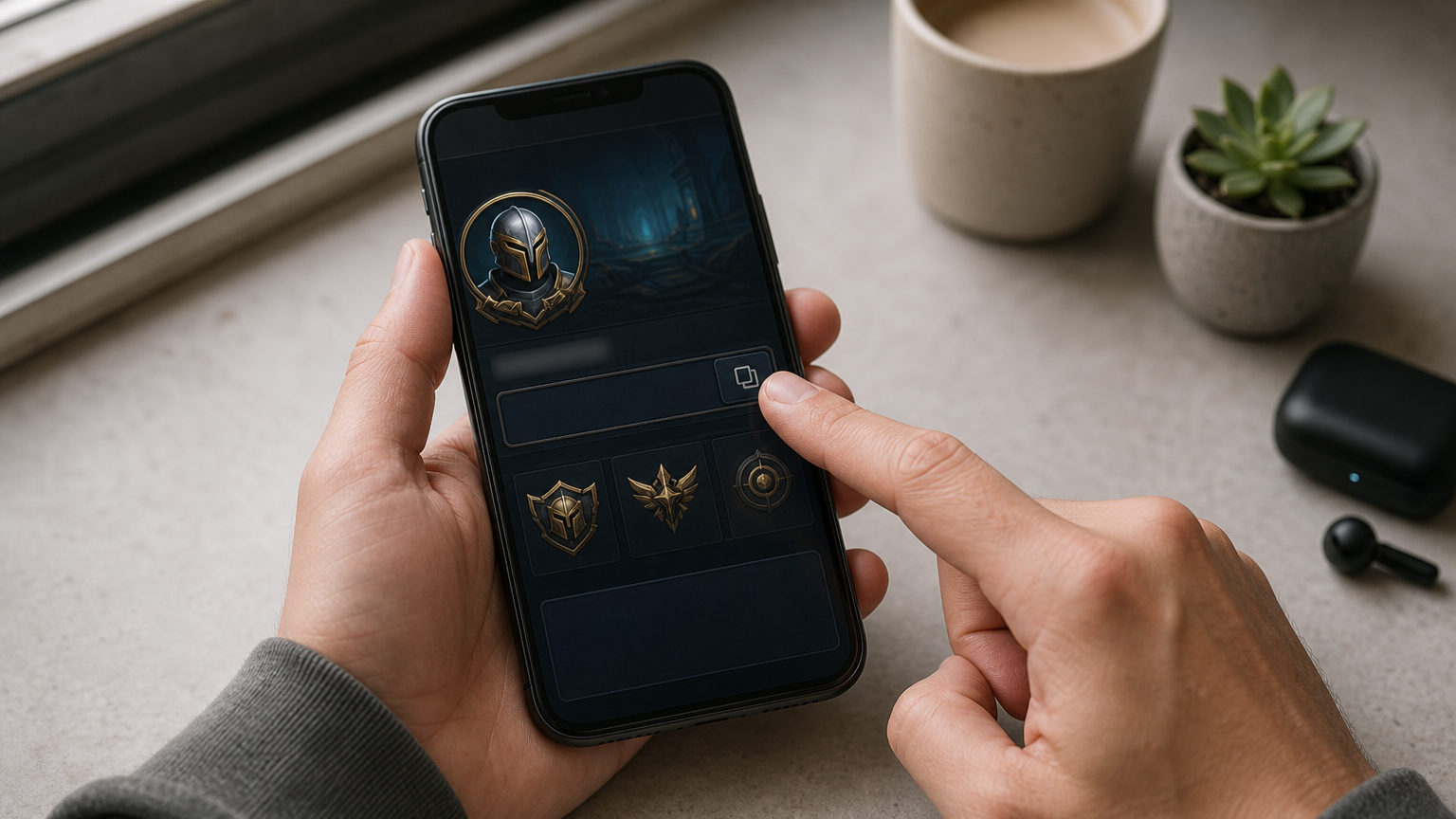
Free Fire and Free Fire MAX share one account and one diamond balance, so diamonds bought for your UID appear in both versions. Your display name is not your UID, and a friend can share theirs from their own profile without ever giving you a login.
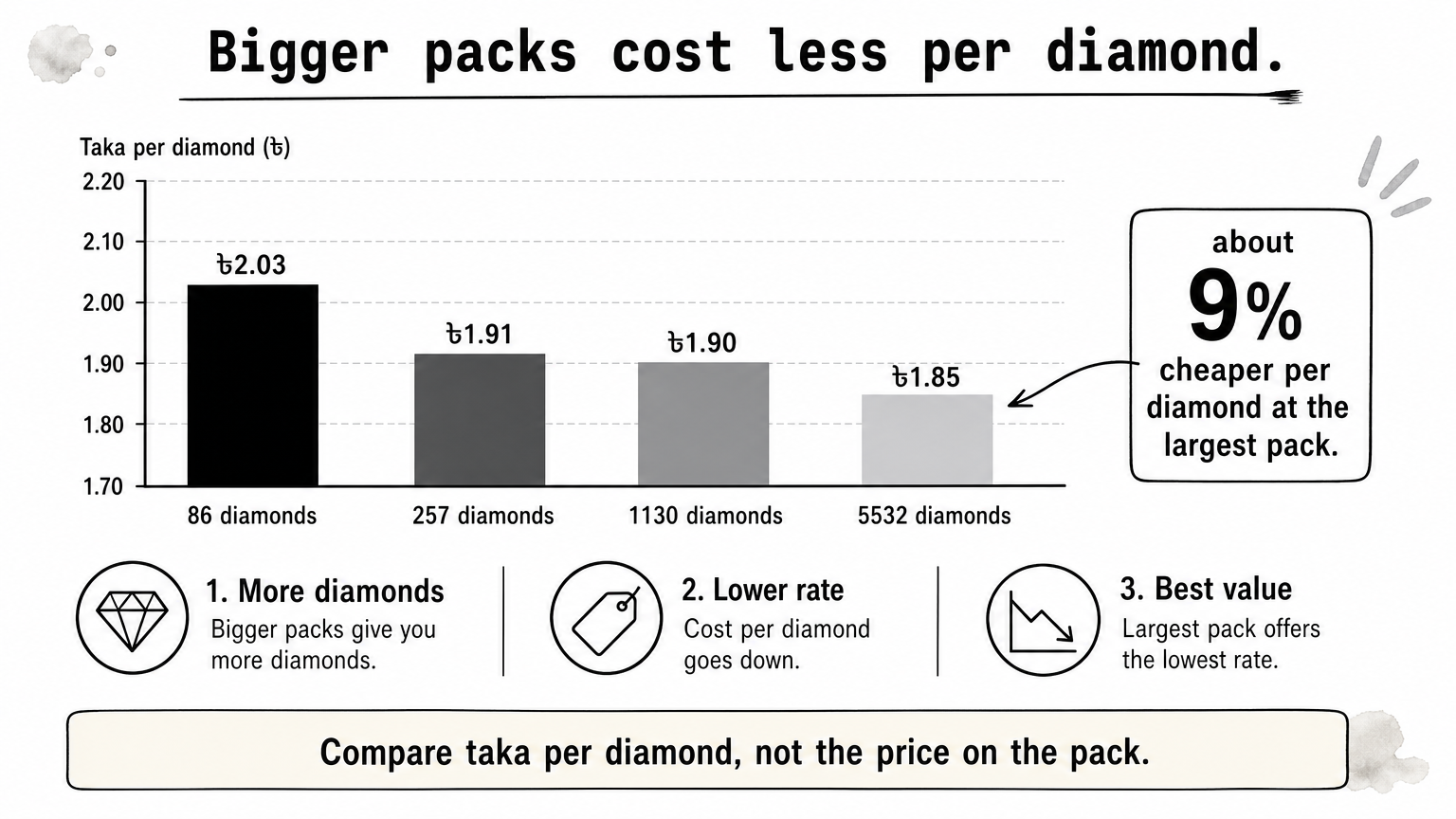
Packs start small, with options such as 50 diamonds, and climb to bundles in the thousands. Larger packs usually cost less per diamond, but only buy big if you will actually spend it. Memberships such as the weekly and monthly passes are separate products, so read the listing to see what they include.
A small pack is useful when you are just short. If a bundle costs 80 diamonds and your wallet holds 35, a 50-diamond top up covers the gap, while a 115-diamond pack leaves you with diamonds you did not plan to buy. The same logic applies whether you pay through bKash or Nagad, because the pack, not the wallet, sets the price. Always trust the total on the checkout page, not a screenshot from someone else's order.
Buy the smallest pack that covers your purchase, and confirm the price on the checkout page.
Spend two minutes checking the site itself, because a Free Fire diamond top up BD bKash website earns your money only if it passes basic trust checks. Do the checks before you enter your UID, not after.
Work through this list on the shop's own pages:
AroraShop runs a website and an official Android app, and the app is worth using if you buy often because it carries app-only discounts. Install it only from the link on the official website, never from a file someone sends you.
A price far below every other shop is a reason to look harder, not to hurry. Discounted diamond offers are a common way for scammers to collect payments, and a seller who is cheap but vague about delivery has already told you what you need to know.
Compare the checkout total for the same pack across two or three shops. A small gap is normal, since shops price differently. A huge gap, or a deal that only works if you pay immediately through a personal number, is a warning sign. A fair price from a site with visible support beats a bargain from a stranger.
If a deal makes you rush, stop and check the site again.
Place the order on the website, choose your wallet, and authorize the payment yourself inside the wallet app. The process is the same for all three wallets, so use whichever holds your balance. You never need a foreign card.
Here is the flow on a marketplace like AroraShop:
Keep those records until the diamonds appear. They are your proof if you need support later.
A 50-diamond top up with Nagad works exactly like one with bKash. You pick the pack, enter the UID, select Nagad, and approve the payment in your own Nagad app. Rocket follows the same pattern.
Across all three wallets, one rule never changes: never share your PIN or OTP with anyone, including someone claiming to be shop staff. A real checkout asks you to enter those details on the official wallet screen, not to read them aloud in a chat. Also stop if the payment instructions suddenly switch to a personal number that is not on the order page.
Approve the payment yourself, on the wallet's own screen, and never read out a PIN or OTP.
After payment, open Free Fire and check your diamond balance. Delivery on an automated site is meant to follow payment confirmation quickly, usually within minutes. If the balance has not changed, work through a short checklist before contacting support.
Close and reopen the game, or go back to the lobby, so the balance refreshes. Then check the diamond count in the top bar or the store. A single pack arrives as one credit. Memberships work differently, so read the listing to see how that product pays out.
Also look at your payment record. If your wallet shows a successful payment and the shop shows a completed order, the diamonds should arrive shortly. If the order still shows as pending, give it a few minutes before assuming something went wrong.
Do not place a second order to fix the first. A duplicate payment makes the problem harder to untangle. Instead, check these likely causes:
If those check out, contact the shop's support with your UID, pack, TrxID and payment screenshot. Written proof lets the team find the order fast. If your wallet shows money leaving but the site shows no order, contact the wallet's official support as well.
Never reorder to solve a missing delivery. Send support your proof instead.
A good Free Fire top-up comes down to four habits: copy your UID carefully, check the site, pay only through the order flow, and keep your payment proof until the diamonds arrive. Do those and a bKash, Nagad or Rocket top-up takes only a few minutes.
If you want a local marketplace built around exactly this flow, with BDT pricing, local wallet payments and instant digital delivery, you can top up your Free Fire diamonds at AroraShop. Have your UID ready, and the rest takes about as long as sending a message.