Leave a Review


The fastest way to get a Steam gift card BD gamers can rely on is to pick a US-region (USD) wallet code from a local store, pay with bKash, Nagad or Rocket, and redeem the emailed code in Steam. At AroraShop, a $10 card costs 1,450 ৳ and arrives as a digital voucher, usually within 1 to 5 minutes. The whole process takes a few minutes.
Most players in Bangladesh have no international card, so Steam's own payment options often fail. A search then shows dozens of sellers with different prices and confusing labels like "global" and "USA". Pick the wrong region and you hold a code that will not work on your account. Digital codes also cannot be refunded once they are sent.
This guide walks you through it in order. You will check your account currency, choose an amount and compare prices in BDT, pay with a local mobile wallet, redeem the code, and handle delays or scam risks. AroraShop sells Steam, Google Play, PlayStation, Xbox and other gift cards to Bangladeshi buyers, so the prices below come from our own product page.
A Steam gift card is a prepaid code that adds money to your Steam Wallet. It only works on an account that uses the same currency as the code. For Bangladesh, that means a USD code.
A Steam gift card and a Steam wallet code are the same thing. You receive a code, redeem it, and the balance lands in your Steam Wallet. You then spend it on games, DLC, software and in-game items.
Valve sells both digital and physical cards. A local store sends you the digital version by email. The balance stays inside Steam, so you cannot withdraw it as cash.
Steam rejects a code whose currency differs from your account's. Most Bangladeshi accounts see store prices in dollars, so a US-region code in USD fits. To confirm, open the Steam store and look at the price symbol on any game. If you see $, you are set.
If you see another currency, such as INR on an account set to India, a USD code will fail. Treat "global" on a product page as a marketing word. Look for the stated region and currency instead. AroraShop's Steam Gift Card is listed as US region.
Match the code's currency to your Steam account before you pay, because a wrong-region code cannot be undone.
A Steam gift card price in BD is simply the dollar value multiplied by the seller's rate. At AroraShop that rate is 145 ৳ per dollar, from 725 ৳ for $5 to 14,500 ৳ for $100.
Here are the current amounts on the AroraShop product page:
| Card value | Price in BDT | Rate per $1 |
|---|---|---|
| $5 | 725 ৳ | 145 ৳ |
| $10 | 1,450 ৳ | 145 ৳ |
| $15 | 2,175 ৳ | 145 ৳ |
| $20 | 2,900 ৳ | 145 ৳ |
| $25 | 3,625 ৳ | 145 ৳ |
| $50 | 7,250 ৳ | 145 ৳ |
| $100 | 14,500 ৳ | 145 ৳ |
Prices can change, so confirm the amount on the product page before you pay. To compare sellers, divide each price by the card value. Only compare cards of the same region, because the rate per dollar differs between stores and moves with the exchange rate.
Cards come in fixed amounts, so combine them to reach your target. Say a game costs $60 on Steam. Buy a $50 card (7,250 ৳) and a $10 card (1,450 ৳). The total is 8,700 ৳, which equals 60 × 145.
If your game costs $29.99, a $20 card plus a $10 card (4,350 ৳) covers it, and a cent stays in your wallet. Check the dollar price in the Steam store first, so you never buy too little.
Work out the dollar price of your game first, then pay 145 ৳ for each dollar you need.
You can buy a Steam wallet code in Bangladesh without an international card. AroraShop accepts bKash, Nagad and Rocket, and the product page also lists card payment.
Follow these steps:
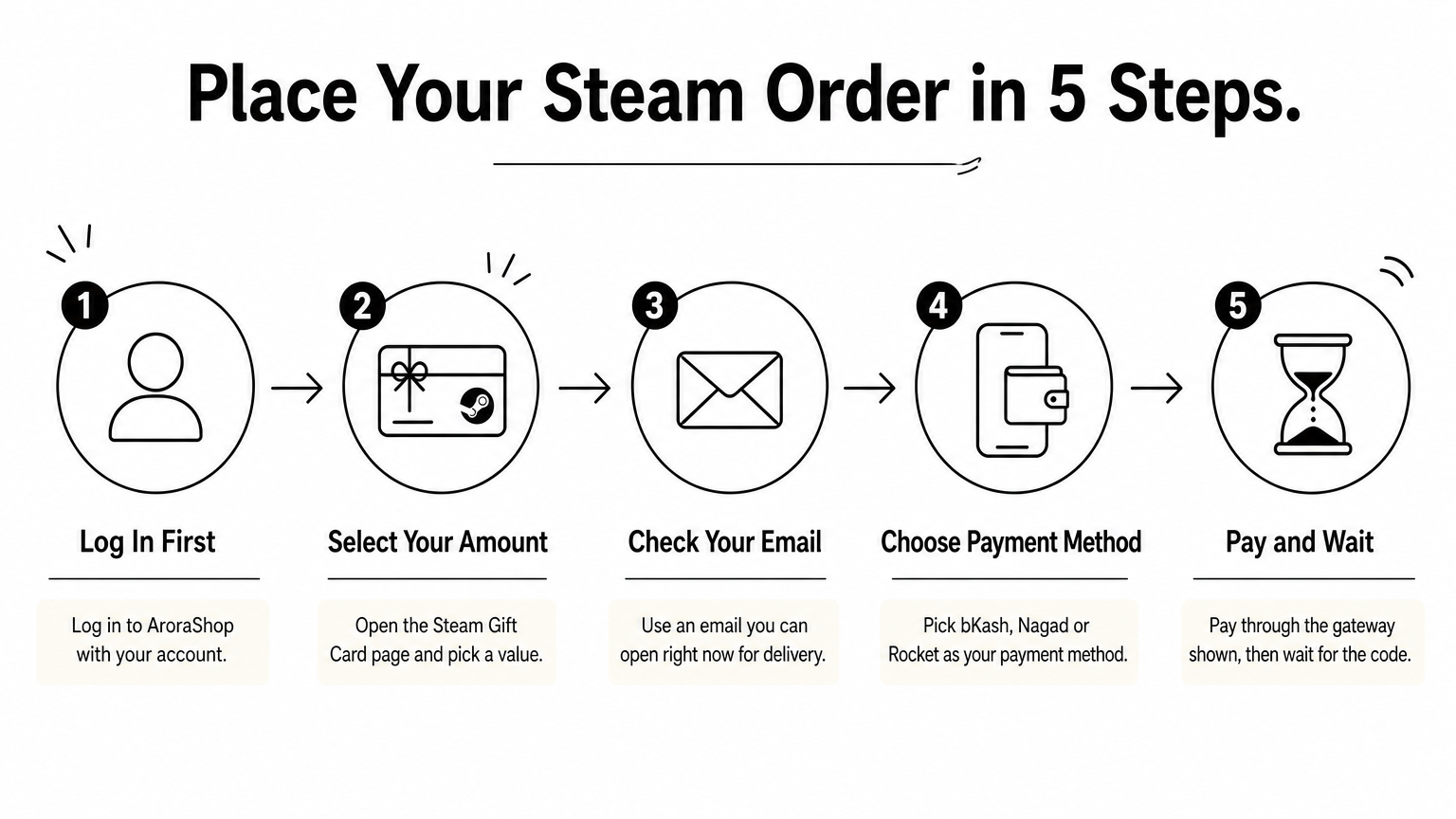
Before you start, make sure your mobile wallet balance covers the full price. A half-finished payment is the most common cause of delays.
AroraShop has an official Android app on Google Play with app-only discounts. If you buy Steam credit often, installing it can lower what you pay per order. The discount amount varies, so compare the app price with the website price before you confirm.
Pay only through the gateway listed on the store's own site, and keep your payment confirmation until the code arrives.
Redeeming takes under a minute. Open Steam, go to Games, choose "Redeem a Steam Wallet Code", paste the code and confirm. The funds appear in your wallet at once.
You can also redeem on Steam's redeem page in a browser. Copy the code instead of typing it, since letters like O and 0 are easy to confuse.
If you bought more than one card, redeem each code separately. In the $60 example, redeem the $50 code first and the $10 code second. The balances add up to $60 in your wallet. Each code only works once, so do not try the same one twice.
Check the wallet balance after each redemption, and buy the game only when the full amount shows.
If your code is late, check your spam folder, wait a few minutes, then contact support. To avoid problems in the first place, verify the region, buy from a store with visible support and redeem the code immediately.
AroraShop lists delivery for this card as instant, within 1 to 5 minutes. If nothing arrives, look in your spam folder and confirm the payment went through in bKash, Nagad or Rocket.
Then reach support. AroraShop runs 24/7 customer support through WhatsApp, by phone at +8801867859776 and by email at support@arorashop.com. Average response time is under 15 minutes. Have your order details and payment confirmation ready.
Use this short checklist before every purchase:
A genuine seller shows its region, price and support details up front, and you should redeem the code the moment it arrives.
Buying a Steam gift card in Bangladesh comes down to four checks. Confirm your account uses USD, work out how many dollars you need, pay through bKash, Nagad or Rocket, and redeem the code in Steam. At 145 ৳ per dollar, the math is simple.
If you want to skip the research, you can buy a Steam gift card at AroraShop and get a US-region code delivered by email.

Please login to live chat or contact via WhatsApp