Leave a Review


To get CapCut Pro for PC, install the free CapCut desktop editor from the official CapCut website or the Microsoft Store, sign in with your account, and activate a Pro plan from the "Join Pro" button. Pro is a paid subscription. The safe routes are paying for a plan, using an official trial if CapCut shows one, or buying a voucher from a seller you trust. A cracked installer is not a route worth taking.
The problem is that search results are full of videos promising "Pro free forever, no hack". In Bangladesh there is a second obstacle. Paying inside the app often expects an international card, which many students, freelancers, and creators do not have. So people drift toward cracked files, or they stay on the free version and hit export limits.
This guide takes you through the whole process on Windows. First you check what Pro adds and whether your PC can run it. Then you download and install CapCut (Step 1), activate Pro (Step 2), confirm the premium tools work (Step 3), and export clean video (Step 4).
CapCut Pro adds premium effects, 4K export, and the full set of AI tools on top of the free desktop editor. Before you install anything, you should know what you are paying for, why cracks fail, and whether your computer can handle it.
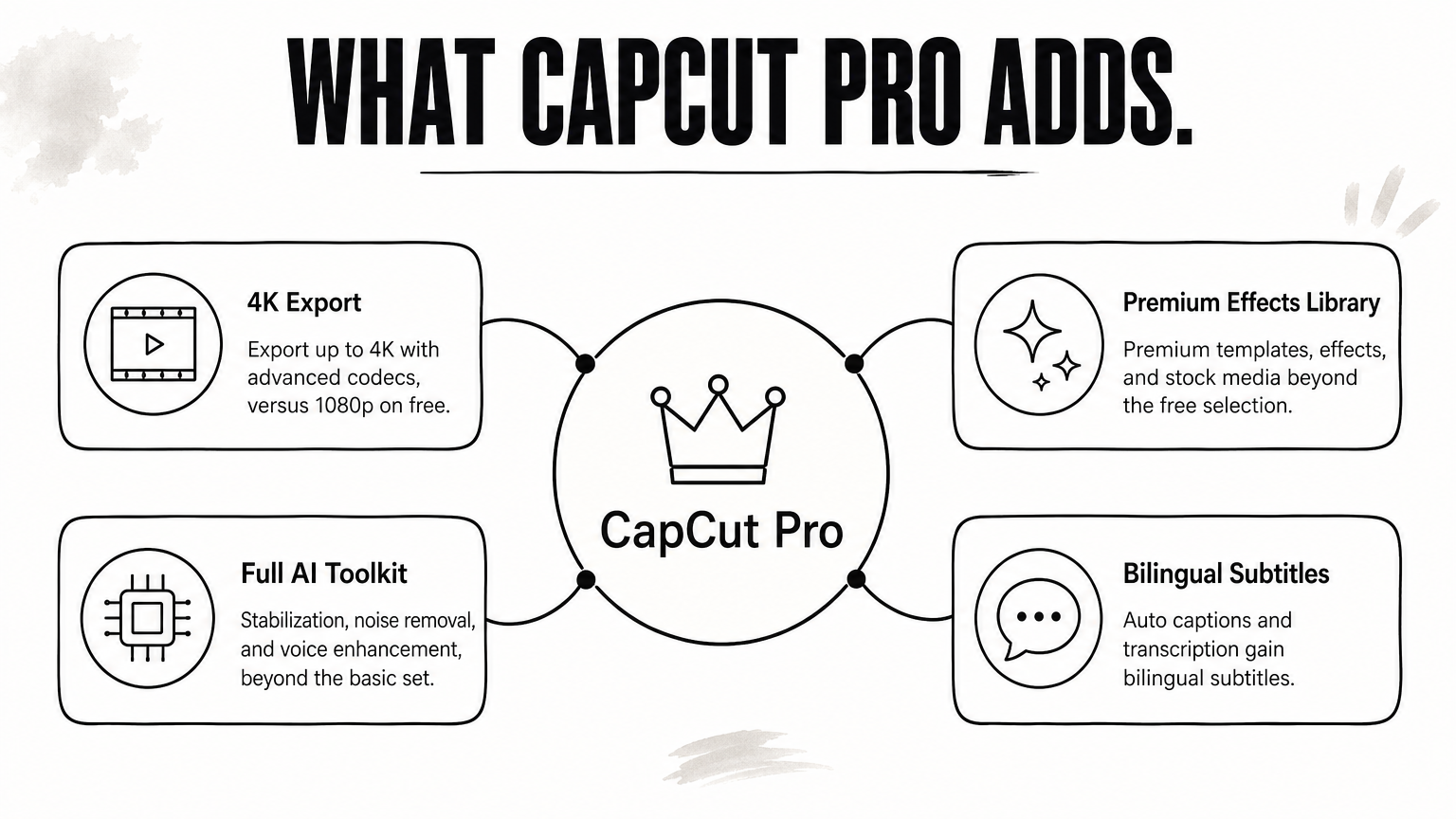
The free desktop editor already covers trimming, splitting, filters, transitions, and auto captions, with export up to 1080p. Pro adds 4K export, premium templates and effects, and the full AI toolkit. Features can differ slightly by region and app version.
| Feature | Free | Pro |
|---|---|---|
| Basic editing, transitions, filters | Yes | Yes |
| Auto captions and transcription | Yes | Yes, plus bilingual subtitles |
| Maximum export | 1080p | 4K with advanced codecs |
| Templates, effects, stock media | Free selection | Premium library |
| AI tools (stabilization, noise removal, voice enhancement) | Basic | Full set |
A cracked installer is a modified file uploaded by a stranger. You cannot verify what else it runs on your PC, and malware, stolen logins, and broken updates are the usual outcome. A patched app also tends to stop working after the next update, often in the middle of a project.
The legitimate options are short. You can pay for a plan in the app, use an official trial if the Join Pro window shows one, or buy a voucher from a reseller you trust. Step 2 compares them.
Open Settings, then System, then About to see your processor and RAM. Settings, System, Storage shows your free disk space. Compare them with this table.
| Component | Minimum | Recommended |
|---|---|---|
| Operating system | Windows 10 (64-bit) | Windows 10 or 11 (64-bit) |
| Processor | Intel Core i3 or AMD equivalent | Intel Core i5 or AMD Ryzen 5 |
| RAM | 4 GB | 8 GB to 16 GB |
| Graphics | Integrated, or 2 GB VRAM | Dedicated, 4 GB+ VRAM |
| Storage | 10 GB free | SSD |
If you plan to edit 4K footage, aim for the recommended column. The minimum is enough for 1080p projects with a few effects.
Pro is a paid subscription tied to your account, so any "free forever" method is either a trial or a crack.
Download the installer only from the official CapCut website or the Microsoft Store, then run it like any Windows app. Both sources give you the same free editor, and Pro is added afterward through your account.
Use the CapCut desktop editor page on the official website, or open the CapCut listing in the Microsoft Store. The Store route is the simplest, because you press Install and Windows handles the rest. For the website route, follow these steps:
A stuck download usually comes from an unstable connection, low disk space, or a browser extension. Refresh the page and try a different browser. Turn off any VPN or security extension for a minute, and free up space on your drive.
If it still fails, switch to the Microsoft Store version. It downloads through Windows instead of your browser, so browser problems do not affect it.
Install from the official website or Microsoft Store only, because the installer is the one file on your PC you cannot afford to get from a stranger.
Sign in to CapCut, click Join Pro, and pay for a plan, either in the app or with a voucher. Everything Pro related attaches to your account, so choose the account you will actually use for editing.
Launch CapCut and sign in with your Google, TikTok, or Facebook account. Use the same account every time, because your Pro access belongs to it. Then click Join Pro on the left side, just below your name.
A window lists the available plans. Plans and prices differ by region, so trust the window on your screen rather than a figure quoted somewhere else.
You have three realistic ways to pay for CapCut Pro on a PC. The right one depends on whether you hold an international card.
| Method | What you pay with | Watch out for |
|---|---|---|
| In-app Join Pro | The payment methods the app shows, often a card | Auto-renewing plans, and your card may not be accepted |
| Official trial, if shown | Usually payment details at sign-up | Cancel before it renews |
| Voucher from AroraShop | bKash, Nagad, or Rocket | Time starts after activation, no refund after dispatch |
AroraShop sells a CapCut Pro Subscription 30 Days voucher for 250 ৳. The listing states full Pro access for 30 days, no watermark on videos, and digital voucher delivery in 1 to 5 minutes. It names Android phone and iPhone as supported devices, so message support on WhatsApp before you pay and confirm it works with the account you use on Windows.
Divide the price by the work you actually do. At 250 ৳ for 30 days, a creator who edits four videos in that window pays about 62.5 ৳ per video. If you need Pro for three months of steady work, three vouchers cost 750 ৳.
The 30 days start after activation, not after purchase. Activate it only when your footage is ready, so you do not burn days.
Buy the plan when your footage is ready, because the clock starts at activation.
Check that premium assets apply without a paywall prompt, then use the Pro tools that save the most time. Do this before a big project, not during one.
Start a new project, click Import, and add a short clip. Drop it on the timeline and try a premium effect or the quality enhancer. If Pro is active, the tools apply without an upgrade pop-up.
If a prompt appears, close and reopen CapCut. Then confirm you are signed in to the account that holds the subscription.
These are the tools that make the biggest difference for most creators on a PC:
Apply stabilization and noise reduction to one clip first and play it back. These tools work harder on weaker PCs, so test before you apply them to a whole timeline.
Test each Pro tool on one clip first, because a heavy effect applied everywhere is what makes weaker PCs lag.
Click Export, set resolution, frame rate, codec, and bit rate, then export. A short test export confirms that the result is clean before you commit to a long render.
Open Export at the top right of the editor. Choose your resolution, frame rate, codec, and bit rate, then click Export again to save the file. You can also share straight to platforms such as YouTube and TikTok.
Pro supports exports up to 4K. If your video is for phones, 1080p is usually enough and renders much faster. Always export a 10-second test section first and check the corners of the frame for any mark.
Most problems on a CapCut Pro PC setup have a short fix.
| Problem | Fix |
|---|---|
| Playback lags on 4K footage | Turn on proxy editing, close other apps, and move project files to an SSD |
| Pro tools are locked | Sign in to the account that holds Pro, update the app, and reopen the project |
| A mark appears on the export | Confirm Pro is active, then re-export from the same account |
| Crashes in long projects | Save often and use autosave |
Keep CapCut updated, because updates bring performance fixes and new AI tools. If a problem survives all of these fixes, the cause is usually your hardware, so compare your PC with the requirements table in the first section.
A 10-second test export tells you in a minute what a failed full render tells you in an hour.
CapCut Pro for PC comes down to four moves: download from an official source, sign in with one account, activate a legitimate plan, and test an export before your real project. Skip cracks, because they put your files, logins, and projects at risk for a feature you can pay for.
If you do not have an international card, a voucher paid with bKash, Nagad, or Rocket solves the payment problem. Check device support with the seller first, as covered in Step 2. When you are ready, you can get a CapCut Pro subscription at AroraShop and start editing the same day.

Please login to live chat or contact via WhatsApp