Leave a Review


To use a Google Play gift card, buy one issued for the country of your Google account, then enter its code at play.google.com/redeem or in the Play Store app under Payments & subscriptions. The balance appears on your account within seconds. The catch is region. Google accepts a card only in the country it was issued for, so the card you buy must match your account.
That catch trips up most buyers in Bangladesh. Many people here have no international card, so they find a seller that accepts bKash or Nagad, pay, and only then see "this code can't be used in your country." Others lose money to fake sellers, or to scammers who ask for a code over chat.
This guide walks through four steps: check your region, pick the right card, buy it safely, and redeem it, with fixes for the errors you may hit. AroraShop sells a US-region Google Play gift card as a digital voucher, payable by bKash, Nagad, or Rocket. So we say plainly when a US card works and when it does not.
A Google Play gift card is valid only in the country where it was issued, and the balance stays locked to your account's country after you redeem it. Check this before you spend any money. It is the one factor that decides whether the card is useful to you.
Google's card terms say the card is valid only in the original country of purchase. Your Play account has a country setting, and the card's currency has to match it. A US card holds US dollars, so it only redeems on a US-country account.
The balance is also not transferable. Once the code is on a Google account, you cannot move it to another one. That is why the account check in Step 3 matters.
A Google Play gift card works only when the card's country, your account's country, and your location all match.
AroraShop's own listing states that Google Play US gift cards cannot be used from Bangladesh. Changing your account region or using a VPN does not fix this, because Google checks where you really are. A code that breaks the terms can be deactivated.
| Your situation | Will a US card redeem? |
|---|---|
| US Play account, and you are in the US | Yes |
| Bangladesh account, and you are in Bangladesh | No |
| US account opened through a VPN while in Bangladesh | No, and the code may be blocked |
If your account country is Bangladesh, you need a card issued for Bangladesh, and only if Google offers cards there. Check the country list on Google's gift card page before you pay anyone. If you only want game currency such as PUBG UC or Free Fire Diamonds, a direct top-up skips the Play balance entirely.
Choose a card with three things matching: the region of your Play account, a denomination that fits what you want to buy, and a digital format if you want the code in minutes. Then judge the price per dollar of balance, not the headline price.
Confirm your account country first. On Android, open the Play Store, tap your profile icon, then Settings, and look under General for your country and profiles. Then pick an amount. A $10 card is a sensible start for one game or app. Larger cards save repeat purchases but lock more money to one account. AroraShop's US-region Google Play card is listed at $100 for 15,400 ৳. Check the product page for the live price and any other denominations, since prices can change without notice.
Digital vouchers arrive as a code by email or on screen. Physical cards need a store visit and must be activated at the till.
Divide the Taka price by the dollar value. For the $100 card, 15,400 ৳ ÷ 100 = 154 ৳ per dollar of balance. Use that number to compare any seller.
Google does not give sellers a general discount, so a price far below the face value is a warning sign. It usually means a stolen code, a wrong-region card, or a scam. A cheaper rate is worth taking only when the card is the right region and the seller lets you pay with a method you trust. App-only discounts, such as AroraShop's Android app offers, are a legitimate way to pay less.
A good price on the wrong region is not cheap, it is a card you cannot use.
Buy through Google's own channels where they exist in your country, or from a digital seller that shows the region, delivers a code, and has support you can reach. Never buy from a seller who cannot tell you the card's region.
Run through these checks every time:
Never send the code to anyone. Google says a code should only ever be entered on Google Play, and any other request is likely a scam. Google explains how to spot them on its gift card scam help page.
Your code is cash: enter it on Google Play and nowhere else.
To redeem a Google Play gift card, sign in to the right Google account, enter the code in the Play app or at play.google.com/redeem, and confirm. The balance is added instantly. Check the account name first, because the balance cannot be moved afterward.
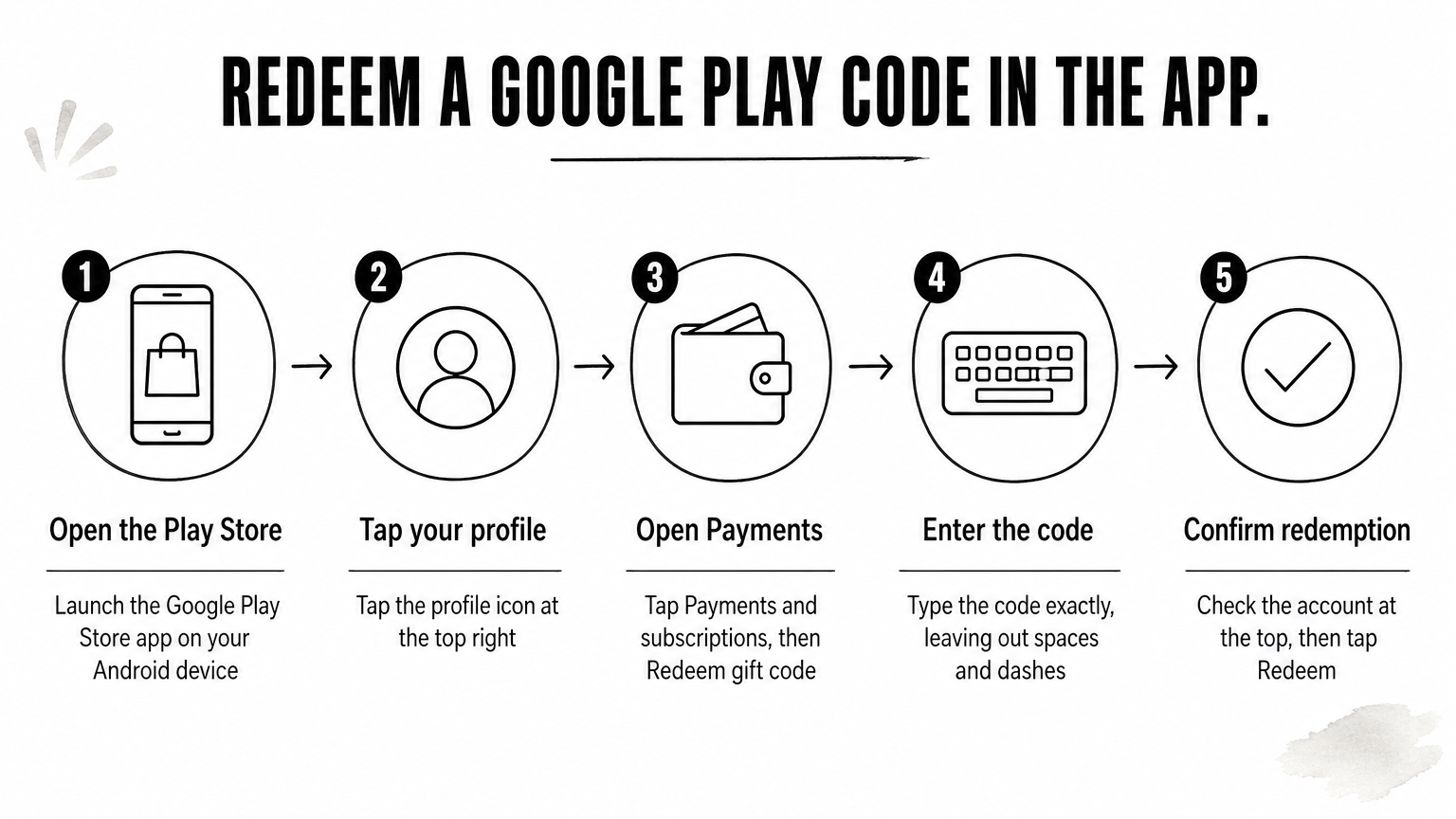
Check the account shown at the top of the app before step 5. If you use several Google accounts, switch to the one that should hold the money.
The web route works on a computer, and on an iPhone or iPad, which have no Play redemption screen.
Google's redemption help page covers the same steps. Your Google Play gift card balance then shows under Payments & subscriptions. It does not expire, and you can spend it on apps, games, in-app purchases, movies, books, and eligible subscriptions. It cannot buy Google Store hardware.
Redeem on the account you actually use, because Google gives you no undo.
Most failed redemptions come from a country mismatch, a typo, or a code that was already used. Match your exact error message to the table, then apply the fix.
| Error or symptom | Likely cause | Fix |
|---|---|---|
| "This code can only be used in [country]" | Card region differs from your account country | Get a card issued for your account's country |
| "Your Play balance can only be used in [country]" | You changed country after redeeming | Spend the balance in the original country |
| "Code already redeemed" | Used on another account, or yours earlier | Check your other accounts, then contact the seller with your order number |
| Code is invalid | Typo, such as O for 0 or I for 1 | Copy and paste the code, with no spaces |
| Physical card is rejected | Not activated at the till | Return to the store with your receipt |
You cannot redeem a US Google Play gift card from Bangladesh, and a workaround is not worth risking your balance. First, contact the seller before trying anything else, and with AroraShop use WhatsApp chat, since support replies in under 15 minutes on average. Do not try to redeem the same code repeatedly from other accounts, because that can trigger a block.
A region error is not a typo, so retyping the code will never fix it.
The method is short. Confirm your account country, pick a card issued for that country, buy from a seller that shows the region and delivers a real code, then redeem it at play.google.com/redeem or in the Play app. If the region does not match, nothing else in the process can rescue the card.
If you hold a US-country Google account and are in the US, you can buy a Google Play gift card at AroraShop and pay in taka by bKash, Nagad, or Rocket. If you are in Bangladesh with a Bangladesh account, check the region first, and ask AroraShop support if you are unsure.