Leave a Review


To get CapCut Pro, install the regular CapCut app from Google Play, the App Store, or capcut.com, then add a Pro subscription to your account. There is no separate Pro app. On capcut.com, Pro costs $19.99 a month or $179.99 a year. AroraShop sells a 30-day Pro subscription for 250 ৳, payable with bKash, Nagad, or Rocket. Subscribe only after you confirm that free CapCut is not already enough for your videos.
The hard part is not the button. Search results mix old and new prices, "Pro APK" files that put your phone at risk, and watermark rules that confuse almost everyone. If you live in Bangladesh, a dollar-priced checkout that expects an international card adds one more obstacle. It is easy to pay for the wrong tier or install the wrong file.
This guide walks through the decision in order: what Pro includes, whether you need it, which plan and payment route to pick, how to install the app safely, how to activate and test Pro, and how to avoid surprises when it ends.
CapCut Pro is the paid tier of the same CapCut editor, and it adds 4K export, the full AI toolkit, Pro-tagged templates and effects without a watermark, and cloud storage. Plan names are where most confusion starts, so this section sets them side by side before you spend anything.
You edit on the same timeline whether you pay or not. What changes is which assets, export resolutions, and AI tools the app lets you use. Pro includes vocal isolation, speaker-ID captions, and camera tracking, plus 1 TB of cloud storage.
You will also see the names CapCut Pro premium and premium CapCut Pro. They mean the Pro tier, not a separate product. CapCut also sells a cheaper Standard tier and a pricier Ultra tier, so check that the plan name says Pro before you pay. The generative AI features draw on a monthly credit allowance (1,200 credits on Pro), so they are not unlimited.
These are the CapCut Pro prices in US dollars when you subscribe directly on capcut.com:
| Plan | Price | What you get |
|---|---|---|
| Free | $0 | Full timeline, 1080p export, free assets only |
| Standard | $9.99 per month | Watermark-free mobile exports, bigger template and effects library, exports capped at 1080p, no 4K or full AI toolkit |
| Pro | $19.99 per month or $179.99 per year | 4K export, full AI toolkit, 1,200 AI credits a month, 1 TB cloud storage |
| Ultra | $79 per month | 8,645 AI credits a month and a few extra AI features, for heavy AI video generation |
CapCut sets prices by country, so confirm the number in your own checkout before you commit. Most editors only ever need the Free, Standard, or Pro rows.
Pro means 4K export plus the full AI toolkit, and it costs twice as much as Standard.
Guides written for CapCut Pro 2025 often say Pro costs $9.99 a month or $89.99 a year. That was accurate then. CapCut later split its paid offering. The old $9.99 tier became Standard, and a new Pro launched at $19.99.
So when a page lists $9.99 together with 4K and the full AI suite, it describes a plan that no longer exists at that price. Treat any price without a recent date as a guess.
You need Pro if you export in 4K, use the AI tools every week, or deliver client work. If none of those apply, free CapCut or the cheaper Standard tier probably covers you. Run this check before you pay anything.
The free plan has no time limit. It includes the following:
For many short videos, that is the whole job.
The watermark follows your assets, not your export resolution. Build an edit from free elements and you can export 1080p without a mark on the free plan. Drop in one Pro-tagged template, effect, sticker, sound, or AI clip, and every export carries the watermark until you pay.
That explains why two people on the same free plan report opposite experiences. Trending templates are almost always Pro. Before paying, open your last project and count the Pro-tagged items. Often it is one sticker you can swap in thirty seconds.
The watermark comes from the Pro assets in your timeline, not from your export resolution.
Answer these honestly:
If you answer yes to the first three, Pro is the right tier. If only the fourth is a yes, Standard may be enough. If all four are no, stay free.
The 4K question deserves care. TikTok, Reels, and Shorts compress uploads hard, so a good 1080p file looks the same after posting. 4K pays off for client deliverables and for footage you want room to crop. You also cannot export 4K from 1080p clips on any plan.
Pick the shortest commitment that covers your project, and pay through a channel that works for you without an international card. For most people that means a monthly or 30-day plan first and a yearly plan only after Pro proves its value.

| Option | Cost | Coverage |
|---|---|---|
| Pro monthly on capcut.com | $19.99 | One month |
| Pro yearly on capcut.com | $179.99 | 12 months, about $15 a month |
| Twelve monthly payments | $239.88 | 12 months |
| AroraShop CapCut Pro 30 days | 250 ৳ | 30 days from activation |
Paying yearly saves $59.89 against twelve monthly payments, about 25 percent. It only makes sense if you will use all twelve months.
Here is a worked example. A freelancer needs Pro for a three-month client project. Three monthly payments on capcut.com come to $59.97. Three 30-day AroraShop subscriptions come to 750 ৳. Compare that with the dollar figure at the day's exchange rate, and note that you only pay for the months you actually edit.
The official checkout on capcut.com offers the payment methods CapCut supports in your region. If none of them works for you, a local voucher route solves it. AroraShop requires an account for full service, accepts bKash, Nagad, and Rocket, and delivers the Pro subscription as a digital voucher in about 1 to 5 minutes.
The product page lists full Pro access with no watermark, global region, and support for Android phones and iPhones. Desktop is not listed, so confirm your device on the product page first. The 30 days start after activation, and there is no refund after dispatch. Prices can change without notice, so check the current price on the page.
App Store and Google Play purchases typically cost $1 to $3 more per month than subscribing on capcut.com, because the stores take a cut. Over a year of monthly billing, that gap is $12 to $36 for the same product.
CapCut also offers a 7-day trial to new subscribers in supported regions. If you start it through an app store, your account is charged automatically when it ends, so set a reminder for day six. A student discount of up to 50 percent has been reported. Treat any coupon site with suspicion and check CapCut's own pricing page.
Buy where the price is lowest and the payment method actually works for you, not where the button is closest.
Install CapCut from Google Play, the App Store, or capcut.com and nowhere else. A "CapCut Pro download" is simply the normal CapCut app with Pro switched on for your account.
Pro is a subscription, not a different file. You install CapCut, sign in, and the account decides whether Pro features appear. Any site selling a special Pro installer is selling something you do not need.
That is also why the source of the app matters more than its version. A clean install from an official store gives you the same app that every paying user has, with updates and cloud backup intact.
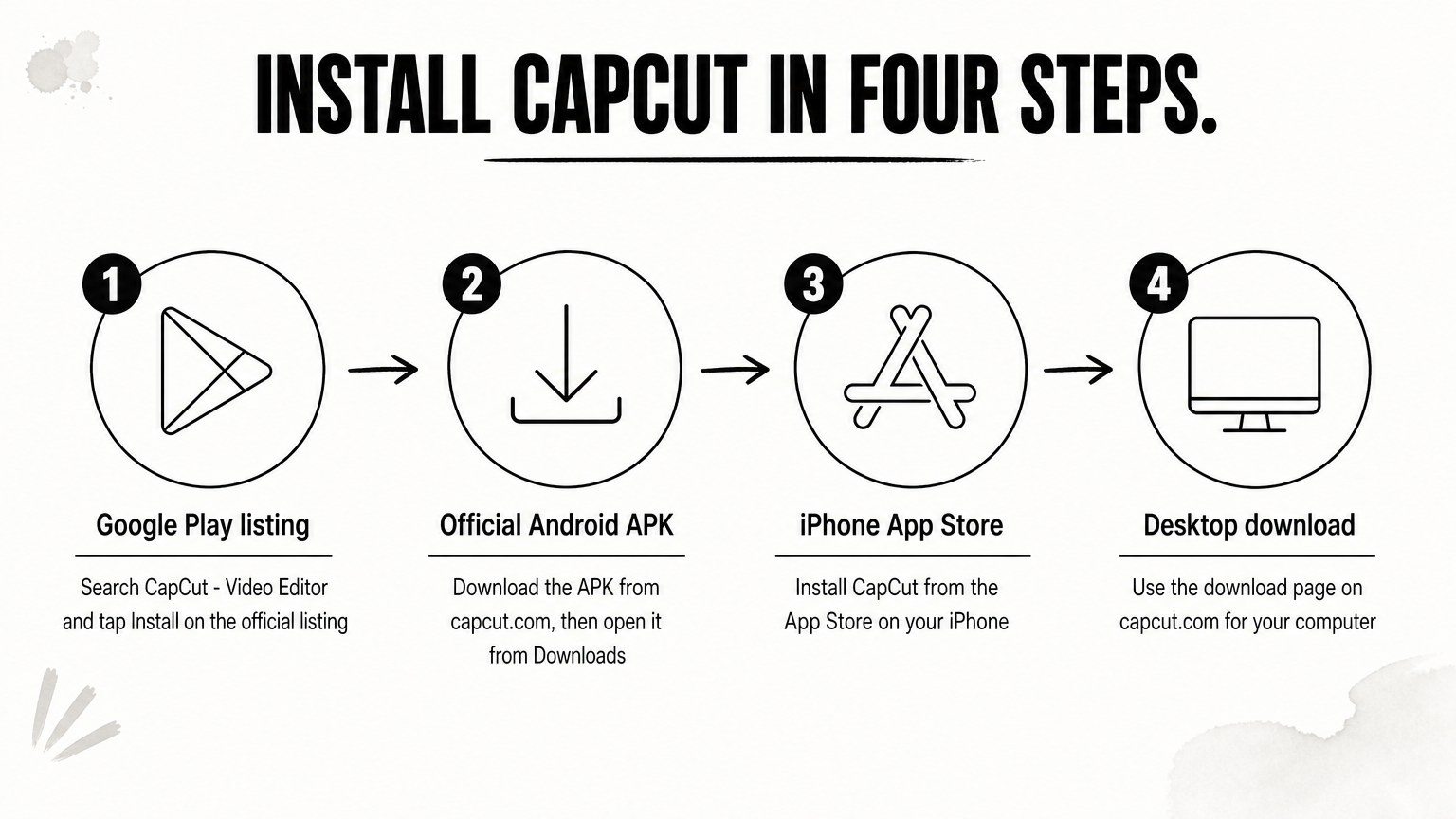
Install only one copy of the app, and keep it updated. Updates bring new AI tools and fix bugs.
A modified "Pro unlocked" APK promises premium features for free. It delivers risk instead:
A modded APK costs nothing upfront, but a banned account or a stolen login costs far more than 250 ৳.
Activate Pro on the exact account you edit with, then prove it works with a short test export before you start real work. Five minutes of testing catches nearly every problem while support can still help.
Follow these steps in order:
Read the product page before paying. It holds the delivery details specific to that item.
Build a short project that proves the features you are paying for:
If all four pass, you are set.
| Problem | Likely cause | What to do |
|---|---|---|
| Pro features still locked | Signed in with a different account | Sign out, sign in with the activated account, restart the app |
| Watermark on export | Pro not active on this account yet | Check account status, then re-export |
| Voucher not received | Payment still being verified | Check order status, then contact support on WhatsApp |
| No 4K option | Source clip is 1080p or the device limits it | Test with genuine 4K footage |
Test one Pro-tagged export on day one, while support can still fix a failed activation.
Export your finished videos while Pro is active, and read the licensing rules before you use Pro assets in paid work. Pro removes the watermark, but it does not make every asset free to reuse forever.
CapCut's terms restrict commercial use on the free plan, so monetized videos, branded content, ads, and client work generally need a paid plan. The assets inside your edit have their own rules:
Treat Pro as permission to use the app, not as a blanket licence for every platform. For paid deliverables, build with assets you own, or read CapCut's current licence terms before you invoice.
When Pro ends, your project files survive and your finished exports stay untouched. But Pro-tagged templates, effects, and music disappear from existing projects, and a new export can come back watermarked or with assets missing.
Before your subscription ends:
CapCut Pro is worth paying for when you export in 4K, use the AI tools weekly, or edit paid work. Otherwise free CapCut or Standard does the job. Check your Pro-tagged assets first, pick the shortest plan that covers your project, install only from official sources, and run a test export on day one.
If you want to pay locally, you can get the CapCut Pro 30-day subscription on AroraShop with bKash, Nagad, or Rocket, and be editing within minutes.