Leave a Review


To get a Google Play 1 dollar gift card, check the country set on your Google account's Play profile, find a seller that stocks that country's edition in a small value, pay, and redeem the code in the Play Store. If a $1 card is not on offer, a $5 card does the same job and the leftover balance stays on your account. The one thing that can break the whole purchase is a country mismatch between the card and your account.
Small cards are harder to find than they should be. Many shop-bought cards start at higher values, online sellers list odd denominations, and a card for the wrong country is refused at redemption. Scammers also target people who just want to add a little money for an app or an in-game item.
This guide starts with what you need to know before buying, then walks through four steps: checking your Play country, choosing the amount and seller, redeeming the code, and spending the balance safely. We run AroraShop, a digital marketplace in Bangladesh that sells Google Play gift cards, so the steps assume you pay with local methods like bKash, Nagad, or Rocket.
Small cards are scarce because Google issues gift cards country by country and sellers stock the values that sell best. A $1 or $5 card exists only where a seller carries that value for your country's edition.
A Google Play card turns into Play balance on one Google account, and that balance is tied to the country of the account's Play profile. Google asks you to redeem a card in the country it was bought for. A card for another country is refused with a message that names the country the code belongs to.
The amount is the easy part. The country on your account is what decides whether a card works.
Shop-bought cards usually come in larger values and must be activated by the cashier at the till. Small values mostly appear as digital codes from online sellers, and which values exist depends on the country edition and the seller. Treat $5 as the realistic floor if no one near you stocks $1.
Buying more than you need costs you nothing extra in practice. Google states that its gift cards have no expiry dates, so the unused part of a $5 card stays on your account for the next purchase. In some countries you can also add money to your balance directly with a payment method, so check Google's own balance page before buying a card.
Your Play country is the country shown in your Google Play profile settings, and it is the edition you must buy. It is not where you are standing, and it is not where your phone was bought.
Open the Play Store app on the account you want to fund and follow these steps:
If you are buying for a friend, use the recipient's account, not yours.
Google publishes where gift cards are supported, so confirm that your account's country is covered before you pay. Some sellers in Bangladesh openly warn that cards do not redeem on accounts set to Bangladesh. Believe those warnings and do not buy a card hoping it will work anyway.
Do not change your account country casually to fit a card. Google requires a payment method from the new country and limits how often you can switch, and existing balance stays attached to the old country. A VPN is no shortcut either, because it risks a refused or deactivated code.
Confirm the country first. A $1 card you cannot redeem costs more than a $10 card you can.
Choose the smallest value that covers what you plan to buy, then buy it only from a seller that states the country edition on the product page. That one rule avoids most failed redemptions.
A $1 card suits one tiny in-app purchase or a test run of the redeem process. A $5 card is the better default, since many apps and in-game packs cost more than one dollar and a single code covers several small buys. If you are searching for how to buy a Google Play gift card 5 dollars in value, the process is identical, only the amount in the cart changes.
Check the price you pay as well. Online sellers add their own margin, so the cost of a very small card can be a larger share of its face value than on a big card.
Look for these on the product page before you check out:
AroraShop lists Google Play gift cards with instant digital delivery, and you can pay with bKash, Nagad, or Rocket. Open the product page to see which country editions and values are currently offered, and match one to the country from Step 1.
Buy only when the product page names the country edition. If it does not, ask or look elsewhere.
Redeem the code in the Play Store app or on the Play redeem page while signed in to the account you are funding. It takes under a minute, and the balance appears immediately.
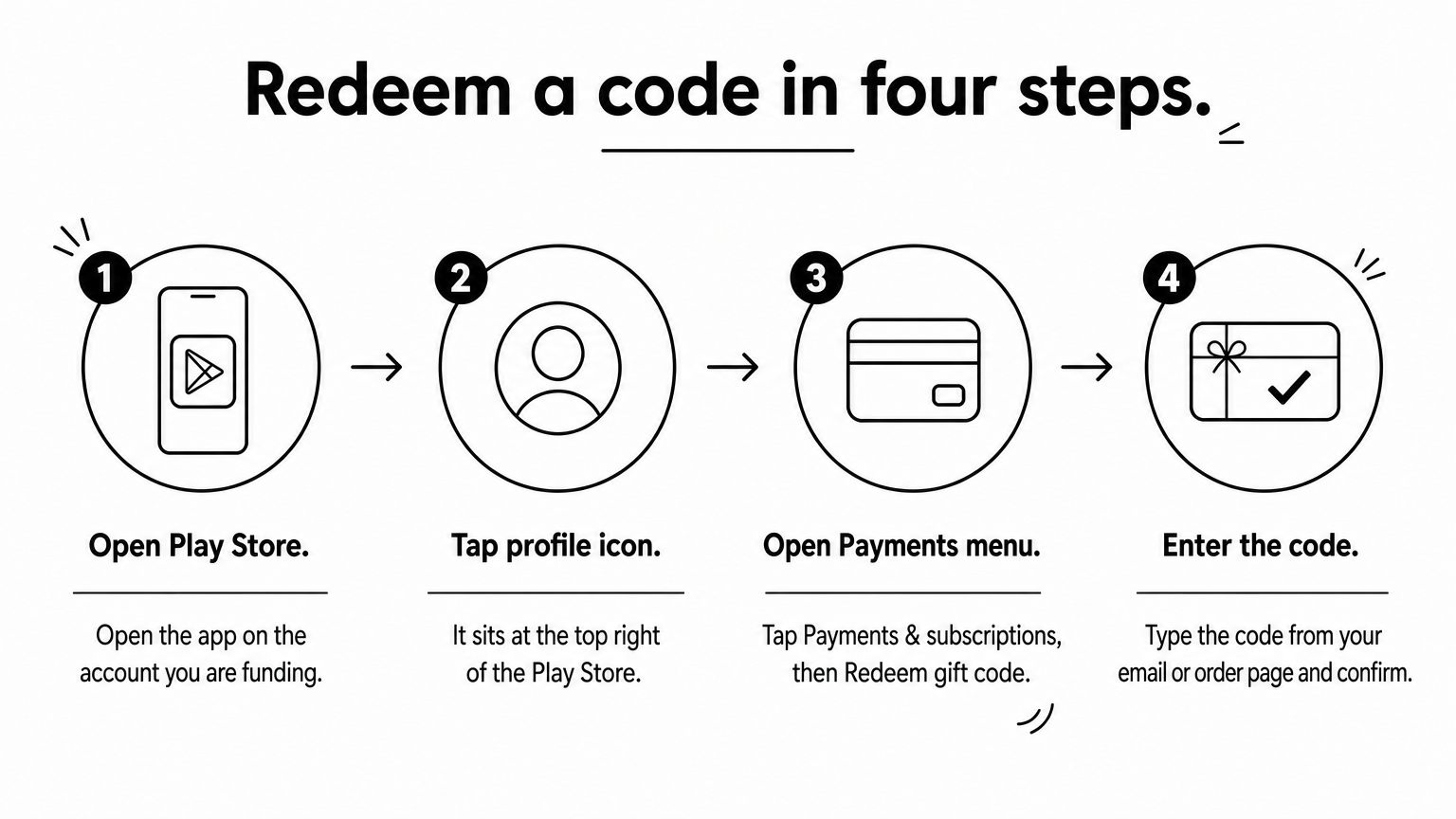
On a computer, go to play.google.com/redeem while signed in. Google's redeem help page covers the same steps.
A message saying the code can only be used in a named country means your account's Play country and the card's country do not match. Stop there. Re-entering the code does not help. Compare the country in the message with the one you found in Step 1.
Then contact the seller. Include your order number and a screenshot of the exact error message, which lets support check the code quickly. Also check for typos, since letters like O and 0 are easy to confuse when you type a code by hand.
A refused code almost always means a country mismatch, not a broken card.
Once redeemed, your Play balance is used first on the next eligible purchase, and anything left stays for later. Protect it by never sharing the code with anyone who is not Google Play.
Balance pays for apps and games, in-app purchases, books, movie rentals, and subscriptions billed through Google Play. It does not pay for Google Store hardware or for Google Ads or Cloud billing, and it cannot be moved to another account. You can see your balance under your payment methods in Google Play.
Here is a worked example with a $5 card and two small buys:
| Step | Amount | Balance left |
|---|---|---|
| Redeem $5 card | +$5.00 | $5.00 |
| Buy a $0.99 app | -$0.99 | $4.01 |
| Buy a $1.99 in-game pack | -$1.99 | $2.02 |
The remaining $2.02 stays on the account until your next purchase. Taxes or fees may apply in some countries, so the final charge can differ slightly.
Google Play codes are a favorite target, so follow one rule. Only enter the code in Google Play. Anyone who asks you to read it out, photograph it, or send it for a prize, a job, or a "verification" is a scammer. Google explains the common tricks on its gift card scam page.
Keep your order number and the delivery email until the code is redeemed, and do not post screenshots of unredeemed codes anywhere.
A gift card code is cash. Anyone who asks for it outside Google Play is stealing it.
Buying a Google Play $1 or $5 card comes down to one order of operations. Check your account's Play country, choose the smallest value that covers your purchase, buy from a seller that names the edition, redeem the code on the right account, and never share it. If $1 is not available, $5 is a sensible floor and the extra balance does not expire.
When you are ready, you can browse the Google Play gift cards at AroraShop, check the listed edition and value against your account, and pay with bKash, Nagad, or Rocket.

Please login to live chat or contact via WhatsApp