



How to Download CapCut Pro in 2026 on Android, iPhone, PC
AroraShop Editorial & Fulfillment Team
Digital Gaming & FinTech Specialists (Dhaka, BD) • UpdatedHow to Download CapCut Pro in 2026 on Android, iPhone, PC
If you are asking capcut pro কিভাবে ডাউনলোড করবো 2026, the answer is simple. Install the free CapCut app from Google Play, the App Store, or the official CapCut website, sign in, then unlock Pro with an in-app subscription or a Pro voucher. There is no separate "CapCut Pro app". Pro is a paid plan that switches on inside the same app, and any file that claims otherwise is a risk to your phone and your account.
The problem is that most results for this search push you toward "free Pro" files, mod APKs, and cracked installers. They look easy, but they often carry malware, break after an update, or get your account banned. For many people in Bangladesh there is a second obstacle. The official plan is billed through Google Play or the App Store, and many buyers do not have an international card to pay with.
This guide walks you through the whole process in four steps: install the official app on your phone or PC, sign in and update, activate Pro safely, and check that it works. First, a short section on what you are actually downloading, so you can avoid the common traps.
What CapCut Pro is and what to avoid
CapCut Pro is a paid subscription layer on top of the free CapCut editor from ByteDance, not a different download. You install one app, and your account decides whether premium tools are unlocked. Knowing this protects you from nearly every fake download page.
Free CapCut and Pro are the same app
The free version already covers trimming, captions, music, and basic effects. Pro adds premium effects, filters, fonts, and tools, and it removes the limits that free exports run into. Because both live in one app, "downloading Pro" really means installing CapCut and upgrading your account.
Why mod APKs and cracks are not worth it
Search results are full of videos promising "Pro for free". Those files are modified copies of the app, and they do not come from the publisher. Here is what usually goes wrong with them:
- They can hide malware or ask for permissions the editor never needs.
- They stop working after an app update, and you lose your projects.
- They can get the account you sign in with restricted.
- They cannot receive official updates, so new features and bug fixes never reach you.
Free trials from the official app do exist at times, but they depend on your region and the current offer. Treat them as a bonus, not a plan, and cancel before the trial ends if you do not want to be charged.
CapCut Pro is an account upgrade inside the official app, so any "Pro APK" is a copy you should not install.
Step 1. Install the official CapCut app
Install CapCut only from a store or the publisher's own website. Which source you use depends on your device.
Pick the right source for your device
| Device | Where to get it | What to check |
|---|---|---|
| Android phone | Google Play Store | Publisher is ByteDance, app name is "CapCut" |
| iPhone or iPad | Apple App Store | Publisher is ByteDance |
| Windows PC | Download page on capcut.com | File comes from the official site, not a mirror |
| Mac | Download page on capcut.com | Same as above |
Install on Android or iPhone
- Open Google Play (Android) or the App Store (iPhone).
- Search for CapCut and open the result published by ByteDance.
- Tap Install or Get, then wait for the download to finish.
- Open the app and allow only the permissions it needs, such as access to your photos and videos.
If your phone is low on storage, clear space first. A failed install is often just a full phone.
Install on a Windows PC
- Go to capcut.com in your browser and open its download page.
- Click the download button for Windows and save the installer.
- Run the installer and follow the on-screen instructions.
- Launch CapCut when it finishes.
Skip any site that asks you to turn off your antivirus to run the installer. The official installer never needs that. Also avoid "repacked" or "pre-activated" versions, which are exactly the cracked builds this guide warns about.
Download CapCut from the app store or the publisher's own site, and nothing else counts as the official version.
Step 2. Sign in and update to the latest version
Sign in first, then update. Pro attaches to your account, so the login you choose now is the one you will unlock later. Updating matters because "the 2026 version" simply means the newest release available to you.
Sign in with an account you will keep
CapCut lets you log in with options such as Google, TikTok, Facebook, Apple, or email. Pick one you will still control in a year, and write down which one you used. If you sign in with a different method on another device, you may land in a different account without your Pro plan or projects.
Update the app to the newest release
- On Android, open the CapCut page in Google Play and tap Update if it appears.
- On iPhone, open the App Store, tap your profile picture, and update CapCut from the list.
- On PC, open CapCut, go to the settings or menu, and check for updates. If there is no update option, download the current installer from capcut.com and install it over the old one.
To confirm you have the current build, compare the version number in the app's settings with the one on its store page. Match them, and you are on the newest version available to you. Turn on automatic updates so you do not have to repeat this later.
Sign in with one account you will keep, because Pro belongs to the account and not to the phone.
Step 3. Activate CapCut Pro the safe way
You have two legitimate ways to unlock Pro: subscribe inside the app, or redeem a Pro voucher. Pick the one that fits how you can pay.
Compare your options
| Option | How it works | Watch out for |
|---|---|---|
| In-app subscription | Tap the Pro or upgrade button and pay through Google Play or the App Store | Price depends on region and plan, and it needs a payment method your store accepts |
| Pro voucher | Buy a digital voucher, then activate it on your account | Check the device support and refund terms before you pay |
| Official free trial | Start the trial offered in the app, if you see one | It renews into a paid plan unless you cancel in time |
| Mod APK | Install a modified file | Not official, so avoid it |
Buy a voucher with bKash, Nagad, or Rocket
If you have no international card, a voucher is the practical route. AroraShop sells a CapCut Pro Subscription for 30 days at 250 ৳, paid with bKash, Nagad, or Rocket. At that price, one month costs about 8 ৳ per day (250 ÷ 30). That is worth thinking about if you edit a few videos a week for a client or your own channel.
The listing says the plan gives full Pro access with no watermark on videos and arrives as a digital voucher in about 1 to 5 minutes. The 30 days start after activation, not at purchase, so redeem it when you are ready to edit. The listed supported devices are Android phones and iPhones, so check the product page first if you plan to work only on a PC. Refunds are not available after dispatch, so confirm the device and your account before you pay. Create an account on arorashop.com first, since the site needs one for full service, and use WhatsApp support if delivery is late.
If you cannot pay through the store, a voucher bought with bKash, Nagad, or Rocket is the safe alternative to a cracked file.
Step 4. Check that Pro works and fix problems
Confirm Pro is active before you start a big project. A two-minute test now saves you from finding a locked feature halfway through an edit.
Run a quick Pro test
- Open CapCut on the account you upgraded.
- Create a new project and add a short clip.
- Open the effects, filters, or fonts and look for items that are no longer marked as locked or paid.
- Export a 5-second test video and check the result for a watermark.
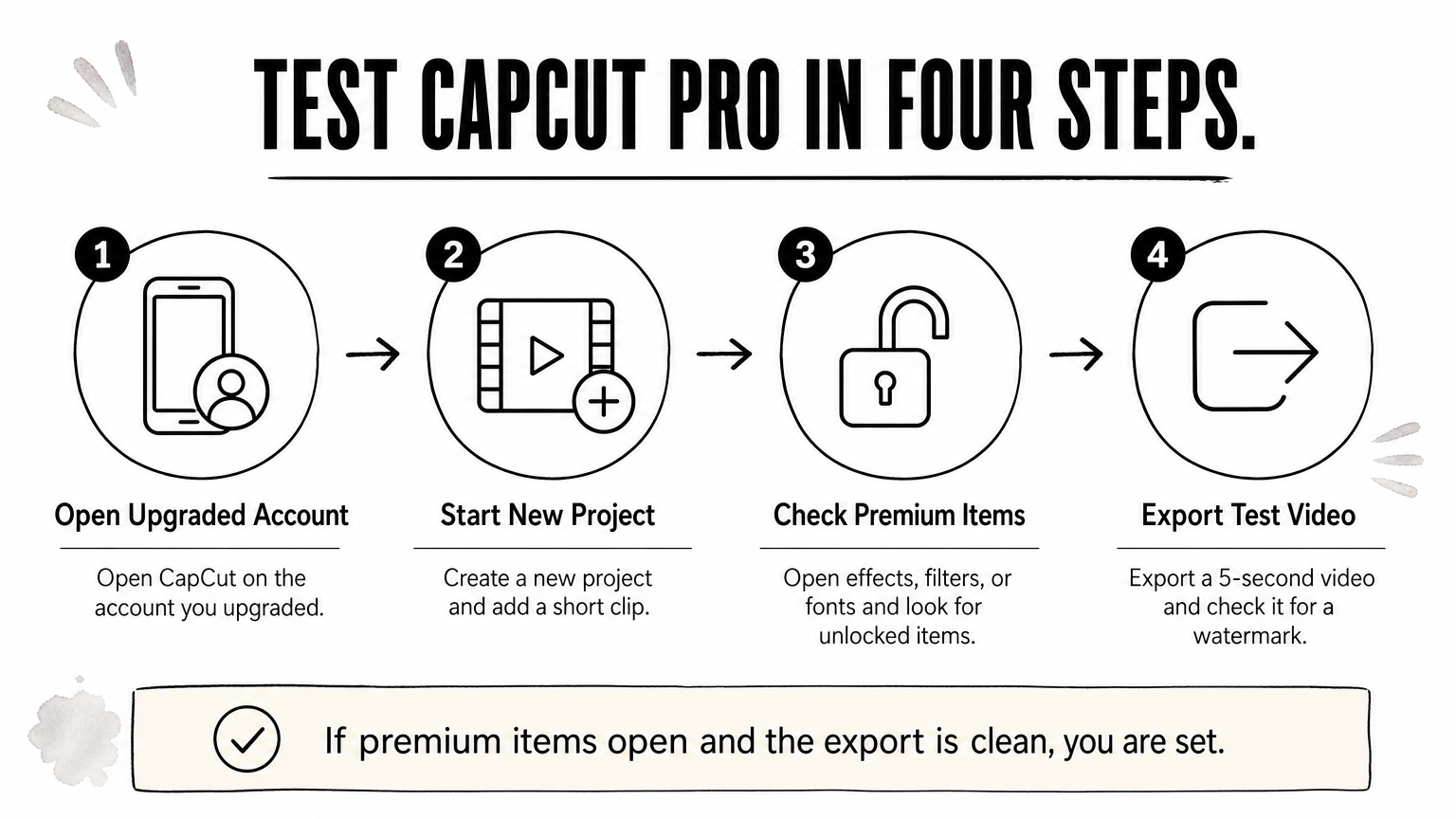
If the premium items open and the export is clean, you are set.
Fix the common problems
When Pro does not appear, the cause is usually small. Work through this list in order:
- Wrong account: Log out and sign in again using the method you chose in Step 2.
- Old version: Update the app, then restart it.
- Voucher not applied: Follow the redemption instructions that came with the voucher, on the account you edit with.
- Stuck sync: Close the app completely, check your internet connection, and reopen it.
- Still locked: Contact the seller or CapCut support with your account name and order details.
If you bought from AroraShop, the support team can be reached over WhatsApp or at support@arorashop.com. Keep your order details ready so the check goes quickly.
If Pro does not show up, check the account first, because a wrong login causes most activation problems.
Get CapCut Pro without the risk
To download CapCut Pro in 2026, install the official CapCut app for your device, sign in with an account you will keep, update it, and unlock Pro through the in-app plan or a voucher. Then run a short test export to confirm everything works. Skip every mod APK, crack, and "free Pro" file, because they cost you more in lost projects and account trouble than a month of Pro does.
If you want a payment route that works with local wallets, you can buy CapCut Pro with bKash, Nagad, or Rocket at AroraShop and activate it on the same account you set up in this guide.
Sponsored
Categories
- Beginners Gamers 1
- Top Up 0
- Gift Card 3
- Announcement 0
- Technology 31
- Artificial intelligence 11
- Updates & Guides 258
- Games 3
- Business & Tech 1
- Freelancing & Career 2
- Tech Tips & Tutorials 1
- Make Money Online 1
- Tech & AI Tools 2
- Crypto & Airdrops 3
- Career & Business 1
- Money Making 2
- Guides 0
- Game Top-Up Guides 0
- Subscription Guides 1
Sponsored
Recent Posts

Sponsored

