Leave a Review


The quickest FF top up BD route is simple. Copy your Free Fire UID, pick a diamond pack, pay with bKash, Nagad or Rocket, and wait one to two minutes. You never share a password or log in through a third party. On AroraShop the whole order takes a few minutes, and the diamonds go straight to your account.
The problem is that searching for Free Fire diamonds in Bangladesh turns up dozens of sellers. Prices are unclear, some ask for your login, and none will refund you if you mistype one digit of your ID. Many players also have no international card, so they need a local wallet option that works. They also want to know what a 100 diamond pack should cost before they pay.
This guide walks through the order in four steps, with approximate prices for popular packs and a checklist for late deliveries. AroraShop sells Free Fire diamonds, along with other game top-ups, gift cards and subscriptions, to players in Bangladesh. The examples below use its process and prices.
You need three things for an FF diamond top up in Bangladesh: your Free Fire UID, money in a mobile wallet, and an account that is not on the Indonesia server. Everything else happens at checkout.
A UID top-up sends diamonds to your account using only your player ID, so no password or login is involved. AroraShop works this way. It needs your player ID and nickname, nothing more.
Treat any seller who asks for your Facebook or Google login as a red flag. Handing over a login puts your account, items and ranked progress at risk, all to save a few taka.
Gather these four items first, and the order will take a few minutes:
Your UID is the only account detail a legitimate Free Fire top-up should ask for.
Your UID is the ID number shown on your profile in the game lobby. It is the same thing sellers call an "ID code" when they offer an ID code top up with bKash.
Open Free Fire and tap your avatar in the top-left of the lobby. Your profile opens with your nickname and, right below it, your UID. If your version shows a copy icon, tap it and paste the number into the order form instead of typing it. Pasting removes the most common cause of failed top-ups.
The UID is not your nickname. A nickname such as "Rohan_FF" will not work in the ID field, and it is easy to confuse the two when you are in a hurry.
Compare the number on screen with the number in the form, digit by digit. Diamonds sent to the wrong UID cannot be refunded or transferred, so ten seconds of checking protects your whole payment.
A mistyped UID is the only mistake in this process that money cannot fix.
Bigger packs cost less per diamond, so choose the largest pack you will realistically spend. These are approximate Free Fire diamond prices in Bangladesh at AroraShop. Prices can change, so confirm the amount on the product page before you pay.
| Diamond pack | Approx. price (BDT) | Approx. cost per diamond |
|---|---|---|
| 100 diamonds | ~90 | 0.90 |
| 310 diamonds | ~260 | 0.84 |
| 520 diamonds | ~430 | 0.83 |
| 1,060 diamonds | ~850 | 0.80 |
Packs run from 60 to 1,800+ diamonds. If you were searching for a 25 diamond top up, note that the smallest pack here starts at 60 diamonds.
Here is a worked example. Ten 100 diamond packs give you 1,000 diamonds for about ৳900. One 1,060 pack costs about ৳850 and gives you 60 more diamonds. You pay ৳50 less for a bigger balance.
AroraShop also sells a Weekly Membership at ৳157, a Monthly Membership at ৳780 and a Level up pack for Level 10 at ৳66. These are not plain diamond packs, so read what each one includes on the product page before buying.
Ten small packs cost more than one large pack, so buy in bulk if you will spend the diamonds anyway.
You can place the order on arorashop.com or in the official Android app from Google Play, which carries app-only discounts. Payment works through bKash, Nagad or Rocket, and the site also takes cards and other wallets.
Follow these steps:
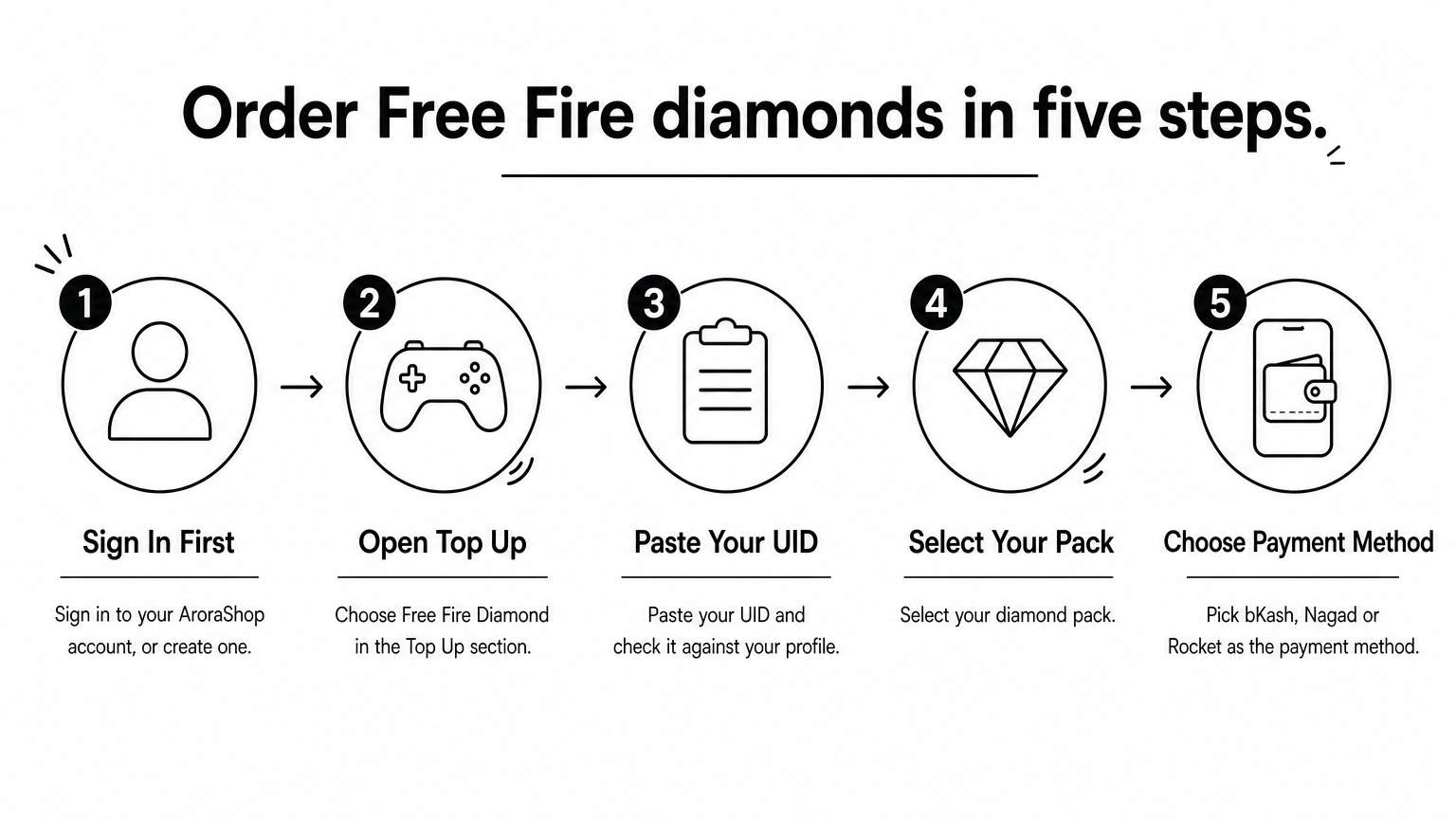
Use the wallet where you already hold the balance, and finish the payment on the checkout page the site gives you. AroraShop requires payment through the gateway listed on its website. Keep your transaction ID or a screenshot of the confirmation until the diamonds arrive.
Never send money to a personal number that someone gives you in a chat message, even if they claim to be a seller.
Pay only inside the official checkout, never to a number sent to you in a message.
Most Free Fire diamond orders show up within one to two minutes of payment. Open the game and check your diamond balance.
Open Free Fire and look at the diamond counter in the lobby. If the balance has not changed, close and reopen the game so it refreshes. Then compare the new total with your old balance plus the pack you bought.
Work through this list in order:
AroraShop support is available 24/7, including instant chat on WhatsApp, and its average response time is under 15 minutes. Refund rules are on the Refunds and Returns policy page.
Send support your UID, order number and transaction ID in one message, and your case moves faster.
An FF top up in Bangladesh comes down to four moves. Find your UID, choose the pack with the best price per diamond, pay with bKash, Nagad or Rocket at the official checkout, and confirm the balance in the lobby. Never share a password, and never submit a UID you have not checked.
When you are ready to buy, top up Free Fire diamonds at AroraShop with just your player ID and your mobile wallet.