



How to Buy an Xbox Gift Card Online Without a Credit Card
AroraShop Editorial & Fulfillment Team
Digital Gaming & FinTech Specialists (Dhaka, BD) • UpdatedHow to Buy an Xbox Gift Card Online Without a Credit Card
The simplest way to buy an Xbox gift card without an international credit card is to order a digital code from a seller that accepts bKash, Nagad, or Rocket. Check that the code's region matches your Microsoft account, then redeem it at xbox.com/redeem. Most codes arrive by email within a few minutes. The balance then pays for games, add-ons, and Game Pass.
The hard part is not the payment. It is avoiding the traps around it. Microsoft's own store expects a card that many gamers do not have. Cheap codes from unknown sites can be the wrong region, already used, or never delivered. Most sellers will not refund a code once it has been sent.
This guide covers what to check first, how to pick an amount, how to choose a safe seller and pay, how to redeem the code, and what to do if something fails. The prices come from AroraShop's US-region Xbox gift card, but the steps work with any seller.
What to check before you buy
What an Xbox gift card actually is
An Xbox gift card is prepaid credit that you add to a Microsoft account. It is not tied to one console. The balance pays for games, add-ons, Game Pass Ultimate, PC Game Pass, and other Microsoft Store purchases.
If you searched for a Microsoft gift card buy option instead, you are looking at the same kind of product. Microsoft sells Xbox and Microsoft gift cards side by side, and both end up as account balance. The code is a one-time purchase and will not charge you again.
Match the card region to your account
Region is the check that fails most often. A US-region card only redeems on an account set to the United States, so look at your account's region before you pay. Changing the region later is possible but restricted, and it can affect content and balance already on the account.
Read Microsoft's current rules before you switch. If you keep a separate account for gaming, create it with the correct region from the start.
A gift card only works when its region matches your Microsoft account, so check the account before you check the price.
What you need ready
Gather four things before you open a store page:
- A Microsoft account with the right region
- An email address you can open right away, because the code arrives there
- A funded bKash, Nagad, or Rocket wallet
- The amount you plan to spend, in dollars
Step 1. Choose your amount
Xbox gift card prices in BDT
AroraShop sells US-region Xbox gift cards in six sizes. The price works out to about 118 ৳ per dollar at every size, so a bigger card gives no discount. Buy the amount you need, not more. Check the live price on the product page before paying, because prices can change.
| Card value | Price | Per dollar |
|---|---|---|
| $10 | 1,180 ৳ | 118 ৳ |
| $15 | 1,770 ৳ | 118 ৳ |
| $20 | 2,360 ৳ | 118 ৳ |
| $25 | 2,950 ৳ | 118 ৳ |
| $50 | 5,899 ৳ | about 118 ৳ |
| $100 | 11,800 ৳ | 118 ৳ |
Work out your total
Add up what you plan to buy, then combine cards to match it. Say you want $35 of credit. A $20 card (2,360 ৳) plus a $15 card (1,770 ৳) costs 4,130 ৳. A single $50 card would cost 5,899 ৳ and leave $15 unused.
Store prices for games and Game Pass can differ by region and change over time. Check the item's price in your own Microsoft Store before you decide on the amount.
The price per dollar is the same at every size, so pick the smallest combination that covers your purchase.
Step 2. Choose a safe seller and pay
Pick the seller
Start with where the code comes from. Microsoft's store delivers digital codes by email, but it asks for a card payment method that you may not have. Local sellers fill that gap with mobile wallets. Judge any seller with this checklist:
- The region is printed on the product page
- The delivery time is stated (AroraShop lists 1 to 5 minutes)
- Reviews are verifiable on Trustpilot or Google
- Support answers on WhatsApp or email, not only through a form
- The refund policy is written down
- The price sits near the dollar rate
Be wary of a price far below the market rate. Steeply discounted codes are often resold, region-mismatched, or fraudulent. Never give anyone your Microsoft password, and never let a seller "redeem the code for you".
Pay with bKash, Nagad, or Rocket
Paying at AroraShop takes five steps:
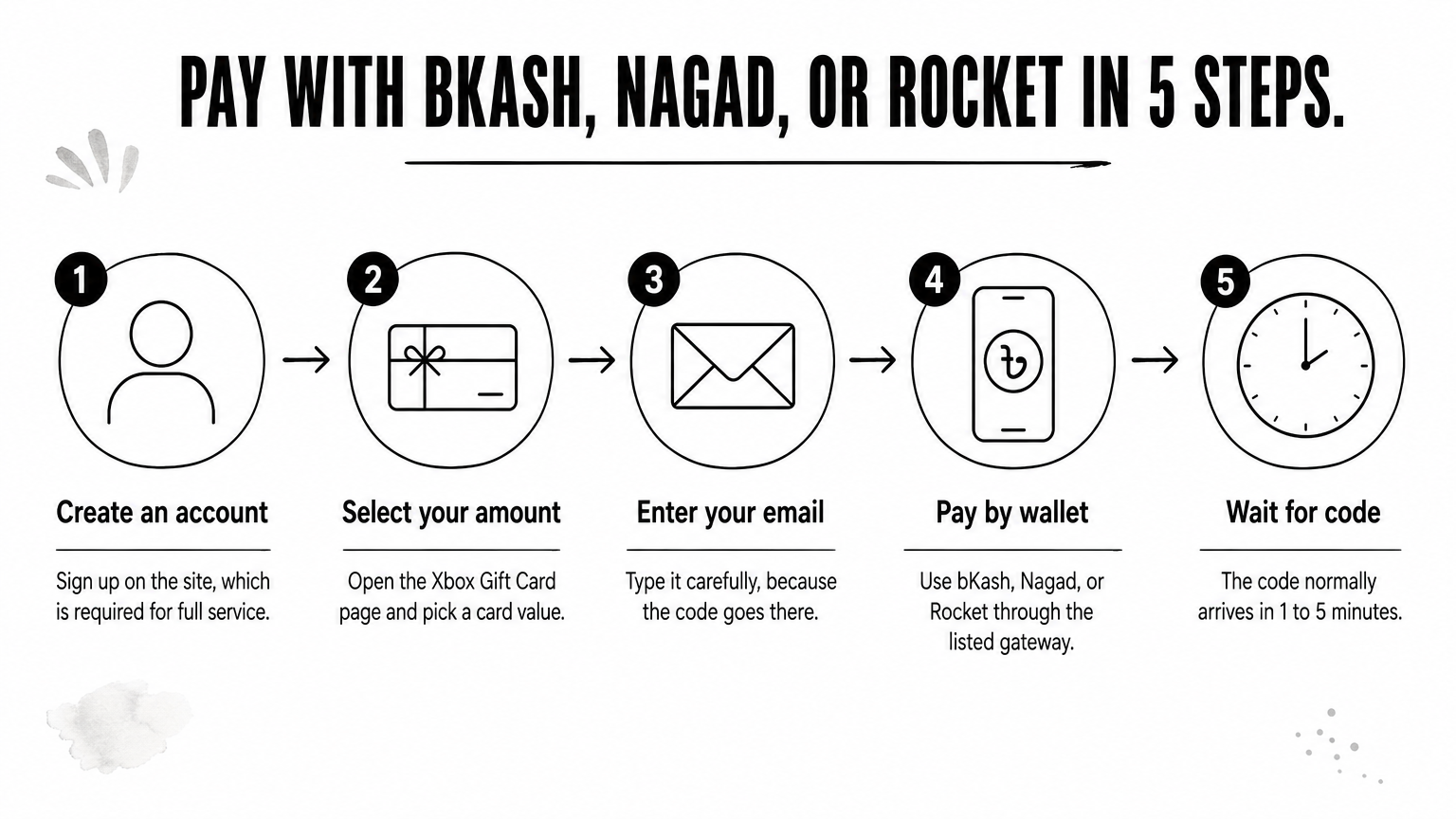
- Create an account on the site, which is required for full service.
- Open the Xbox Gift Card page and select your amount.
- Type your email address carefully, because the code goes there.
- Pay with bKash, Nagad, or Rocket through the gateway listed on the site.
- Wait for the code, normally 1 to 5 minutes.
The AroraShop Android app also carries app-only discounts, so compare the app price with the website price before you pay.
Pay only through the gateway shown on the seller's website, and never to a number sent in a chat message.
Step 3. Redeem the code
Redeem on the web
The web is the most reliable route because it shows clear error messages. Open the official Xbox redeem page and follow these steps:
- Sign in with the Microsoft account whose region matches your card.
- Paste or type the 25-character code exactly as received.
- Confirm, and wait for the balance to appear.
Redeem on console or Windows
You can also redeem inside the apps, which saves a trip to the browser. On an Xbox console, open the Store and choose the option to redeem a code. On Windows, open the Microsoft Store app, click your profile picture, and select Redeem code or gift cards.
Redeem soon after delivery. Treat the code like cash, and never post it in a screenshot or send it to someone who asks for it.
Redeem the code as soon as it arrives, and never share a screenshot of it.
Step 4. Confirm the balance and fix problems
Confirm your balance
After redeeming, your balance shows in your Microsoft account under payment and billing, and at checkout in the Store. Choose the account balance as the payment method when you buy.
Keep the order email and your transaction ID until you have spent the money. Support needs both if a question comes up later.
Common problems and fixes
| Problem | Likely cause | What to do |
|---|---|---|
| Code rejected | Region mismatch or typo | Check the account region, then re-type the code carefully |
| No email after 5 minutes | Delay, spam folder, or wrong address | Check spam, then contact support with your order number |
| Paid but no order | Payment not yet verified | Send your transaction ID to support |
| Wrong amount or region ordered | Mistake before paying | Codes cannot be refunded after dispatch, so check both on the order page first |
AroraShop's support team is reachable on WhatsApp and at support@arorashop.com, with an average response time under 15 minutes. Send your order number and transaction ID instead of guessing at fixes.
If a code fails, contact the seller with your order number and transaction ID before you try anything else.
Get your Xbox code the safe way
Buying an Xbox gift card comes down to four checks. Match the card's region to your Microsoft account. Pick the amount you need, since the price per dollar is the same at every size. Pay a seller you can verify through a mobile wallet. Redeem the code on the official page as soon as it arrives.
If you want a US-region code you can pay for in BDT with bKash, Nagad, or Rocket, you can order an Xbox gift card on AroraShop. Check the product page for the live price, and keep your order number until the balance is spent.
Sponsored
Categories
- Beginners Gamers 1
- Top Up 0
- Gift Card 3
- Announcement 0
- Technology 31
- Artificial intelligence 11
- Updates & Guides 278
- Games 3
- Business & Tech 1
- Freelancing & Career 2
- Tech Tips & Tutorials 1
- Make Money Online 1
- Tech & AI Tools 2
- Crypto & Airdrops 3
- Career & Business 1
- Money Making 2
- Guides 0
- Game Top-Up Guides 0
- Subscription Guides 1
Sponsored
Recent Posts
Sponsored