



Free Fire MAX Diamond Top-Up: 5 Steps to Do It Safely
AroraShop Editorial & Fulfillment Team
Digital Gaming & FinTech Specialists (Dhaka, BD) • UpdatedFree Fire MAX Diamond Top-Up: 5 Steps to Do It Safely
The safest way to complete a Free Fire MAX diamond top-up is a direct top-up. You pick a pack, enter only your Player ID, pay with bKash, Nagad or Rocket, and the diamonds land in your account within minutes. You never share a password. Before paying, compare the price per diamond and check whether a bonus or double diamond promotion is running.
Most players run into the same problems. You have no international card, or a seller promises "50% extra" without saying how. You mistype your ID in a hurry, or the diamonds take longer than you expected. Each of these costs you money or time, and a few of them are how scams start.
AroraShop sells Free Fire Diamond top-ups in Bangladesh, so this guide follows the process we see every day. It covers what to prepare, how to choose a pack, how bonus offers work, how to pay, and what to do if delivery is slow. It also answers whether you can top up a single diamond.
Before you start: what a direct top-up needs
A direct top-up needs your Player ID, a pack, and a payment method. Nothing else. Spend two minutes on the checklist below and the rest of the process stays quick.
What to have ready
- Your Player ID, an 8 to 10 digit number, and your in-game nickname.
- A mobile wallet with enough balance: bKash, Nagad or Rocket.
- An account on the seller's website. AroraShop asks you to create one to get full service.
- Your server region. AroraShop's Free Fire Diamond top-up is not available for Indonesian servers.
One account for Free Fire and Free Fire MAX
Free Fire MAX uses the same Garena account and Player ID as the standard app. The ID you enter is therefore the same whichever version you play. Diamonds belong to the account, so you top up once and can spend them on weapons, pets, outfits, Luck Royale and Diamond Spin.
What a legitimate top-up never asks for
A direct top-up never asks for your password, a login code, or your Facebook or Google credentials. Anyone who asks for them wants your account, not your order. Free diamond generators and "hack" tools belong in the same category. Skip them.
A genuine direct top-up needs your Player ID and nothing that lets someone log in as you.
Step 1. Find your ID and choose a pack
Copy your Player ID from the game, then choose the pack with the lowest price per diamond that fits your budget. Bigger packs cost less per diamond, so buy in bulk only if you will spend the diamonds.
Find and copy your Player ID
Open the game, tap your profile picture in the lobby, and find the number under your nickname. Copy it instead of retyping it. Then check that the nickname the store shows after you enter the ID matches yours. A wrong digit sends diamonds to someone else, and you cannot get them back.
Compare packs by price per diamond
AroraShop packs run from 60 to 1,800+ diamonds. These approximate prices show how the rate improves as packs grow. Check the live price on the product page before paying.
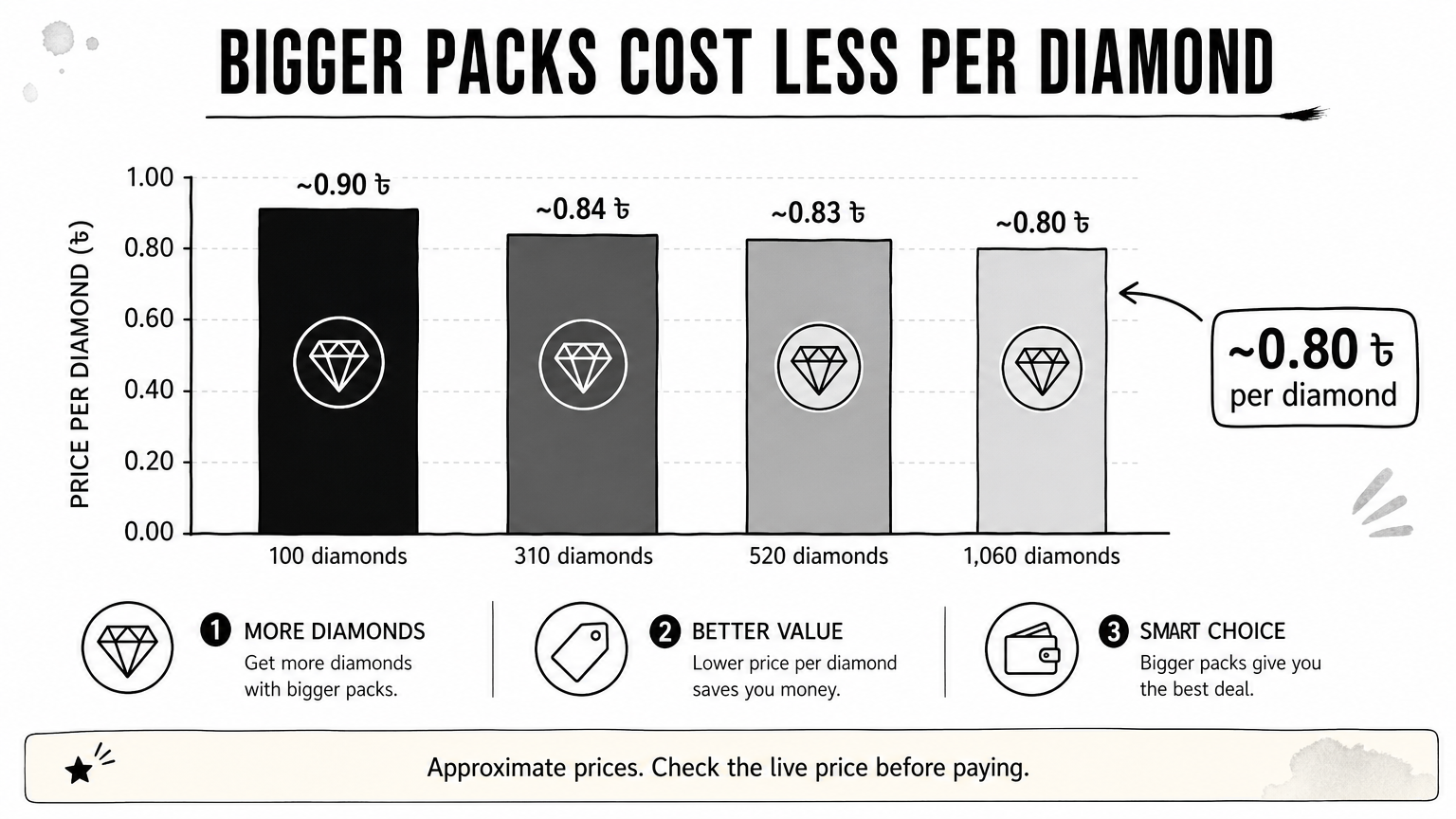
| Pack | Approx. price | Price per diamond |
|---|---|---|
| 100 diamonds | ~90 ৳ | ~0.90 ৳ |
| 310 diamonds | ~260 ৳ | ~0.84 ৳ |
| 520 diamonds | ~430 ৳ | ~0.83 ৳ |
| 1,060 diamonds | ~850 ৳ | ~0.80 ৳ |
Say you want about 1,000 diamonds. Ten 100-diamond packs cost roughly 900 ৳ for 1,000 diamonds. One 1,060 pack costs roughly 850 ৳. You pay about 50 ৳ less and get 60 more diamonds.
Can you top up just 1 diamond?
No. Diamonds are sold in fixed packs, and the smallest pack at AroraShop is 60 diamonds. A listing that offers a single diamond is either mislabeled or a trap. If you need a small amount, buy the smallest pack that covers it.
The biggest pack you will actually spend is almost always the cheapest way to buy.
Step 2. Check bonus and double diamond offers
Bonus offers exist, but they come from Garena promotions, seller discounts or memberships, and each works differently. Check which one applies before you pay so you do not pay full price by mistake.
How double diamond offers work
A Free Fire double diamond top up is a time-limited Garena promotion. It typically gives extra diamonds the first time you buy a given pack. The eligible packs, the bonus size and the dates change with each event, so read the event details inside the game. Do not trust a third-party page that quotes a fixed bonus without naming the event.
How to judge a bonus claim from a seller
A Free Fire diamond top up bonus is only worth having if the final price per diamond is lower than the normal rate. Divide the price by the total diamonds you receive and compare it with the table above. If a seller advertises a huge bonus but will not show the total, walk away.
Two honest ways to pay less exist. AroraShop's Android app carries app-only discounts. Memberships are also sold separately: the Weekly Membership is 157 ৳, the Monthly Membership is 780 ৳ and the Level Up Pack (Level 10) is 66 ৳. Compare what each includes on the product page.
A bonus is real only when the price per diamond you end up paying actually drops.
Step 3. Pay with bKash, Nagad or Rocket
Pay through the gateway listed on the store's website, using bKash, Nagad or Rocket. You do not need an international card, though cards and other wallets are also accepted.
Place the order
- Log in to your account on the store's website or app.
- Open the Free Fire Diamond page and select your pack.
- Paste your Player ID and confirm that the nickname matches.
- Choose bKash, Nagad or Rocket as your payment method.
- Review the pack, price and ID once more, then pay.
Keep the payment safe
AroraShop requires payment through the gateway listed on its website, which uses encrypted local payment channels. Never send money to a personal number that someone gives you in a chat. Screenshot the payment confirmation and keep your transaction ID. You will need both if something goes wrong, and refunds and returns are covered on the store's separate policy page.
If a payment request does not come through the official checkout, do not pay it.
Step 4. Confirm delivery and fix delays
Diamonds usually arrive within minutes. AroraShop states that top-ups and vouchers are delivered within 20 to 60 minutes after the transaction is verified, so wait that long before you assume something is wrong.
Check that the diamonds arrived
Open Free Fire MAX and look at the diamond balance in the lobby. If it has not changed, close the game fully and reopen it. The balance sometimes refreshes only after a restart. Do not place a second order yet, because that is how players pay twice.
What to do when they do not arrive
If the wait window has passed, contact support with your Player ID, transaction ID and payment screenshot. AroraShop's support runs through WhatsApp, email at support@arorashop.com and phone at +8801867859776, with an average response under 15 minutes. Delays usually come from payment verification or a wrong ID, and both are quick to fix when you send the full details.
Wait out the stated delivery window, then contact support with proof instead of reordering.
Pay once, check twice
A Free Fire MAX top-up is simple when you follow the order. Copy your Player ID, choose the pack with the best price per diamond, check for a genuine bonus, pay through the official gateway and confirm the balance. Never hand over a password, and never expect to buy a single diamond.
When you are ready, you can top up Free Fire diamonds at AroraShop using bKash, Nagad or Rocket, with only your Player ID and nickname required.
Sponsored
Categories
- Beginners Gamers 1
- Top Up 0
- Gift Card 3
- Announcement 0
- Technology 31
- Artificial intelligence 11
- Updates & Guides 278
- Games 3
- Business & Tech 1
- Freelancing & Career 2
- Tech Tips & Tutorials 1
- Make Money Online 1
- Tech & AI Tools 2
- Crypto & Airdrops 3
- Career & Business 1
- Money Making 2
- Guides 0
- Game Top-Up Guides 0
- Subscription Guides 1
Sponsored
Recent Posts

Sponsored